
Your needs, this model
Does it fit your priorities?
What is different about its nine bays compared with an ordinary eight-bay tower?
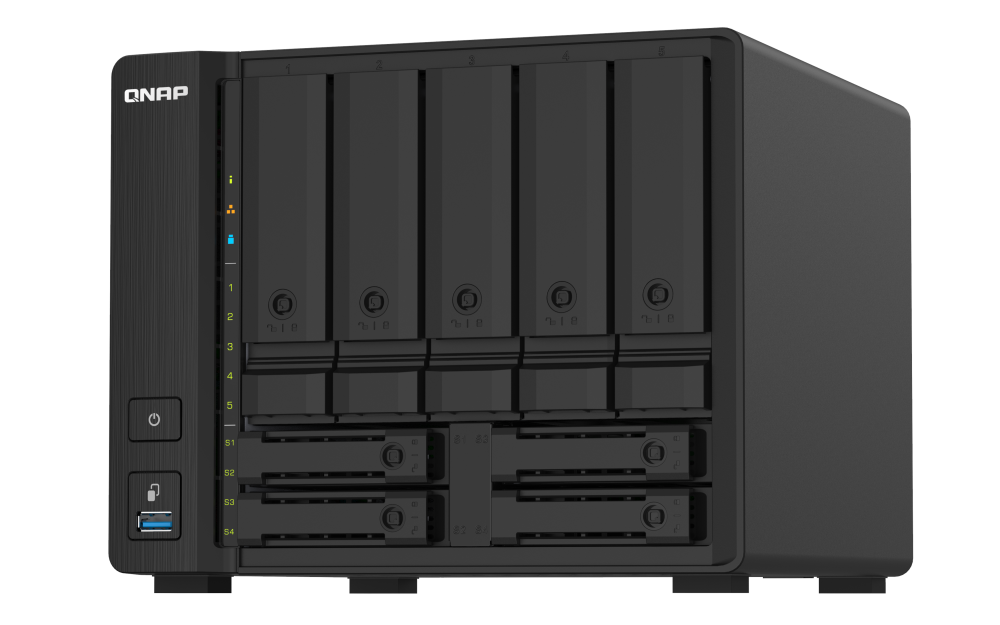
The TS-932PX allocates five 3.5-inch SATA bays to HDD/2.5-inch media and has four separate 2.5-inch SSD positions. This is a hybrid HDD/SSD layout, not nine full-size 3.5-inch trays; choose the balance of bulk capacity and SSD positions deliberately.
Explore this need in the finder →Can the 2.5-inch SSD positions be used for a two-drive mirror?
QNAP's user guide documents RAID 1 for two member drives. The buyer can select compatible media that fits the chosen bays and configure the mirror, but must not assume those four dedicated 2.5-inch SSD positions accept HDDs or arrive populated.
Explore this need in the finder →Does dual SFP+ provide a single 20Gbps path?
No. Each built-in SFP+ port is individually rated at 10GbE; two ports do not prove one client flow at 20Gbps. The other endpoint, compatible module/DAC, switch, cabling, disk layout and workload all affect file transfers.
Explore this need in the finder →Assessment basis: this is a documentation-based assessment of the QNAP U.S. TS-932PX page, its model guide and the U.S. Store identity. No hands-on test is claimed. The configuration discussed here is TS-932PX-4G-US; the “PX” family is a desktop tower, not the similarly named “PXU” rack chassis.
Nine positions, but only five are full-size HDD bays
The distinctive layout is five 3.5-inch SATA bays plus four dedicated 2.5-inch SATA SSD bays. QNAP's guide lists the smaller positions as SSD-only, while the five larger bays accept 3.5-inch SATA hard drives and 2.5-inch SATA hard drives or SSDs. It is therefore not accurate to imagine nine interchangeable 3.5-inch trays. A buyer who wants bulk HDD capacity should plan around five large-bay positions; the four dedicated SSD slots support a separate fast tier or cache-style role. Exact drive compatibility and capacity still require the manufacturer's list.
The exact 4G profile uses an AnnapurnaLabs AL324 ARM Cortex-A57 quad-core processor and 4 GB DDR4 SODIMM. The user guide lists one memory slot and 16 GB maximum, so any expansion should use a supported module and match the intended workload. More memory is not automatically more speed, and the product page's application claims are not independent measurements of a particular file server, surveillance workload or virtual-machine set.
10GbE SFP+ plus 2.5GbE RJ45
QNAP lists two 10GbE SFP+ and two 2.5GbE RJ45 ports. That combination can be useful when a NAS needs a faster connection to an editing workstation or central switch while ordinary clients remain on 2.5GbE. SFP+ requires a compatible far-end port and the right direct-attach cable or transceiver/fiber arrangement. A 10GbE port's label is not an expected transfer rate: drive count, RAID work, client, switch, cable and file size all matter. Two SFP+ ports do not mean one computer automatically gets a single 20Gbps stream.
The TS-932PX's four dedicated SSD positions make a more concrete hybrid-storage plan than adding an optional M.2 card: the manual and product page document those actual 2.5-inch bays. QNAP also describes Qtier and SSD caching functions, but the owner still has to choose compatible media and configure storage. Do not treat a feature name as proof that any off-the-shelf SSD, firmware or RAID arrangement is supported.
QTS, RAID 1 and backup boundaries
The guide identifies QTS and documents RAID 1 as a two-member mirror. An owner could mirror two compatible drives, using either SATA media supported by the chosen bays, and still have other positions available. The array is owner-created; the guide's package contents list includes the chassis, AC adapter, cord, Cat5e cable, tray keys and screws, not data drives. Confirm the actual reseller package and drive count rather than relying on a generic family photo.
A mirror helps with one member-drive failure but does not protect against accidental deletion, malware, theft or losing the whole NAS. Plan snapshots, another device or a cloud destination as a separate recovery layer, then test restoring a file. QNAP describes external TR RAID and TL JBOD expansion options, but this research does not assign a maximum expanded capacity or claim a specific enclosure pairing: check the exact compatibility table. Expansion shelves are separate equipment and do not change the native nine-position count.
When the hybrid layout is worth the tradeoff
This model deserves a look when a buyer wants five larger HDD positions, four dedicated SSD positions, dual SFP+ and a desktop form factor, and is comfortable administering QTS. It is a weaker fit if all nine bays need to be 3.5-inch HDD slots, if the owner wants a simple two-bay appliance, or if the network has no SFP+ path and no reason to add SSD media. Compare it directly with the TS-832PX: that model gives eight 3.5-inch SATA positions and an optional PCIe card slot, whereas the TS-932PX allocates four positions to 2.5-inch SSDs and has a fixed SFP+/RJ45 mix. These are different capacity plans, not just a one-bay count difference.
The QNAP image shows five upper HDD trays and four lower SSD positions. It cannot establish whether any drive, module or accessory is present in a particular order. Before purchase, confirm the 4G-US suffix, exact seller contents, support for chosen drives and SSDs, memory requirements, SFP+ interconnects and a separate backup target. This assessment does not claim measured throughput, temperature, power use, noise or customer experience.
Primary references: QNAP TS-932PX product page, the TS-932PX User Guide and the QNAP U.S. Store TS-932PX-4G-US page.
Key specifications
Key details at a glance
| Internal drive bays | 9 bays |
|---|---|
| Documented internal drive media | 3.5-inch SATA HDD/2.5-inch SATA HDD/2.5-inch SATA SSD in five 3.5-inch bays / 2.5-inch SATA SSD in four dedicated 2.5-inch bays |
| Built-in Ethernet ports | 2 x 10GbE SFP+ / 2 x 2.5GbE RJ45 |
| Fastest individual Ethernet port | 10 Gbps |
| Installed system memory | 4 GB |
| Maximum listed memory | 16 GB |
| Listed storage arrangements | RAID 1 / RAID 5 / RAID 6 / RAID 10 / RAID 50 / RAID 60 |
| Internal file systems | EXT4 (QTS) |
| Hardware warranty | 2 years |
| Data drives included in listed package | No |
| M.2 NVMe slots | 0 |
| Listed expansion unit | QNAP TR RAID expansion enclosure or TL JBOD (confirm exact compatibility) |
| Processor | AnnapurnaLabs Alpine AL324 ARM Cortex-A57 |
| CPU cores | 4 |
| CPU threads | 4 |
| Installed memory type | DDR4 SODIMM |
Use the exact model’s instructions for operating limits, supplied equipment and version differences.
Sources for this review
Sources for this assessment

Check your setup before choosing a NAS
Use the finder to narrow documented desk/shelf or rack formats, internal-bay minimums, a single Ethernet-port rating and optional redundancy requirements.