
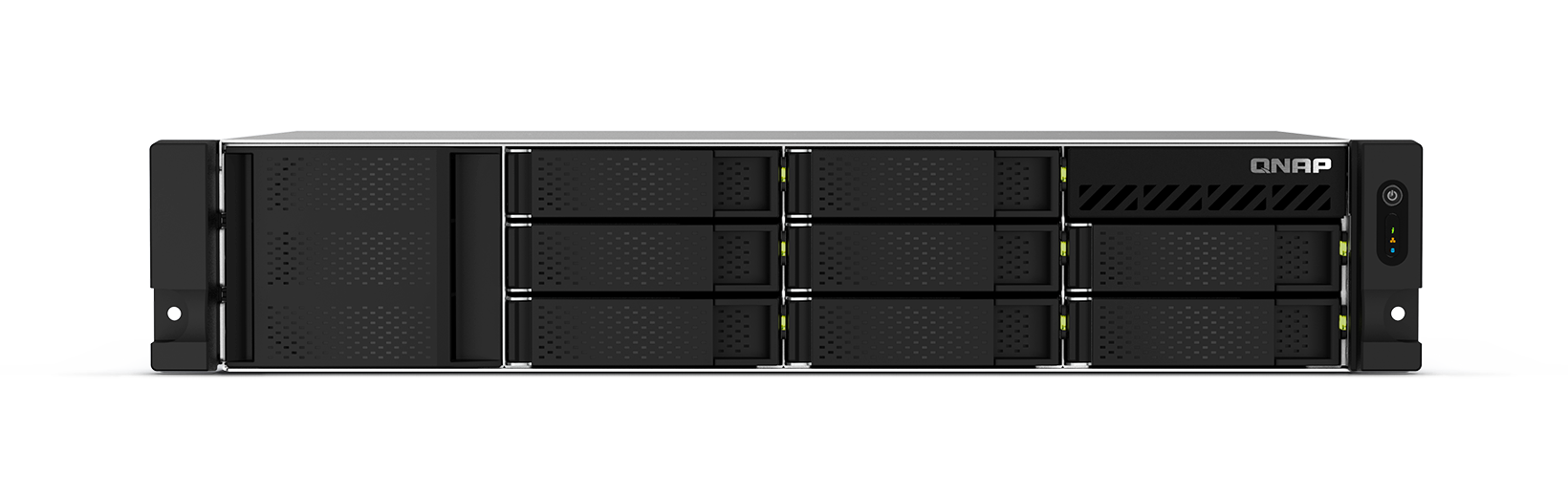
Your needs, this model
Does it fit your priorities?
Does the RP label provide drive redundancy?
This non-RP profile lists one 300W supply. A separate owner-created two-drive RAID 1 arrangement is documented, but that mirror is not backup.
Explore this need in the finder →What is the memory-profile distinction?
The comparison exposes 4GB in this selector. It also exposes a separate 8GB or 4GB sibling profile; do not treat the U.S. Store 8G-US SKU as a confirmed 4GB package. QuTS hero has an 8GB minimum, so the 4GB profile needs a supported upgrade first.
Explore this need in the finder →Can I rely on one rack-depth number?
No. QNAP’s current comparison and older English-U.S. guide report materially different chassis dimensions and weight. Verify the exact hardware revision, rail model, rack-post depth, loaded weight, cabling, airflow and service clearance in writing before installation.
Explore this need in the finder →This assessment covers the 4GB TS-864eU selector configuration, not a verified U.S. Store package. QNAP’s current U.S.-language comparison exposes TS-864eU-4G alongside TS-864eU-8G, and the English-U.S. guide also names TS-864eU-4G as an ordering configuration. The exact current U.S. Store item captured for this family is the 8G-US SKU; no exact 4G-US suffix, seller package or Amazon listing is established here. Treat the 4GB entry as a current manufacturer selector profile—not a confirmed retail offer—and use a full-model search only as a search, not as proof that a result is the same package.
Same eight-bay purpose, less memory as selected
QNAP lists eight native 3.5-inch SATA positions, two built-in 2.5GbE ports and one PCIe Gen 3 x2 slot for this family. The current hardware comparison exposes four- and eight-gigabyte selector profiles; it gives a 16GB maximum. The 4GB version is not equivalent to the 8GB version for every operating plan. In particular, QNAP states that QuTS hero requires at least 8GB RAM. At the 4GB selector setting, plan for the default QTS route; any memory upgrade must use a supported configuration and should be checked against the exact board/revision. Do not assume a seller has upgraded it or included an extra module.
QNAP’s current U.S. product narrative names an Intel Celeron N5095 four-core processor, but the 2022 English-U.S. family guide’s table groups N5105/N5095 variants. Because the exact 4G retail package is not resolved here and those records differ, check the processor label for the particular unit before buying for a CPU-specific requirement. The family headline is not enough to establish every selected unit’s processor.
Eight trays do not mean drives or a ready-made array
The manufacturer lists 3.5-inch SATA hard drives and 2.5-inch SATA solid-state drives for the internal bays; verify a full drive model and firmware on QNAP’s compatibility list. The built-in chassis does not have native M.2 sockets: QNAP describes M.2 as an optional PCIe-adapter route. The single PCIe slot can instead be used for a faster network card or a USB expansion card, so these choices compete. No measured transfer rate or workload result is implied by the N5095 label or by two network ports.
QNAP’s U.S. comparison marks RAID 1 for this profile, and QTS documentation describes RAID 1 as a two-drive mirror. The owner supplies compatible drives, creates the array and manages backups; nothing in this assessment says that the exact selector configuration arrives with drives or an initialized pool. A mirror can help with one member-drive failure, but deletion, malware or loss of the entire chassis still requires a separate backup copy. The RP power-supply option is a different hardware configuration, not a property of this non-RP model.
Check physical measurements before using a short-depth rack
QNAP’s current comparison places the 4G non-RP column at 88.6 × 432 × 297.4mm and 17.15lb. The older English-U.S. guide gives 88.6 × 482.14 × 318.13mm and 6.68kg (14.73lb) for TS-864eU-4G. Those measurements conflict in width, depth and weight; the current product page recommends optional RAIL-S01, while the older guide lists RAIL-B02. Neither rail should be assumed included, and neither set of measurements is a clearance guarantee for a specific rack. Confirm the chassis revision, rack opening, rail kit, front/rear clearance and loaded weight with QNAP before installation.
Decision summary
The 4GB configuration can suit a buyer who needs eight SATA positions and a 2.5GbE link, is comfortable with QTS, and verifies the exact 4GB package before ordering. It is a poor paper match if the requirement is QuTS hero at the installed memory level, if an exact -US retail SKU must be established, or if a rack cannot tolerate the documented physical-specification disagreement. The official Store’s 8G-US configuration is the better-evidenced exact U.S. retail profile in this edition, but it should be treated as a distinct memory configuration rather than a silent substitute for the 4GB selector profile.
Check the model label and the seller’s written package details before purchase. Confirm whether any drives are included, whether the memory is the selector’s 4GB or a different installed capacity, and what current rail matches the unit. QNAP’s product material describes OS choices and PCIe expansion, but this review does not claim test results, ownership, installation experience or a seller’s current stock.
Key specifications
Key details at a glance
| Internal drive bays | 8 bays |
|---|---|
| Documented internal drive media | 3.5-inch SATA hard disk drives / 2.5-inch SATA solid-state drives |
| Built-in Ethernet ports | 2 x built-in 2.5GbE RJ45 |
| Fastest individual Ethernet port | 2.5 Gbps |
| Installed system memory | 4 GB |
| Maximum listed memory | 16 GB |
| Listed storage arrangements | QTS: RAID 1 (two drives) |
| Internal file systems | QTS: EXT4 / QuTS hero: ZFS |
| Hardware warranty | 3 years |
| M.2 NVMe slots | 0 |
| Processor | Intel Celeron N5095 |
| CPU cores | 4 |
| CPU threads | 4 |
| Installed memory type | 4GB DDR4 as specified for this selector profile |
Use the exact model’s instructions for operating limits, supplied equipment and version differences.
Sources for this review
Sources for this assessment

Check your setup before choosing a NAS
Use the finder to narrow documented desk/shelf or rack formats, internal-bay minimums, a single Ethernet-port rating and optional redundancy requirements.