
Your needs, this model
Does it fit your priorities?
How many native drive bays does the TS-473A-8G-US have, and do its M.2 sockets count toward that number?
QNAP's current U.S. hardware selector lists four native 3.5-inch SATA positions. The two built-in M.2 2280 NVMe sockets are separate from those trays, so they do not make this a six-bay SATA NAS. QNAP says M.2 drives are not standard equipment and are not hot-swappable; verify the exact SSD and account for the recommended heat sinking.
Explore this need in the finder →Can one built-in TS-473A-8G-US Ethernet port meet a 2.5-Gbps link requirement?
Yes. QNAP lists two individual built-in 2.5GbE RJ45 ports. Its up-to-5Gbps trunking figure describes combined links, not one 5Gbps jack or measured file-transfer performance. The switch, client, cable, storage and workload still determine the end-to-end result; optional faster PCIe networking is separate hardware.
Explore this need in the finder →Can the four-bay TS-473A-8G-US support a two-drive mirror?
QNAP's 2021 TS-x73A guide describes QTS RAID 1 using two member disks and lists the one-disk failure case. QNAP's current U.S. page also lists QuTS hero support; pairing that model-specific support with QNAP's QuTS hero guide's two-disk RAID 1 description supports a separate owner-created QuTS hero plan. The owner must choose one OS, verify and supply compatible disks, then create the pool. Two positions make up the mirror; no configured array is included and RAID is not backup.
Explore this need in the finder →Does the base 8GB profile reach QuTS hero's stated memory minimum?
QNAP says QuTS hero requires at least 8GB, which equals this profile's listed 8GB base. That does not meet every feature threshold: inline data deduplication requires at least 16GB and QNAP recommends 32GB or more for optimal performance. Check the installed module type and supported upgrade parts before planning heavier workloads.
Explore this need in the finder →What drive compatibility difference should I resolve before choosing disks?
The current U.S. selector lists 3.5-inch SATA HDDs and 2.5-inch SATA SSDs; the 2021 family guide also lists 2.5-inch SATA HDDs. That older/current discrepancy is unresolved here, so the matching plans claim only selector-listed 3.5-inch HDDs. Check each exact drive model and firmware in QNAP's current compatibility list, and ask QNAP if a 2.5-inch HDD is essential.
Explore this need in the finder →What should I measure before putting this tower in a shelf?
The current selector lists 7.09 × 7.85 × 11.01 inches before a foot pad that may add up to 1.18 inches, while the 2021 guide lists 7.41 × 7.85 × 11.05 inches and a different net weight. The discrepancy is unresolved. Measure the complete delivered enclosure and reserve airflow, tray-pull, cable-bend and service space instead of trusting the smaller published envelope for a close fit.
Explore this need in the finder →Does the current-only finder include this TS-473A profile?
The active U.S. model page shows one TS-473A-8G hardware profile and the official U.S. Store page identifies TS-473A-8G-US / SKU TS-473A-8G-US-BDL. That supports current-reference treatment in this edition, not a statement about current offer, seller stock or support end date.
Explore this need in the finder →What changes when I include earlier NAS models?
The TS-473A-8G-US stays in the candidate library as a current-reference profile when earlier models are included. That setting broadens historical comparisons; it does not make the TS-473A an earlier configuration or resolve its media, measurement or package checks.
Explore this need in the finder →QNAP · four-bay tower NAS · source-based assessment
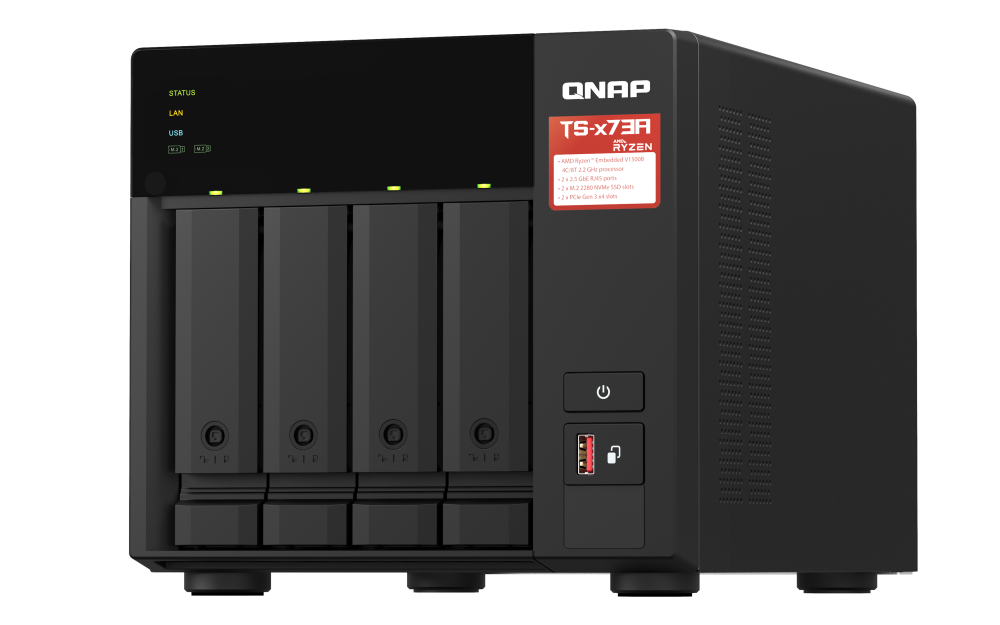
The QNAP TS-473A-8G-US is a four-position desktop NAS whose unusual balance is a Ryzen Embedded processor, two built-in 2.5GbE ports and two separate M.2 sockets, with space for two PCIe cards. It is a more expansion-oriented design than a simple four-drive file box, but none of the extra connections or sockets substitutes for planning the storage layout. This assessment uses QNAP's U.S. product and specification pages, an official Store identity page and the 2021 TS-x73A family guide. I did not purchase, install or test the unit, so I make no independent speed, noise, power-draw or reliability claim.
One current 8GB profile, with an exact U.S. identifier
QNAP's current U.S. hardware selector presents one TS-473A-8G profile: an AMD Ryzen Embedded V1500B processor with four cores and eight threads at 2.2GHz, 8GB of DDR4 SODIMM memory, two memory slots and a 64GB stated maximum. QNAP's official U.S. Store page identifies the retail configuration as TS-473A-8G-US and gives the item SKU TS-473A-8G-US-BDL. The model page, selector and Store identity support treating this as a current-reference model in this review library. That is not a manufacturer support-end date or a claim that a specific seller currently has the item available.
Read the SKU as an identifier, not a promise about what arrives in a carton. Check the exact order's written bill of materials, seller, condition, warranty and any optional configuration. The manufacturer package list and family guide show no data drives or preconfigured pool; a seller may offer a separately configured package, but this review does not infer one from the suffix.
Four SATA positions, with M.2 as a separate layer
The current selector lists four 3.5-inch SATA drive bays. It also lists two M.2 2280 PCIe Gen3 x1 NVMe sockets, but those are not a fifth and sixth native SATA tray. QNAP describes the M.2 positions for caching or Qtier use, says M.2 SSDs are not included as standard, and warns that built-in M.2 devices are not hot-swappable. Its package view lists two heatsinks, not the SSDs. For a buyer whose main goal is bulk capacity, count the four native bays and choose the drive sizes and pool layout before treating the M.2 sockets as part of an overall capacity plan.
There is a meaningful compatibility caveat for anyone using 2.5-inch drives. The current U.S. hardware selector lists 3.5-inch SATA hard drives and 2.5-inch SATA solid-state drives. The TS-x73A guide, dated 2021, also lists 2.5-inch SATA hard drives in its tray compatibility table. Those statements do not reconcile on their own. I have kept 2.5-inch SATA HDD support out of the supported matcher arrangement; check the exact drive model and firmware in QNAP's live compatibility information, and ask QNAP directly if a 2.5-inch HDD is essential to your build.
Two 2.5GbE jacks are not one 5GbE link
QNAP lists two built-in RJ45 ports, each capable of a 2.5GbE link and backward-compatible with slower 1GbE and 100MbE links. The product page's up-to-5Gbps port-trunking note describes an aggregate arrangement. It does not make either jack a 5Gbps single-client port, and it is not a file-transfer benchmark. The matching profile therefore counts 2.5Gbps as the fastest individual built-in link.
Two PCIe Gen3 x4 slots make the machine more adaptable than its native network ports suggest: QNAP lists optional 5GbE and 10GbE networking cards among expansion uses. Those cards are separate hardware and do not change the base-port specification. Check the precise card, QNAP compatibility, low-profile fit and slot-clearance notes; then follow the entire path through switch, peer adapter and cable. An upgraded NAS port cannot overcome a slower device or network segment.
RAID 1 is an owner-created choice
The 2021 TS-x73A User Guide lists RAID 1 for two disks and describes the one-member-disk failure case. QNAP's U.S. product page also identifies QuTS hero as an available OS for this model; QNAP's QuTS hero guide describes two-disk RAID 1 at the operating-system level. I treat the latter as a cross-source inference rather than a model-specific selector row. Either documented path is a storage option the owner configures, not an included mirror. Supply two compatible drives, choose one operating system, initialize the pool and maintain an independent backup. The four bays are still four chassis positions; a mirror occupies two and does not protect against deletion, malware or loss of the whole NAS.
There is an important OS and memory decision before first setup. QNAP says the TS-473A supports QTS/EXT4 and ZFS-based QuTS hero as separate alternatives, and that switching filesystems requires removing all drives. QNAP sets an 8GB minimum for QuTS hero, which matches the listed starting memory. That does not cover every feature: inline data deduplication needs at least 16GB, with 32GB or more recommended for optimal performance. The current selector says ECC memory is supported and asks for identical modules in dual-DIMM setups, while the older guide describes the installed module as non-ECC; QNAP warns not to mix ECC and non-ECC memory. Confirm the exact compatible module before upgrading, and settle on an OS and memory plan before loading data.
Measure the whole case and allow working room
QNAP's current U.S. selector gives a 7.09 × 7.85 × 11.01-inch (H × W × D) envelope and notes that a foot pad can add up to 1.18 inches. The 2021 guide instead lists 7.41 × 7.85 × 11.05 inches and a different net weight. The foot-pad note does not fully explain the discrepancy, so neither number is a safe basis for an unusually tight shelf. Measure the delivered enclosure and allow space for airflow, tray extraction, cable bends and service access.
The current selector lists one 250W supply, not redundant power, and a three-year standard warranty. A power-supply rating is not a measured wall draw. The package list names the unit, power cord, Ethernet cable, fasteners, tray keys, heatsinks and quick-start material; it does not list data drives. Confirm the exact warranty and box contents in the written offer, especially if a seller has added drives or memory.
Who should compare it?
The TS-473A-8G-US is worth investigating when four native positions, a 2.5GbE individual link, optional M.2 storage and card expansion match the intended setup. Its most direct family distinction is bay count: the TS-673A and TS-873A add two and four SATA positions respectively, while the 473A remains the four-bay member. If a six- or eight-bay future is already likely, compare those exact profiles before spending on a chassis that may have to be replaced sooner. Conversely, do not count the two M.2 sockets as a substitute for more native bays when the plan is to install additional SATA disks.
- Check the exact model and firmware for each intended hard drive or SSD; ask QNAP about the unresolved 2.5-inch SATA HDD difference.
- Decide whether QTS or QuTS hero suits the intended filesystem and memory-sensitive features before initialization.
- For a 2.5GbE target, verify the switch, client adapter and cabling; do not treat link aggregation as a faster individual port.
- Measure the full tower and leave ventilation and drive-service clearance; the current selector and older guide differ.
- Verify the exact Store/SKU and written package contents; the assessment does not claim included data drives, an initialized RAID pool or redundant PSU.
On the documents reviewed, this is a current-reference four-bay tower with unusual expansion flexibility, not an out-of-box storage plan. The four-bay limit, current-versus-older drive-media language, memory rules, physical envelope and exact seller package all matter more than the headline ports alone. Use those facts to decide whether it deserves a shortlist, then verify every drive and the delivered configuration before purchase.
Key specifications
Key details at a glance
| Internal drive bays | 4 bays |
|---|---|
| Documented internal drive media | 3.5-inch SATA HDD (current selector-listed) / 2.5-inch SATA SSD (current selector-listed) |
| Built-in Ethernet ports | 2 x individual built-in 2.5GbE RJ45 |
| Fastest individual Ethernet port | 2.5 Gbps |
| Installed system memory | 8 GB |
| Maximum listed memory | 64 GB |
| Listed storage arrangements | QTS/EXT4: the 2021 TS-x73A User Guide describes RAID 1 using two disks and a one-member-disk failure case. / QuTS hero/ZFS: QuTS hero is supported for the TS-473A on the U.S. product page; the official QuTS hero guide describes RAID 1 for two disks. This is an explicitly documented cross-source inference, not a model-specific current selector row. |
| Internal file systems | EXT4 (QTS) / ZFS (QuTS hero) |
| Hardware warranty | 3 years |
| Data drives included in listed package | No |
| System drives included (not data-bay drives) | |
| M.2 NVMe slots | 2 |
| Processor | AMD Ryzen Embedded V1500B |
| CPU cores | 4 |
| CPU threads | 8 |
| Installed memory type | DDR4 SODIMM |
Use the exact model’s instructions for operating limits, supplied equipment and version differences.
Sources for this review
Sources for this assessment
Check your setup before choosing a NAS
Use the finder to narrow documented desk/shelf or rack formats, internal-bay minimums, a single Ethernet-port rating and optional redundancy requirements.