
Your needs, this model
Does it fit your priorities?
Does the TS-433-4G meet a four-native-bay minimum, and what kinds of SATA drives fit those positions?
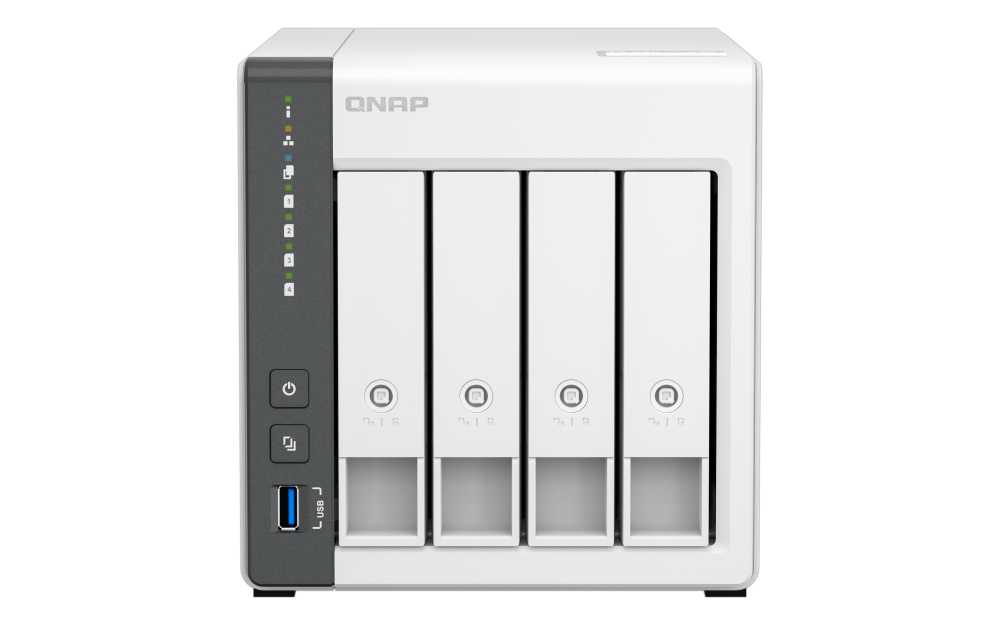
QNAP lists four native 3.5-inch SATA bays and supports 3.5-inch SATA HDDs plus 2.5-inch SATA HDDs or SSDs. That is four physical SATA positions; it does not make data drives part of the box. Check each full model code and capacity in QNAP's current TS-433 compatibility lookup.
Explore this need in the finder →Does one built-in TS-433 Ethernet port satisfy a 2.5-Gbps minimum?
Yes: the model has one built-in 2.5GbE RJ45 interface and a separate 1GbE RJ45 interface, so one port meets a 2.5-Gbps link-rating threshold. It is not a combined 3.5-Gbps link or a file-transfer prediction; the peer, switch/router, cabling, client, drive set and workload shape the actual path.
Explore this need in the finder →Can the TS-433-4G use two drives for a QTS RAID 1 mirror while keeping the 2.5GbE path?
QNAP's model table lists QTS RAID 1 and the hardware table lists a built-in 2.5GbE port. A two-drive QTS RAID 1 arrangement uses two separately selected compatible SATA drives in two of the four native bays; QNAP's package contents list no data drives. A mirror can help with one member-drive failure but is not an independent backup.
Explore this need in the finder →This is a research-based fit assessment, not a hands-on test. QNAP's U.S. TS-433 page and model-specific English guide identify the reviewed configuration as TS-433-4G: four native SATA positions, 4 GB of onboard memory, one 2.5GbE port and a separate 1GbE port. I have not established a current U.S. seller suffix or live package, so this is a manufacturer-configuration reference rather than a claim about a particular order.
Four bays are a real step up, but count the media carefully
The TS-433 is a compact tower for a buyer whose plan genuinely calls for four internal drive positions. Its four trays accept the SATA drive types QNAP lists for the model: 3.5-inch hard drives, 2.5-inch hard drives and 2.5-inch SSDs. The exact drive model and capacity still belong in QNAP's current compatibility lookup; a supported interface alone does not certify every capacity or revision. QNAP's guide lists the NAS, power adapter, power cord, Ethernet cable, screws and tray keys, but no data drives. The product photo shows the four-bay chassis, not the contents of a retailer's package.
Four bays can support different storage plans, not automatic extra capacity. QNAP lists the four-bay model with QTS RAID 1 and RAID 5 among its supported arrangements. A two-drive RAID 1 plan uses two selected drives and leaves two physical bays outside that two-member mirror. A four-drive RAID 5 layout uses all four positions and has a different capacity and fault-tolerance tradeoff. These layouts must be planned and created in QTS; four trays alone do not mean any array is configured. Neither arrangement is a second backup. Keep a separate copy, ideally with a tested restore path.
A single faster network jack, plus a gigabit port
The TS-433 has one built-in 2.5GbE RJ45 port and one distinct 1GbE RJ45 port. That gives a documented 2.5-Gbps single-port ceiling for the finder, but it is not a combined 3.5-Gbps link. Do not add the two connectors together to estimate one workstation's copy speed. The router or switch, client NIC, cabling, drive array, file protocol and workload all affect the path. If the rest of your home network is gigabit-only, the faster jack may not change everyday transfers until the other links are upgraded.
QNAP positions the TS-433 for home and small-office storage, and the standard operating system is QTS. The page also describes a built-in NPU for supported QuMagie photo-recognition tasks. That is a model feature to consider if photo organization matters, not evidence that all applications are accelerated or that the NAS will feel fast under any workload. The fixed 4 GB memory is a more practical boundary for heavier multitasking: QNAP calls the TS-433-4G memory non-expandable and notes that part of the system memory is reserved for shared graphics.
What its small-system tradeoffs mean
The TS-433's strongest case is not that it is the most expandable QNAP tower, but that it combines four conventional SATA bays with a 2.5GbE port and a simple QTS base. Its 4 GB is fixed, and this assessment does not assume QuTS hero as an alternative operating system. Buyers expecting memory-intensive applications or a memory-upgrade path should compare the exact hardware table before deciding. The QNAP TS-364-8G is a smaller three-bay reference with 8 GB memory and a 2.5GbE port; the TS-464 is a separate four-bay comparison with its own hardware and network configuration. Those distinctions matter more than a shared brand or similar chassis family.
QNAP's guide documents USB expansion-unit setup, but that is a separate device and connection plan, not extra native bays or a promise about the exact expansion package. Check the supported enclosure and storage arrangement separately if growth beyond four internal drives is essential. Also leave room for the listed 120-mm fan and airflow rather than treating a desktop tower as a silent appliance; no noise measurement was made here.
Checks before choosing an exact listing
Before buying, verify that the listing identifies TS-433-4G rather than the similarly named TS-433eU rack model or another QNAP configuration. Confirm the seller's memory and drive package, because the manufacturer guide describes the NAS without data drives and does not prove a current retailer bundle. Check every intended drive in QNAP's TS-433 compatibility lookup, decide whether a two-drive mirror or four-drive RAID 5 plan fits the capacity and recovery goal, and set up an independent backup. Finally, trace the actual network path: a 2.5GbE NAS port only helps when the switch/router, client and cabling can support it. QNAP's product page and guide support the hardware comparison; they are not independent performance tests or evidence of current stock, price or customer experience.
Primary references: QNAP U.S. TS-433 page; QNAP TS-433 hardware specifications; TS-433 English U.S. User Guide; QNAP QTS RAID reference; QNAP drive compatibility list.
Key specifications
Key details at a glance
| Internal drive bays | 4 bays |
|---|---|
| Documented internal drive media | 3.5-inch SATA HDD / 2.5-inch SATA HDD / 2.5-inch SATA SSD |
| Built-in Ethernet ports | 1 x built-in 2.5GbE RJ45 / 1 x built-in 1GbE RJ45 |
| Fastest individual Ethernet port | 2.5 Gbps |
| Installed system memory | 4 GB |
| Maximum listed memory | 4 GB |
| Listed storage arrangements | QTS: JBOD, Single, RAID 0, RAID 1, RAID 5, RAID 6, RAID 10 |
| Internal file systems | QTS |
| USB 3.2 Gen 1 ports | 1 |
| Hardware warranty | 2 years |
| Data drives included in listed package | No |
| Processor | ARM Cortex-A55 |
| CPU cores | 4 |
| Installed memory type | 4 GB onboard memory; QNAP labels TS-433-4G non-expandable and notes that some RAM is reserved for shared graphics memory. |
Use the exact model’s instructions for operating limits, supplied equipment and version differences.
Sources for this review
Sources for this assessment

Check your setup before choosing a NAS
Use the finder to check bay count, the network link you need, and whether a documented two-drive redundant arrangement is essential.