
Your needs, this model
Does it fit your priorities?
How many native drive bays does the TS-432PXU-RP-2G-US provide, and do adapter-mounted M.2 drives count as another SATA tray?
QNAP lists four native 3.5-inch SATA positions. M.2 requires a PCIe adapter and is a separate storage layer, not a fifth native SATA bay; verify each exact drive model in QNAP compatibility data.
Explore this need in the finder →Can one built-in Ethernet port meet a 10-Gbps floor, and should I add the two ports together?
QNAP lists two 10GbE SFP+ interfaces, so an individual interface meets a nominal 10-Gbps port floor. They are separate links, not a single 20-Gbps port or a throughput guarantee; check the compatible peer, DAC or transceiver, client and cable.
Explore this need in the finder →Does the TS-432PXU-RP-2G-US arrive with a two-drive RAID 1 mirror, and are the dual power supplies a backup?
No. QNAP documents RAID 1 as an available QTS plan, but the buyer supplies compatible drives and creates the array. The two 250-W supplies are separate power hardware, not drive redundancy; keep an independent backup.
Explore this need in the finder →Document-based model assessment · U.S. TS-432PXU-RP-2G-US profile
QNAP’s U.S. hardware selector names the TS-432PXU-RP-2G profile; the Official Store item title/SKU adds the “-US” identity. This RP version has two supplies, unlike the separate single-supply TS-432PXU. This document-based assessment uses QNAP product/comparison pages, its TS-x32PXU guide and QTS documentation. It is not a hands-on test or a claim about a later package or offer.
Four native drive positions define the capacity plan
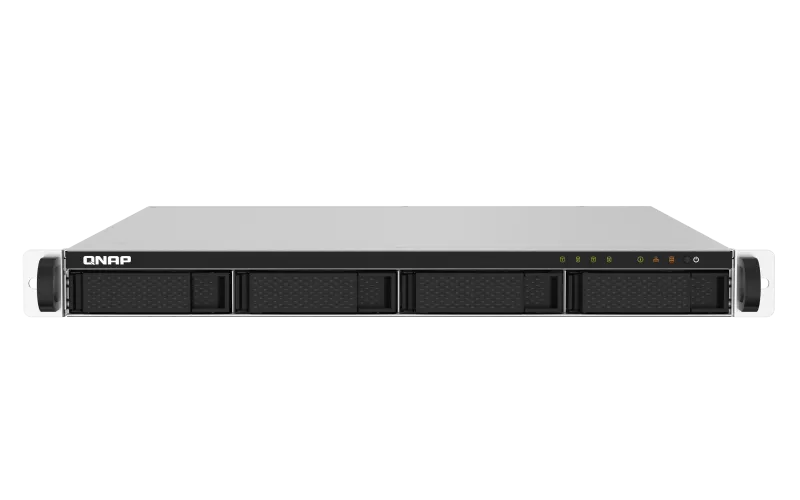
The chassis has four 3.5-inch SATA trays. QNAP lists 2.5-inch SATA HDDs and SSDs for those same trays; smaller drives do not add positions. Usable capacity depends on drives, RAID and formatting. The family guide package list names no data disks, but a later seller’s contents need confirmation. Check each exact drive and firmware in QNAP’s compatibility list.
M.2 storage requires a PCIe adapter rather than occupying a built-in bay. One PCIe Gen 2 x2 slot is available, and QNAP warns that its bandwidth can constrain an add-in card’s 10GbE performance. An adapter competes for this expansion position and is not a fifth SATA tray. Decide which expansion function matters before buying a card.
RAID 1 is a setup choice, not a prepared array
QNAP lists RAID 1 for four-bay QTS systems. A two-disk plan uses two compatible SATA drives; the buyer installs them, creates the pool and checks its status. QTS defines RAID 1 as two members holding matching copies and tolerating one member-drive failure. The mirror uses about half the pair’s combined raw capacity before overhead and two of the four trays. It is not a second independent copy.
RAID does not protect against deletion, malware, theft, fire or NAS failure. Keep a separate backup and verify recovery. QNAP lists backup and snapshot features, but that does not mean an organization’s job is configured. The software specification also says its 250-TB maximum-volume line requires 4 GB RAM; this profile starts at 2 GB. Do not plan on that maximum without a supported upgrade and a new requirements check.
10GbE means SFP+, while copper ports are 2.5GbE
There are two built-in 10GbE SFP+ interfaces and two 2.5GbE RJ45 ports. One SFP+ link meets a 10-Gbps port threshold, but it is not copper 10GBASE-T. Check a compatible DAC or transceiver, switch/peer, client NIC and cable. The two RJ45 jacks are not one 5-Gbps link. Port ratings do not predict file-transfer speed through another network and storage path.
A compatible expansion card may add networking or caching, but it occupies the single Gen 2 x2 slot. QNAP warns its bandwidth can limit add-in 10GbE performance. Check the exact card and host requirements; do not assume an optional card is included or tested.
Memory and redundancy are real trade-offs
The observed 2G configuration has one 2-GB DDR4 UDIMM; QNAP lists a 16-GB maximum. It advises QNAP modules and warns unsupported memory may cause errors or prevent startup. With one slot, upgrading means replacing the installed module. Confirm the exact supported part and application requirements before budgeting a memory change.
The RP profile has two 250-W supplies, separate from drive redundancy. If relying on both, confirm they are present and connect them to the site’s intended power feeds. QNAP warns that one older PSU revision requires a matched cage-and-two-supply replacement set; the newer PSU alone is not a universal substitute. Check the chassis label before ordering service parts.
Check rack fit, rails and package contents
QNAP’s current U.S. selector gives 1U dimensions of 1.7 × 16.93 × 18.86 inches and a 20.02-lb net weight, excluding the ear hooks and protruding PSU portion. The English v03 family guide gives 44 × 439 × 499 mm and 17.90 lb for the RP model. Those manufacturer values disagree on width, depth and net weight; they are not measurements taken for this assessment. Verify the physical unit, rear cable bend, airflow, service clearance and rail compatibility against the rack you have.
The guide says the rail kit is not included and names RAIL-B02 as compatible. It lists two power cords for RP models, one Cat5e network cable, drive screws and handles that require manual installation. That is a standard guide list, not a guaranteed contents list for a used, bundled or later seller package. Confirm the exact suffix, both PSU modules, rails, screws, handles, cables and any drive bundle in writing. QNAP’s guide also lists 39 dB(A); treat that as a manufacturer figure, not a room-noise measurement.
When this configuration makes sense
Keep the TS-432PXU-RP-2G-US on a shortlist when four internal SATA positions, a 10GbE SFP+ connection and a 1U chassis with dual supplies match a real rack plan. It is less compelling if the deployment needs four bays plus an internal expansion card at full 10GbE throughput, copper 10GbE without transceivers, or the manufacturer’s 250-TB volume maximum without upgrading beyond the installed 2 GB. Choose drives, memory, network components and rails only after model-specific compatibility checks.
The product page’s throughput demonstrations are QNAP lab claims, not results reproduced here or predictions for another drive set. No price, live stock, rating, customer experience, seller-added contents or unit condition is assessed. The central buying page lists the supported fit and the checks that remain; it is not a compatibility guarantee.
Key specifications
Key details at a glance
| Internal drive bays | 4 bays |
|---|---|
| Documented internal drive media | 3.5-inch SATA HDD / 2.5-inch SATA HDD / 2.5-inch SATA SSD |
| Built-in Ethernet ports | 2 x built-in 10GbE SFP+ / 2 x built-in 2.5GbE RJ45 |
| Fastest individual Ethernet port | 10 Gbps |
| Installed system memory | 2 GB |
| Maximum listed memory | 16 GB |
| Listed storage arrangements | JBOD / Single / RAID 0 / RAID 1 / RAID 5 / RAID 6 / RAID 10 |
| Internal file systems | EXT4 |
| Data drives included in listed package | No |
| Processor | AnnapurnaLabs Alpine AL324 64-bit ARM Cortex-A57 |
| CPU cores | 4 |
| Installed memory type | 2 GB DDR4 UDIMM (1 x 2 GB) |
Use the exact model’s instructions for operating limits, supplied equipment and version differences.
Sources for this review
Sources for this assessment
- QNAP U.S. Tower/SMB product grid
- TS-432PXU-RP — QNAP U.S. product page
- TS-432PXU-RP-2G rendered U.S. hardware selector — QNAP
- TS-432PXU-RP QTS software specification — QNAP
- TS-432PXU-RP package contents — QNAP U.S.
- QNAP U.S. TS-432PXU / TS-432PXU-RP comparison
- TS-x32PXU User Guide v03, English-U.S. — QNAP
- TS-432PXU-RP-2G-US — QNAP U.S. Official Store identity
- RAID types — QTS 5.2.x documentation
- TS-432PXU-RP-2G-US front product image — QNAP U.S. Official Store gallery
Check your setup before choosing a NAS
Use the finder to narrow documented desk/shelf or rack formats, internal-bay minimums, a single Ethernet-port rating and optional redundancy requirements.