
Your needs, this model
Does it fit your priorities?
How many internal bays does the TS-432PXU-2G-US provide?
QNAP lists four native 3.5-inch SATA positions and identifies 3.5-inch SATA HDDs, 2.5-inch SATA HDDs and 2.5-inch SATA SSDs as media classes. The guide's standard package does not list data drives. Check each exact drive model and firmware; optional M.2 storage needs a PCIe adapter and does not add a native SATA bay.
Explore this need in the finder →Can one built-in port meet a 10-Gbps minimum?
Yes, by nominal link rating: QNAP lists two 10GbE SFP+ ports. These are not 10GBASE-T RJ45 jacks. Verify the peer/switch, client interface, cabling and compatible DAC/transceiver; the nameplate port rate is not a file-copy benchmark.
Explore this need in the finder →Can the owner choose a two-drive mirror?
QNAP's current four-bay QTS table includes RAID 1. The owner must supply two compatible drives and create the mirror; the standard guide package does not list drives or a prebuilt pool. Mirroring can address one member-drive failure under QNAP's conditions, not deletion, malware, loss of the NAS or the need for a separate backup.
Explore this need in the finder →What should a rack buyer verify before ordering?
The standard English guide list excludes the rail kit and data drives and names RAIL-B02 as a separately purchased compatible part. The current QNAP selector and v03 guide disagree on dimensions and weight. Confirm the exact unit revision, rack depth/post fit, rear cable clearance, airflow, supported drives and written seller contents before installation.
Explore this need in the finder →QNAP · four-bay 1U rackmount NAS · source-based assessment
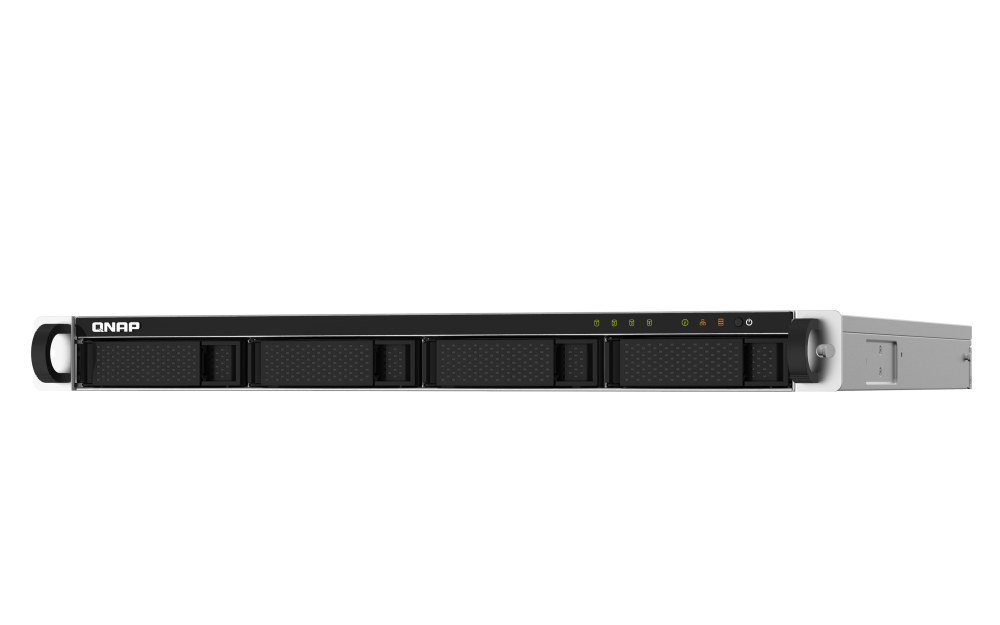
The TS-432PXU-2G-US is a compact rack-format network storage appliance with a useful mix of SFP+ and 2.5GbE interfaces. Its less obvious tradeoffs are just as important: the non-RP version has a single power supply, the base configuration has 2GB of memory, and QNAP's current physical specification differs from the shared family guide. This assessment uses QNAP's U.S. model, selector, comparison and guide documents rather than a hands-on test; it does not establish the condition or contents of any particular seller's unit.
Four native bays, not a ready-built array
QNAP lists four 3.5-inch SATA positions and media support for 3.5-inch SATA hard drives plus 2.5-inch SATA hard drives and solid-state drives in those trays. That gives a buyer room to choose a two-disk mirror with spare positions for a later layout, but the NAS is not documented as arriving with disks or a preconfigured storage pool. Check exact drive model numbers, capacities and firmware against QNAP's current compatibility information instead of treating a media class as universal approval.
The optional M.2 route is less simple than a chassis with built-in sockets: QNAP says M.2 storage can be added through a compatible PCIe adapter. There is one PCIe Gen 2 x2 slot, and QNAP warns that its bandwidth can restrict add-in card performance, including network expansion. An adapter occupies that one expansion path and is a separate part. It does not turn the four SATA positions into a different native bay count. The included-drive and add-in-card lists for any real unit should be checked against written seller contents.
A 10-gigabit link with an SFP+ dependency
The built-in network layout is two 10GbE SFP+ ports plus two 2.5GbE RJ45 ports. The port count creates choices for links to a compatible switch, client or another device, but only the SFP+ ports carry the 10GbE rating. Buyers wanting copper 10GBASE-T should not mistake the 2.5GbE RJ45 jacks for that interface. An SFP+ cable or transceiver, the far-end port, client adapter and cabling all need to match. One port's nominal rate is not a promise about a particular file-copy workload or an aggregate transfer speed.
For a conservative plan, count only one 10GbE SFP+ port in the shortlist and confirm the rest of the path before ordering link parts. The optional PCIe card route should not be assumed to deliver an unconstrained extra 10GbE connection: QNAP specifically flags the Gen 2 x2 slot's bandwidth limits.
Two gigabytes is a meaningful starting constraint
This U.S. profile starts with one 2GB DDR4 UDIMM in a single slot; QNAP lists a 16GB maximum. That is not the same as saying every 16GB module will work, so a planned change needs a supported part and confirmation of the delivered revision. More importantly, QNAP's current software table attaches a 4GB minimum to its 250TB maximum-volume and LUN lines. The base 2GB configuration does not meet that threshold, so the headline capacity is not a fair description of what this exact starting profile can do without a supported memory change.
QNAP's current software view lists QTS 5.2.11 and EXT4 for internal drives; point releases can change. The four-bay QTS table includes RAID 1. That makes an owner-created mirror a documented possibility, not an included feature ready at first boot. The buyer selects compatible drives, installs them, chooses the storage layout and verifies setup. RAID 1 can help with a member-drive failure under QNAP's conditions, but it does not replace a separate backup against deletion, malware, theft or loss of the NAS.
Do not treat the RP sibling as the same power design
The TS-432PXU-2G and TS-432PXU-RP-2G share several headline traits, including four bays and the stated network interfaces. Their power arrangements are materially different. QNAP's comparison lists one 250W supply for the non-RP profile and two 250W supplies for the RP configuration; the v03 guide likewise distinguishes a single supply and one cord from the RP unit's redundant arrangement. If power redundancy is part of the plan, the RP suffix matters. A mirror of the disks will not protect against loss of the lone power supply, just as redundant power would not protect data from a failed drive or backup gap.
Rack fit and package checks are not optional details
The current QNAP selector gives a 1U height and dimensions of 1.7 by 16.93 by 18.86 inches, excluding ear hooks and the protruding PSU part, with a listed net weight of 16.29 pounds. The English v03 guide instead states 44 by 439 by 499 millimeters and 6.53 kilograms. These are different manufacturer values, not measurements of the same unit in our hands. Before installation, ask which chassis envelope applies to the exact revision and check rack opening, post depth, rail adjustment, rear cable bend, airflow and loaded cabinet capacity.
The family guide lists a power cord, network cable, drive screws, manually installed handles and a quick-install guide for this model family. It does not list data drives or rails, and names RAIL-B02 as compatible but separately purchased. That document is not a later retailer's bill of materials. Confirm whether the exact item is new, refurbished or used, what accessories are actually included, and whether the specified rail kit fits the rack. The RP-labelled image data present on the Store page is not a substitute for a correct model image or an exact package list.
Who should consider it
This model is worth comparing when four native SATA bays, a rackmount chassis and at least one built-in 10GbE link fit a small-team file or backup plan. A buyer seeking a desktop NAS, copper 10GbE, redundant built-in power, a shipped RAID set, or a documented 250TB volume from the base 2GB profile should look carefully at those mismatches before shortlisting it. For a buyer who can accommodate SFP+, verify the intended drives and RAM, plan an independent backup, and use the exact non-RP model suffix in any purchasing conversation. Firmware support, final compatibility, rack fit and seller-specific contents remain due diligence; no price, stock, measurement or performance result is asserted here.
Key specifications
Key details at a glance
| Internal drive bays | 4 bays |
|---|---|
| Documented internal drive media | 3.5-inch SATA HDD / 2.5-inch SATA HDD / 2.5-inch SATA SSD |
| Built-in Ethernet ports | 2 x built-in 10GbE SFP+ / 2 x built-in 2.5GbE RJ45 |
| Fastest individual Ethernet port | 10 Gbps |
| Installed system memory | 2 GB |
| Maximum listed memory | 16 GB |
| Listed storage arrangements | JBOD / Single / RAID 0 / RAID 1 / RAID 5 / RAID 6 / RAID 10 |
| Internal file systems | EXT4 |
| USB 3.2 Gen 1 ports | 4 |
| Hardware warranty | 3 years |
| Data drives included in listed package | No |
| System drives included (not data-bay drives) | |
| M.2 NVMe slots | 0 |
| Processor | AnnapurnaLabs Alpine AL324 64-bit ARM Cortex-A57 |
| CPU cores | 4 |
| Installed memory type | 2 GB DDR4 UDIMM (1 x 2 GB) |
Use the exact model’s instructions for operating limits, supplied equipment and version differences.
Sources for this review
Sources for this assessment
- QNAP U.S. Tower/SMB product grid
- TS-432PXU — QNAP U.S. product page
- TS-432PXU-2G rendered U.S. hardware selector — QNAP
- TS-432PXU QTS software specifications — QNAP U.S.
- TS-432PXU package contents — QNAP U.S.
- QNAP U.S. TS-432PXU / TS-432PXU-RP comparison
- TS-x32PXU User Guide v03, English U.S. — QNAP
- TS-432PXU-2G-US — QNAP U.S. Official Store item identity
- QNAP U.S. Store 1U SMB rackmount result page — cycle84
- RAID types — QTS 5.2.x documentation
- TS-432PXU non-RP product-page image — QNAP U.S.
Check your setup before choosing a NAS
Use the finder to narrow documented desk/shelf or rack formats, internal-bay minimums, a single Ethernet-port rating and optional redundancy requirements.