
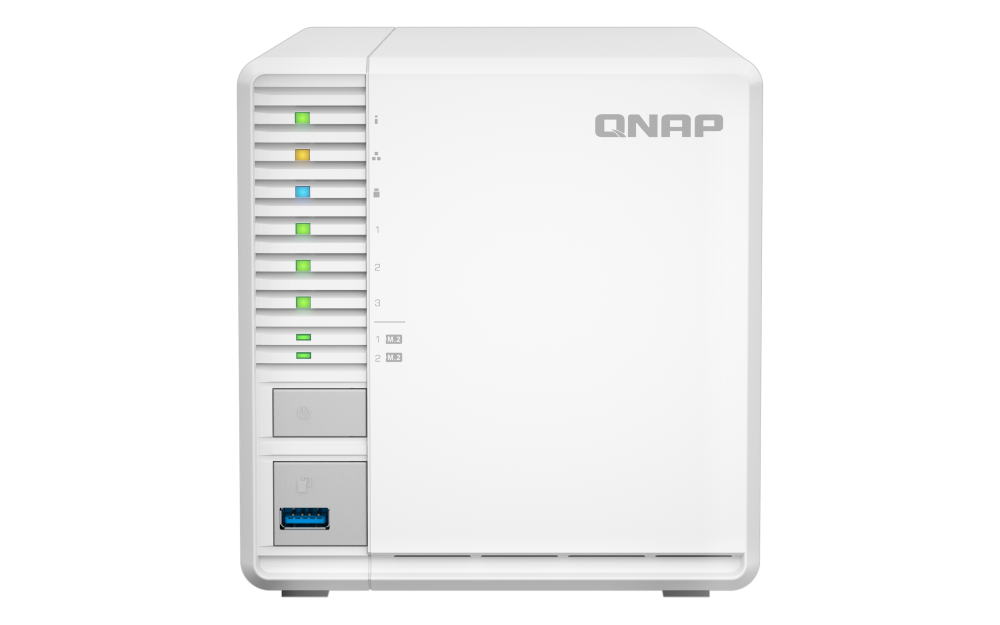
Your needs, this model
Does it fit your priorities?
Does TS-364-8G provide three native drive bays, and do its M.2 positions count as more?
QNAP lists three native SATA drive bays. The two M.2 2280 positions are a separate NVMe layer for storage-pool or cache use, not two additional SATA bays. For 2.5-inch SATA SSDs, QNAP requires optional tray bases; verify each exact drive model and capacity in the current compatibility lookup.
Explore this need in the finder →Can one TS-364-8G network port meet a 2.5-Gbps requirement?
Yes. QNAP lists one built-in 2.5GbE RJ45 port. That is a link rating, not a transfer-speed promise: switch or router, client interface, cabling, drives and workload still determine the end-to-end result.
Explore this need in the finder →Does the TS-364-8G have room for a two-drive mirror without using every SATA bay?
QTS RAID 1 uses two separately selected compatible SATA drives, so the documented two-drive plan uses two of the three native SATA bays. That does not mean the third bay is automatically part of the mirror or that drives are included. QTS RAID 5 is a distinct three-drive option; either layout still needs an independent backup.
Explore this need in the finder →Can the current TS-364-8G be expanded past 8 GB for a larger QuTS hero workload?
QNAP lists 8 GB as both the installed and maximum memory for TS-364-8G. Its 8 GB meets the stated minimum for switching to QuTS hero, but not the 16 GB inline-deduplication threshold or the 32 GB recommendation. If those memory ceilings matter, compare an exact configuration that QNAP documents as expandable rather than assuming this 8G version can be upgraded.
Explore this need in the finder →This assessment follows the QNAP TS-364-8G configuration identified in QNAP's U.S. hardware table. QNAP's expected U.S. Store URL for a model suffix ending in “-US” returned a not-found page when checked, so I do not claim that exact retail suffix or a current seller package. The manufacturer configuration is clear: three native SATA bays, one 2.5GbE network port, two separate M.2 positions and 8 GB memory with an 8 GB listed maximum. This is a research-based comparison, not hands-on use or an independent performance test.
Three native drive bays are the important distinction
TS-364 is a compact desktop tower designed around three SATA drive positions. That makes its main storage choice meaningfully different from a two-bay box: QNAP lists both a two-drive RAID 1 arrangement and a three-drive RAID 5 option. Those are different layouts, not interchangeable labels. A two-drive mirror uses two separately selected SATA drives and leaves the third native position outside that two-member mirror. RAID 5 uses three drives and gives a different balance of usable capacity and fault tolerance. Neither layout turns the enclosure into a backup destination by itself.
The physical bay question is easy to misread because QNAP also lists two M.2 2280 NVMe positions. They can support SSD storage or cache, but they do not add SATA trays and QNAP does not list them as hot-swappable. If the plan uses 2.5-inch SATA SSDs in the main trays, QNAP's manual says the 3.5-inch caddies need separate 2.5-inch tray bases. Data drives, M.2 SSDs and those tray bases are not something to assume from the chassis photo; the manual's listed package contents do not include data drives. Check each drive's full model code and capacity in QNAP's live TS-364 compatibility lookup before ordering.
One 2.5GbE port, not a pair
The TS-364 has one built-in 2.5GbE RJ45 connection. It can be a sensible middle ground if the NAS, switch or router, cable and client all support multigigabit Ethernet. It is not a 5GbE aggregate, and the port rating is not a promise that a file copy will run at 2.5Gb/s. Drive layout, client hardware, protocol overhead, concurrent work and the slowest link still matter.
QNAP publishes transfer results from its own lab using a named QTS version, a three-drive SSD RAID 5 set and a specified Windows client. Those are manufacturer test results in that environment, not independent evidence of what a buyer should expect. The more useful buying question is whether the rest of your path can use a single 2.5GbE link and whether the workload benefits enough to justify a multigigabit switch or client upgrade.
The 8 GB configuration has a firm memory ceiling
QNAP lists the TS-364-8G with 8 GB memory and an 8 GB maximum. That is a real distinction from the earlier TS-364-4G, which the same U.S. hardware page marks “Legacy” and lists with two SODIMM positions and a 16 GB maximum. The current 8G version starts higher, but do not buy it assuming that you can add memory later for a heavier application mix.
QTS is the documented default operating system. QNAP also describes QuTS hero as an alternative from QTS 5.2.1, with a published minimum of 8 GB RAM. The 8G model reaches that minimum, but not QNAP's 16 GB threshold for inline data deduplication or the 32 GB recommendation for optimal performance. A buyer who expects to run several virtual machines or other memory-hungry apps should check each app's requirements and the exact product revision instead of treating “NAS” as a workload guarantee. Switching operating systems is a separate migration that calls for a current backup and careful drive handling.
Where it fits—and what it does not solve
The TS-364-8G is worth comparing when a three-bay internal layout, one built-in 2.5GbE port and a QTS drive-layout choice all matter. A two-bay QNAP such as the TS-264 is physically smaller in drive count and has a different M.2 and memory configuration; a four-bay TS-464 adds another SATA position and has two 2.5GbE ports, with its own model-specific memory-source caveat. Those alternatives may be more appropriate if you have a strict minimum or expansion plan. The TS-364 is not automatically “between” them in value; exact drive needs and software workload decide.
QNAP lists an HDMI output and USB ports for display and peripheral functions, but a home-theater feature list should not replace checking the exact software package, supported codecs and client playback path. Nor does the product page's QNAP lab benchmark establish independent results. If quiet placement matters, the listed fan means this is not a fanless design, and installed drives can add their own noise and heat. Leave ventilation room and follow the setup guide.
Practical checks before choosing a seller
Confirm that the listing says TS-364-8G rather than TS-364-4G or another similarly named QNAP unit. Check whether the exact seller package is diskless or has a separately identified drive bundle; verify drive model and capacity in QNAP's compatibility list; and budget separately for any 2.5-inch tray bases or M.2 SSDs. For a mirror, identify two drives and an independent backup location before initialization. For RAID 5, understand the three-drive layout and recovery steps. Finally, trace NAS → switch/router → client and confirm the whole path, not just the NAS jack. No price, stock claim or seller package is assumed in this assessment.
Key specifications
Key details at a glance
| Internal drive bays | 3 bays |
|---|---|
| Documented internal drive media | 3.5-inch SATA HDD / 2.5-inch SATA SSD (optional tray base required) |
| Built-in Ethernet ports | 1 x built-in 2.5GbE RJ45 |
| Fastest individual Ethernet port | 2.5 Gbps |
| Installed system memory | 8 GB |
| Maximum listed memory | 8 GB |
| Listed storage arrangements | QTS: RAID 1 with two compatible SATA drives / QTS: RAID 5 with three compatible SATA drives |
| Internal file systems | QTS (default) / QuTS hero (optional alternative from QTS 5.2.1; requires at least 8 GB RAM) |
| USB 3.2 Gen 1 ports | 1 |
| Dimensions (H × W × D) | 146 x 142 x 257.1 (foot pads may add height) |
| Hardware warranty | 2 years |
| Data drives included in listed package | No |
| M.2 NVMe slots | 2 |
| M.2 SSD storage-pool support | Yes |
| Processor | Intel Celeron N5095 |
| CPU cores | 4 |
| CPU threads | 4 |
| Installed memory type | 8 GB system memory; QNAP lists 8 GB maximum for TS-364-8G, so do not plan an upgrade above that configuration. |
Use the exact model’s instructions for operating limits, supplied equipment and version differences.
Sources for this review
Sources for this assessment
- QNAP U.S. Creators & Home Users catalogue observation
- QNAP U.S. Tower / SMB product grid
- QNAP U.S. TS-364 product page
- QNAP U.S. TS-364 hardware specifications
- QNAP U.S. TS-364 configuration comparison
- QNAP TS-364 English U.S. User Guide
- QNAP QTS 5.2 RAID type reference
- QNAP drive compatibility list
- QNAP U.S. Official Store TS-364-8G-US endpoint retrieval attempt
- QNAP U.S. Official Store TS-364-4G-US endpoint retrieval attempt
- QNAP U.S. TS-364 product-page gallery image

Check your setup before choosing a NAS
Use the finder to narrow documented desk/shelf or rack formats, internal-bay minimums, a single Ethernet-port rating and optional redundancy requirements.