
Your needs, this model
Does it fit your priorities?
What is the actual difference between TS-364-4G Legacy and the current TS-364-8G?
QNAP labels TS-364-4G Legacy and lists 4 GB in one SODIMM, two SODIMM positions and 16 GB maximum. The current TS-364-8G starts at 8 GB and is listed with an 8 GB maximum. Their three SATA bays and one 2.5GbE port are shared, but their memory ceiling and lifecycle label are not; check the exact model suffix and seller package before comparing an older offer.
Explore this need in the finder →Can the TS-364-4G run QuTS hero without a memory change?
No. QNAP publishes an 8 GB minimum for switching to QuTS hero, while the TS-364-4G starts with 4 GB. QNAP's current hardware table lists two memory positions and a 16 GB maximum, so an upgrade to at least 8 GB is a prerequisite; verify the module and exact revision before relying on it.
Explore this need in the finder →Does this legacy three-bay configuration document a two-drive mirror and 2.5GbE together?
Yes. QNAP lists three native SATA bays, QTS RAID 1 with two compatible SATA drives, and one built-in 2.5GbE port. That mirror uses two selected drives; the third bay is not part of the two-member array by default, and a separate backup is still needed.
Explore this need in the finder →Does the Legacy label establish that the TS-364-4G is in stock or has a known U.S. -US seller package?
No. The QNAP U.S. hardware page labels TS-364-4G Legacy, but the expected U.S. Official Store endpoint returned a not-found response and does not establish package, price, seller or current stock. Treat the manufacturer configuration as an earlier model reference and confirm the exact suffix, warranty and included accessories in any live offer.
Explore this need in the finder →QNAP's U.S. hardware table identifies TS-364-4G as a separate memory configuration and labels it “Legacy.” It lists 4 GB DDR4 SODIMM memory, two SODIMM positions and a 16 GB maximum. The table and U.S. comparison establish this hardware identity, but the exact retailer suffix ending in “-US” and a live retail package were not confirmed: the expected U.S. Official Store endpoint returned a not-found page. I therefore assess the manufacturer model code TS-364-4G without claiming present inventory, a seller bundle or a price. This is a source-based assessment, not a hands-on review.
The memory variant is the point—not a different bay count
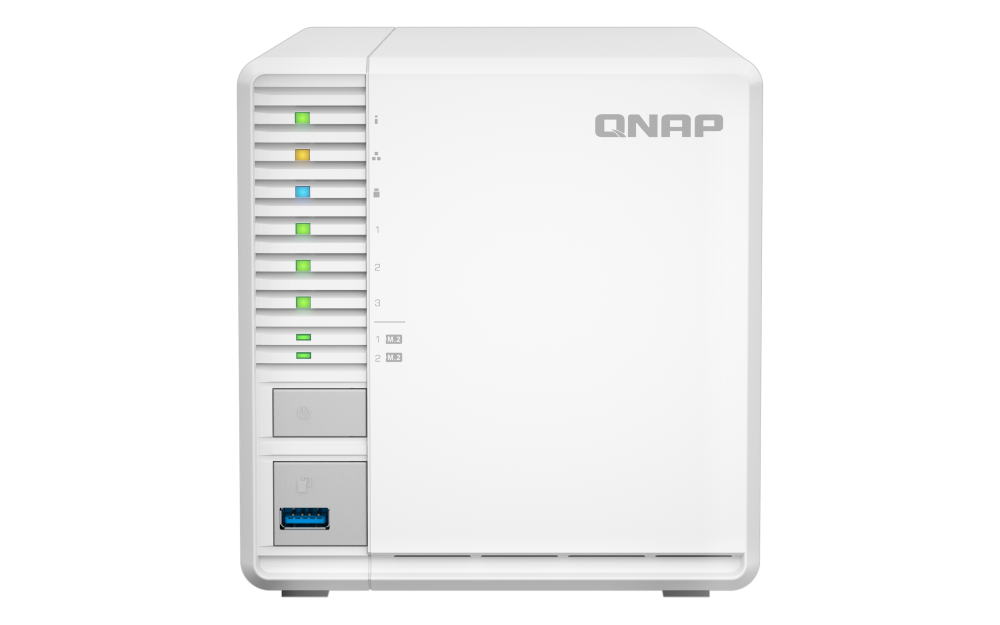
The TS-364-4G shares the three-bay tower design, one built-in 2.5GbE port and two separate M.2 positions with the TS-364-8G. The meaningful configuration difference is memory: the 4G version starts with one 4 GB SODIMM, has two listed memory positions and a 16 GB maximum; the current 8G configuration starts at 8 GB but is listed with an 8 GB maximum. Someone comparing a specific older offer should check the model suffix and the installed memory before treating the two as interchangeable.
QNAP's U.S. hardware page labels the 4G option Legacy, but that label alone does not tell you whether a seller has stock, how long support remains, what warranty applies or what a particular package includes. The exact store URL we tried returned 404, which is an access result, not proof that no retailer has a unit. Check the seller's exact model string, return terms, support status and package contents at the time of purchase. Do not infer that the 4 GB configuration is a current standard package because the TS-364 product family still has an active page.
Three SATA trays with separate M.2 positions
The TS-364 has three native SATA drive bays. QNAP also lists two M.2 2280 NVMe positions for cache or storage use; they are not two additional SATA bays and are not listed as hot-swappable. The manufacturer's QTS specifications describe a two-drive RAID 1 option and a three-drive RAID 5 layout. A two-drive mirror uses two selected SATA drives, not the M.2 positions; the third native bay is not automatically part of that mirror. RAID 5 instead uses three drives. These storage layouts are not equivalent, and neither protects against deleting a file, malware, theft or loss of the complete NAS.
The base unit should be treated as diskless unless an exact seller offer clearly specifies a separately packaged drive set. QNAP's user guide lists the NAS, drive-caddy pins, power adapter and cord, Ethernet cable and setup material; it says 2.5-inch drive tray bases are separate purchases for fitting 2.5-inch drives. Verify the full drive model and capacity in QNAP's live compatibility list. Do not count NVMe positions, external shelves or a seller's optional bundle as native drive bays.
A 2.5GbE link needs a compatible path
The 4G configuration has one built-in 2.5GbE RJ45 port. The connection can negotiate at supported lower rates as well; a multigigabit-rated jack is useful only if the router or switch, cabling and client interface also support the intended path. One 2.5GbE port is not two ports that can be added together, and a line rate is not a tested real-world speed. QNAP's published test environment is a manufacturer result, not a guarantee or an independent measurement.
For an everyday file share or scheduled backup destination, the larger decision may be whether your client network is wired and whether you have a second backup copy. If you want high-speed access from one workstation, check that workstation's Ethernet adapter and the intervening switch. For remote access, also review the current setup and security documentation; a faster local port does not make internet access private or automatic.
Memory and QuTS hero require a planned upgrade
QTS is the default system. QNAP says that switching to QuTS hero is supported from QTS 5.2.1, but its published hardware requirement is at least 8 GB of RAM. The TS-364-4G's 4 GB base does not meet that threshold. QNAP lists a maximum of 16 GB for this 4G configuration, so an upgrade to at least 8 GB is a prerequisite if QuTS hero matters. QNAP also lists 16 GB for inline data deduplication and recommends 32 GB for optimal performance; this model cannot reach that recommendation. Confirm supported modules, memory population guidance and the exact hardware revision rather than buying RAM based only on a reseller title.
The 16 GB ceiling may still be relevant for a buyer considering an earlier configuration with a specific, memory-sensitive workload, but it is not evidence of a particular VM count or a performance level. Consider whether memory upgrade costs, module fit and the model's Legacy status make sense compared with a current configuration that has a different base-memory plan. An operating-system change is also a migration, not a harmless toggle; preserve a separate backup and follow QNAP's instructions before changing storage OS.
Who should keep this earlier version on a shortlist?
This 4G variant is most relevant to someone comparing a specifically identified TS-364-4G listing and willing to verify the package and, if needed, a supported memory upgrade. It is not the right shortcut for a buyer who simply wants “a three-bay QNAP”: the current TS-364-8G has the same native bays and network rating but a higher starting memory level and a lower documented memory ceiling. Compare those limits with the applications you actually plan to run. A four-bay TS-464 changes the native storage count and adds a second built-in 2.5GbE port; it is a different chassis, not a RAM-upgraded TS-364.
QNAP lists an HDMI 1.4b output, a front USB port and two rear USB 3.2 Gen 2 ports, but these connectors do not add storage bays. The model has an active fan and populated drives can generate additional sound and heat, so allow airflow and avoid treating a media-focused feature list as evidence that the unit will be silent. No independent acoustic or performance testing was performed for this assessment.
Check the exact offer before ordering
Use the full TS-364-4G model string, confirm the installed memory and ask whether any upgrade modules, drive bases or drives are actually included. Check the exact drive model and capacity with QNAP; map a two-drive RAID 1 plan or three-drive RAID 5 plan before setup; and write down a separate backup target and restore procedure. Confirm support and seller terms directly because QNAP's Legacy label is not a stock or warranty promise. If you cannot verify the suffix, package and memory condition, treat the listing as unresolved rather than assuming it is the configuration described here.
Key specifications
Key details at a glance
| Internal drive bays | 3 bays |
|---|---|
| Documented internal drive media | 3.5-inch SATA HDD / 2.5-inch SATA SSD (optional tray base required) |
| Built-in Ethernet ports | 1 x built-in 2.5GbE RJ45 |
| Fastest individual Ethernet port | 2.5 Gbps |
| Installed system memory | 4 GB |
| Maximum listed memory | 16 GB |
| Listed storage arrangements | QTS: RAID 1 with two compatible SATA drives / QTS: RAID 5 with three compatible SATA drives |
| Internal file systems | QTS (default) / QuTS hero (optional alternative after meeting the 8 GB memory minimum) |
| USB 3.2 Gen 1 ports | 1 |
| Dimensions (H × W × D) | 146 x 142 x 257.1 (foot pads may add height) |
| Hardware warranty | 2 years |
| Data drives included in listed package | No |
| M.2 NVMe slots | 2 |
| M.2 SSD storage-pool support | Yes |
| Processor | Intel Celeron N5095 |
| CPU cores | 4 |
| CPU threads | 4 |
| Installed memory type | 4 GB DDR4 SODIMM as one 4 GB module; QNAP lists two SODIMM positions and a 16 GB maximum for TS-364-4G. |
Use the exact model’s instructions for operating limits, supplied equipment and version differences.
Sources for this review
Sources for this assessment
- QNAP U.S. Creators & Home Users catalogue observation
- QNAP U.S. Tower / SMB product grid
- QNAP U.S. TS-364 product page
- QNAP U.S. TS-364 hardware specifications
- QNAP U.S. TS-364 configuration comparison
- QNAP TS-364 English U.S. User Guide
- QNAP QTS 5.2 RAID type reference
- QNAP drive compatibility list
- QNAP U.S. Official Store TS-364-8G-US endpoint retrieval attempt
- QNAP U.S. Official Store TS-364-4G-US endpoint retrieval attempt
- QNAP U.S. TS-364 product-page gallery image

Check your setup before choosing a NAS
Use the finder to narrow documented desk/shelf or rack formats, internal-bay minimums, a single Ethernet-port rating and optional redundancy requirements.