
Your needs, this model
Does it fit your priorities?
Does the TS-262A meet a two-native-bay requirement, and do its M.2 slots add to the count?
QNAP lists two native 3.5-inch SATA bays for TS-262A. The two M.2 2280 NVMe positions are a separate cache or storage-volume layer and do not create four native bays. The base model is shipped without HDD, so verify each intended drive by its complete model and capacity in QNAP's compatibility list.
Explore this need in the finder →Does one built-in TS-262A port meet a 2.5-Gbps Ethernet requirement?
Yes. QNAP documents a single built-in 2.5GbE port, so one physical interface meets a 2.5-Gbps link-rating threshold. It does not promise that file transfers reach that rate: the switch or router, client adapter, cabling, storage and workload all affect the path.
Explore this need in the finder →Can the TS-262A use a two-drive mirror while keeping the documented multigigabit link?
QNAP's TS-262A QTS test uses two SATA SSDs in RAID 1, and the model has one built-in 2.5GbE port. That arrangement uses both of the two native SATA positions; the diskless base needs two compatible drives chosen separately, and RAID 1 is not a second backup copy.
Explore this need in the finder →How does the TS-262A differ from the older TS-262?
QNAP's comparison lists the TS-262A with a four-core N5095, 4 GB DDR4 SODIMM and a three-year standard warranty, while the older TS-262 uses a two-core N4505 and has HDMI 2.1 and a PCIe Gen 3 x2 slot that the TS-262A table does not list. That means the A model is a CPU-generation change, not an across-the-board expansion upgrade; compare the exact ports and seller package for your use.
Explore this need in the finder →Which model and package are assessed?
This review follows the QNAP TS-262A-4G-US, not the older TS-262-4G or the four-bay TS-462A. QNAP's U.S. Official Store two-bay listing and exact configurable product page use the TS-262A-4G-US name, while QNAP's model page and comparison supply the hardware identity. The offer is configurable: QNAP distinguishes a NAS-only selection from optional drive choices. The hardware table says the system is shipped without HDD, so this assessment treats the base enclosure as diskless and does not claim what a particular order might add. This is a source-based evaluation, not a hands-on test.
Two SATA bays are the real expansion limit
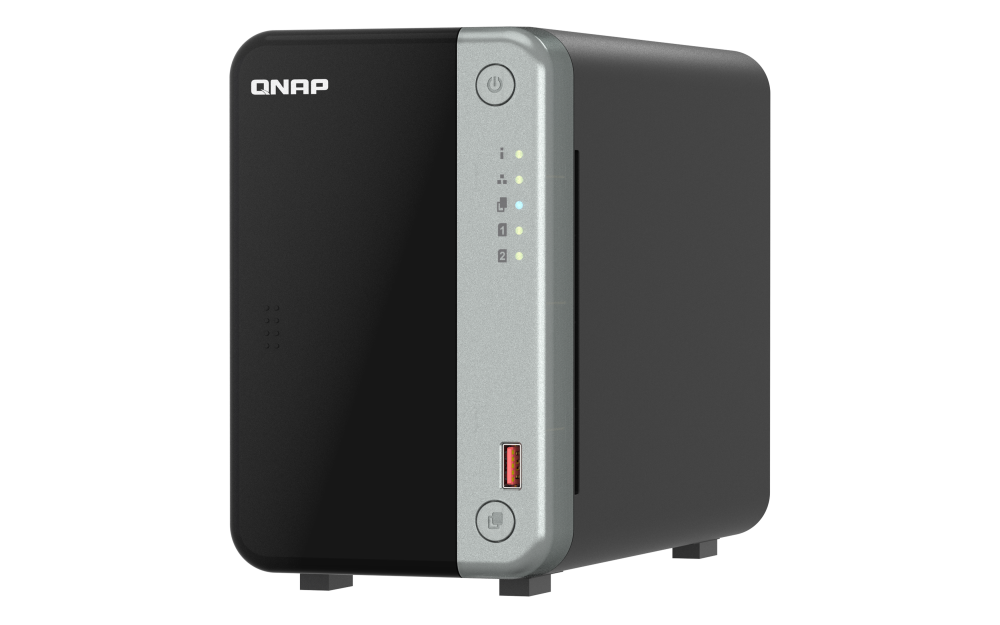
The TS-262A is a two-bay desktop tower with two native 3.5-inch SATA positions. QNAP also lists 2.5-inch SATA SSD support. The precise drive and capacity still need a check in the manufacturer's compatibility lookup; “SATA” alone does not certify every disk, firmware combination or capacity. This distinction is especially important with a two-bay chassis: a mirror uses both native trays, leaving no internal SATA position for a third drive.
QNAP lists two separate M.2 2280 NVMe positions. It describes them as available for an SSD storage volume or cache acceleration, so they can add an SSD layer without occupying either SATA bay. They are not two more hot-swappable drive trays, and they do not change the NAS's two-bay rating. The page recommends appropriate heatsink use; check the exact module and clearance instead of assuming a generic M.2 stick will fit or be supported.
One 2.5GbE port, with the rest of the path left to you
QNAP documents one built-in 2.5GbE RJ45 port. A single port of that rating can be relevant when the NAS, wired computer, switch or router and cable all support the faster link; the slowest part of the path still limits negotiation. The A-series does not have a second 2.5GbE port to spread different traffic across, and QNAP's U.S. comparison lists no PCIe expansion slot for adding an optional network card. If a dual-port setup or an add-in faster NIC matters, compare the exact TS-264 or another model rather than inferring those features from the 2.5GbE label.
QNAP publishes 295 MB/s sequential SMB read and write figures for one 2.5GbE link, but its page labels them as lab results and names a QTS 5.2 setup using two Samsung 860 PRO SATA SSDs in RAID 1. Treat that as a vendor test condition, not our measurement or a forecast for a home connection, HDD array, client or small-file workload. The page's own notes say results vary by environment; network speed is not the same thing as file-copy speed.
The “A” revision changes the tradeoffs, not every port
QNAP's comparison distinguishes the TS-262A-4G from the older TS-262-4G. The A model uses a four-core Intel Celeron N5095, where the older table lists a two-core N4505; both top out at 2.9 GHz. The current A model's hardware table lists 4 GB DDR4 SODIMM memory, two slots and support up to 16 GB. Its comparison row also shows a three-year standard warranty. Those are useful exact-package details, but not a reason to promise a specific multitasking or media workload result.
The change is not an unqualified feature upgrade. QNAP's comparison lists HDMI 2.1 and a PCIe Gen 3 x2 slot for the older TS-262 but no HDMI output or PCIe slot for the TS-262A. That makes the A a poor fit if direct HDMI display or add-in networking is a hard requirement. By contrast, QNAP's TS-264-8G-US assessment lists two built-in 2.5GbE ports, more starting memory and a PCIe slot; it is a separate package and capability set, not an interchangeable name variant.
A QTS mirror is documented, but not a backup
QNAP presents QTS as the TS-262A's NAS operating system. Its own TS-262A performance setup uses two SATA SSDs in RAID 1, while QTS's RAID guidance describes RAID 1 as a two-drive mirror. This is a supported plan that fills both internal bays; the two M.2 slots do not need to be part of the mirror. The 4 GB diskless base does not arrive with a working drive pair installed, so choose drives using the compatibility list and configure the array during setup.
A mirror can keep service available through a covered member-drive failure while the mirror is healthy, but it does not restore an accidentally deleted file or protect against theft, ransomware or damage to the whole NAS. Keep a separate backup on another device or location and verify a restore. A second M.2 SSD or two drive bays inside one case are not, by themselves, that independent copy.
When this two-bay NAS belongs on a shortlist
The TS-262A-4G-US is worth comparing when two internal SATA drives are enough, one built-in multigigabit Ethernet link is useful, and a separate NVMe cache or storage volume is more valuable than HDMI or PCIe expansion. Its 4 GB starting memory and 16 GB listed ceiling are stated limits to plan around; an upgrade is not included in the base identity. Buyers who need more native SATA positions should move up to a four-bay model rather than count M.2 sockets as drive bays. Buyers who require a built-in video output or an add-in network card should check an alternative model's exact specs.
Before choosing an offer, confirm the TS-262A-4G-US identifier, distinguish the NAS-only selection from a configured drive bundle, and check the exact HDD or SSD model in QNAP's compatibility tool. Verify whether your switch, client and cable can negotiate 2.5GbE, and leave budget and space for a separate backup destination. The relevant decision is not whether a single advertised speed or core count sounds high; it is whether these two native bays, one fixed onboard port and the listed expansion options match the job you actually need to run.
Key specifications
Key details at a glance
| Internal drive bays | 2 bays |
|---|---|
| Documented internal drive media | 3.5-inch SATA HDD / 2.5-inch SATA SSD |
| Built-in Ethernet ports | 1 x built-in 2.5GbE RJ45 |
| Fastest individual Ethernet port | 2.5 Gbps |
| Installed system memory | 4 GB |
| Maximum listed memory | 16 GB |
| Listed storage arrangements | QTS: RAID 1 (two-SATA-drive manufacturer test arrangement) |
| Hardware warranty | 3 years |
| Data drives included in listed package | No |
| M.2 NVMe slots | 2 |
| M.2 SSD storage-pool support | Yes |
| Processor | Intel Celeron N5095 |
| CPU cores | 4 |
| CPU threads | 4 |
| Installed memory type | 4 GB DDR4 SODIMM in the reviewed U.S. model; QNAP lists two SODIMM positions and up to 16 GB |
Use the exact model’s instructions for operating limits, supplied equipment and version differences.
Sources for this review
Sources for this assessment
- QNAP U.S. Creators & Home Users catalogue observation
- QNAP U.S. Tower / SMB product grid
- QNAP U.S. Official Store two-bay NAS category
- QNAP U.S. Official Store TS-262A-4G-US configurable offer
- QNAP U.S. TS-262A product page
- QNAP U.S. TS-262A model-specific hardware specifications
- QNAP U.S. comparison for TS-262, TS-462, TS-262A and TS-462A
- QNAP QTS 5.2 RAID type reference
- QNAP drive compatibility list
- QNAP TS-262A U.S. product-page gallery image asset

Check your setup before choosing a NAS
Use the finder to check bay count, the network link you need, and whether a documented two-drive redundant arrangement is essential.