
Your needs, this model
Does it fit your priorities?
Do the two M.2 positions give the TS-253E four ordinary drive bays?
No. It has two native SATA drive bays and two separate M.2 NVMe positions intended for caching/acceleration. Do not count the M.2 devices as SATA HDD capacity or assume they can hold an ordinary share volume without checking support.
Explore this need in the finder →Can two SATA drives be mirrored?
The TS-x53E guide documents RAID 1 for two member drives. A buyer can use the two native SATA bays for an owner-created mirror, but this leaves no spare SATA bay and still calls for a separate backup.
Explore this need in the finder →Can a buyer plan to add memory later?
Do not budget on that assumption. QNAP's current hardware selector shows a two-slot/16-GB maximum for the 8-GB profile, while the English-U.S. guide calls the TS-253E-8G memory non-expandable. Confirm the exact unit revision and manufacturer-supported configuration before ordering or modifying it.
Explore this need in the finder →Assessment basis: this is a model-specific assessment based on QNAP's TS-253E product page, current rendered hardware selector, English-U.S. user guide and Official Store identity. It is not a hands-on review. The U.S. Store SKU is TS-253E-8G-US, while the guide's ordering part number is TS-253E-8G.
A small two-bay server with unusually varied I/O
The TS-253E's core is still a two-bay NAS. QNAP documents two 3.5-inch SATA positions that also support 2.5-inch SATA SSDs. Two M.2 2280 PCIe Gen 3 x2 positions sit alongside them for NVMe SSD caching; they are not two more ordinary SATA bays. That makes it possible to plan a pair of large drives for shared files and keep the M.2 slots for acceleration, but do not count four physical drive paths as four comparable HDD positions. QNAP's compatibility list remains important for both SATA and NVMe media.
The current hardware selector identifies an Intel Celeron J6412 with four cores/four threads and an 8 GB DDR4 profile. It also shows two 2.5GbE ports and two HDMI outputs. HDMI can be relevant for local display or surveillance monitoring, while the Ethernet rating supports a wired multigig path if the switch and client also support it. Neither feature proves a particular multimedia result or a specific file-transfer speed. QNAP's product claims about applications, transcoding and surveillance are manufacturer descriptions, not independent tests in this assessment.
QNAP documentation disagrees about the memory upgrade path
There is a material documentation conflict that should not be hidden. QNAP's current rendered hardware table displays two SODIMM slots and a 16 GB maximum for the 8 GB TS-253E-8G profile; the English-U.S. TS-x53E guide calls the TS-253E-8G's 8 GB memory non-expandable. The shared QNAP Store title identifies an 8G-US package but does not resolve the hardware revision conflict. Do not assume that you can add RAM later or plan a purchase around 16 GB until QNAP confirms the exact unit revision and supported module configuration. The starting 8 GB profile is identifiable; the maximum and upgrade procedure remain uncertain for this edition.
QTS first, QuTS hero as a deliberate option
QNAP says the TS-253E uses QTS by default and supports a switch to QuTS hero beginning with QTS 5.2.1. The guide documents RAID 1 for two drives, so a supported pair of SATA disks can be configured as an owner-created mirror in the native bays. The user guide's standard package list includes the NAS, power adapter, cord, one Cat5e cable, two trays, keys and screws, but no data drives or prebuilt pool. This compact layout fills both SATA bays when mirrored, leaving no spare bay for a simple internal add-on.
RAID 1 can protect against one member-disk failure, but it is not a backup against deletion, ransomware or losing the enclosure. QTS snapshots, external storage or cloud copies are separate plans; choose a destination and test restoration. Before installing QuTS hero, confirm the exact switching prerequisites and the software features needed. Choosing a filesystem is an administration decision with a migration cost, not a cosmetic preference.
What the TS-253E suits
The strongest case is for a small office, home office or monitoring location that needs two SATA bays, dual 2.5GbE, two M.2 cache positions and direct HDMI rather than a larger set of HDD slots. The model page says QNAP intends long-term availability and support through 2029; that statement is useful for planning consistent systems, but it does not guarantee a particular firmware feature, software update or retailer offer in a specific year. If storage growth is the priority, compare a four-bay unit before the two bays become a constraint. If local HDMI is irrelevant and NVMe caching will not be used, the price of an extra interface may not buy much for the actual workflow.
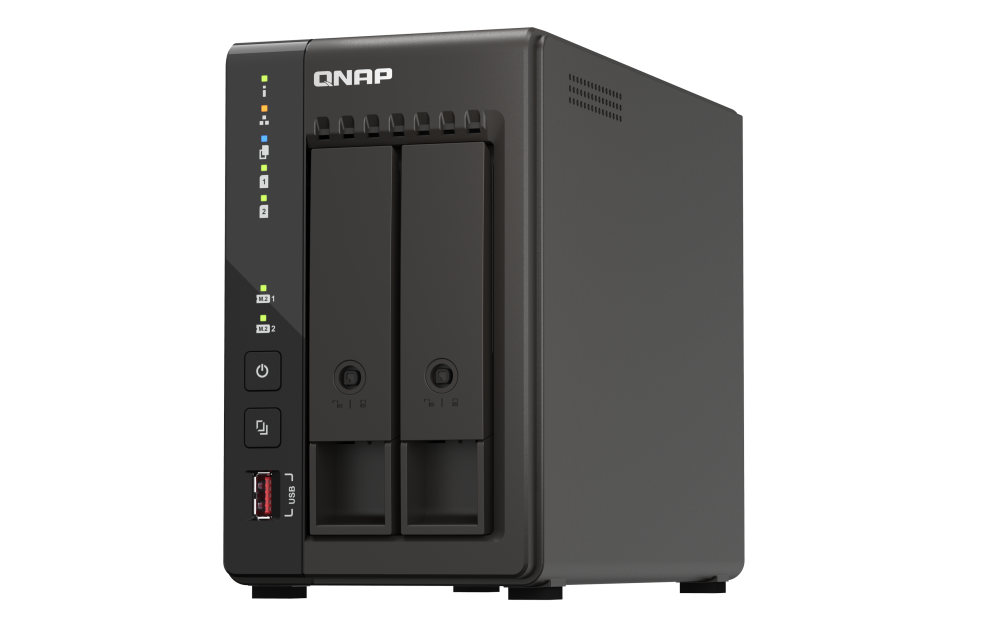
Check the exact TS-253E-8G-US suffix, the package contents, current supported SATA/NVMe drive identifiers, memory revision and QTS/QuTS hero requirements before ordering. The product photograph shows the two-bay tower and front status features, but not installed drives or RAM. This review does not claim measured network speed, power use, noise, reliability or lived customer experience. Use the published specifications as a starting point, then design a separate backup and restore test around the data the NAS will hold.
Primary references: QNAP TS-253E product page, current hardware specifications, the TS-x53E User Guide and the QNAP U.S. Store TS-253E-8G-US page.
Key specifications
Key details at a glance
| Internal drive bays | 2 bays |
|---|---|
| Documented internal drive media | 3.5-inch SATA hard disk drives / 2.5-inch SATA solid-state drives in the SATA bays |
| Built-in Ethernet ports | 2 x built-in 2.5GbE RJ45 |
| Fastest individual Ethernet port | 2.5 Gbps |
| Installed system memory | 8 GB |
| Listed storage arrangements | RAID 1 |
| Internal file systems | EXT4 (QTS) / ZFS (QuTS hero, optional OS path) |
| Hardware warranty | 3 years |
| Data drives included in listed package | No |
| M.2 NVMe slots | 2 |
| Listed expansion unit | QNAP-compatible external USB expansion enclosure (check exact model compatibility) |
| Processor | Intel Celeron J6412 |
| CPU cores | 4 |
| CPU threads | 4 |
| Installed memory type | DDR4 SODIMM (listed 8-GB configuration) |
Use the exact model’s instructions for operating limits, supplied equipment and version differences.
Sources for this review
Sources for this assessment

Check your setup before choosing a NAS
Use the finder to narrow documented desk/shelf or rack formats, internal-bay minimums, a single Ethernet-port rating and optional redundancy requirements.