
Your needs, this model
Does it fit your priorities?
Does the TS-233 have enough native bays for a two-drive mirror?
QNAP lists two native 3.5-inch SATA positions and RAID 1 among the supported two-bay layouts. A mirror uses both bays with two separately selected compatible drives; QNAP's guide does not list data drives in the standard package. RAID 1 can help with one member-drive failure, but it is not a separate backup.
Explore this need in the finder →Can a TS-233 meet a 1-Gbps built-in port minimum?
Yes. QNAP lists one built-in Gigabit RJ45 port, so it meets a 1-Gbps single-port link-rating minimum. It does not meet a 2.5-Gbps threshold, and the Ethernet rating is not a promise of file-copy speed; the whole network path and workload matter.
Explore this need in the finder →What should be checked before building a two-drive TS-233 RAID 1 setup?
Confirm each complete drive model and capacity in QNAP's current TS-233 compatibility selector, then verify the seller's exact package because data drives are not in the documented standard package. QTS RAID 1 uses both native positions and is only one layer of protection; keep and test an independent backup. The TS-233's 2 GB memory is fixed and its one network port is Gigabit only.
Explore this need in the finder →The QNAP TS-233 is a small two-bay tower built around a simple storage choice: use two SATA drives independently, or configure a documented QTS RAID 1 mirror. The hardware boundary is just as clear. The current U.S. specification lists one Gigabit Ethernet jack and 2 GB of onboard memory that cannot be expanded. This is a plausible fit for a modest household file share or backup destination when a gigabit network is enough; it is not a multigigabit upgrade or a flexible compute platform.
Two native positions, with a real two-drive mirror option
QNAP identifies the TS-233 as a two-position 3.5-inch SATA NAS. Its current U.S. hardware table names 3.5-inch SATA hard drives and 2.5-inch SATA solid-state drives. The TS-x33 version 6 guide also lists 2.5-inch SATA hard drives, which the current table does not repeat. Because those documents differ in what they explicitly list, do not assume every 2.5-inch hard drive is supported; check the exact drive model and capacity in QNAP's live TS-233 compatibility lookup before ordering. The number of bays says nothing by itself about drives in the seller's box.
QNAP's current two-bay storage table includes RAID 1 as well as JBOD, Single and RAID 0. RAID 1 uses both positions to keep an identical copy on each member disk, with tolerance for one member-drive failure. Its usable space starts around the capacity of the smaller disk before formatting and system overhead, not the sum of both labels. The mirror is a storage arrangement, not a second backup: deleted files, malware, theft, a failed NAS or a mistake can still take out the data. Keep a separate copy with a recovery path. See the guide to RAID and backups for that distinction.
Gigabit is the built-in network ceiling
The TS-233 has one 1-Gigabit RJ45 port. That is a link rating for one connection, not a file-transfer promise: the switch or router, client adapter, cable, disk activity, protocol and workload can all lower real throughput. If every device in the intended path is gigabit, the TS-233's port may be an adequate match. If a faster local copy path is a firm requirement, the TS-233 cannot meet a 2.5-Gbps one-port minimum from its documented built-in hardware. A QNAP TS-262A, for example, is a separately reviewed two-bay model with a built-in 2.5GbE port; its other specifications and package still need their own comparison. The network-path guide explains why an upgrade only helps when the whole route supports it.
Fixed memory and an unresolved NPU claim
The U.S. hardware table and comparison sheet specify 2 GB of onboard memory, non-expandable, and note that some RAM is reserved for shared graphics. That leaves no memory-upgrade path if a future workload needs more. The processor is a four-core ARM Cortex-A55 at 2.0 GHz. Those are identification facts, not independent evidence of application speed; QNAP's product page also shows its own lab results under a particular drive and RAID setup, which should not be mistaken for a household performance guarantee.
There is a documentation wrinkle around AI. QNAP's feature page describes a built-in NPU for image recognition, but the current U.S. hardware table and the comparison sheet do not show a positive NPU specification. I would treat that capability as unresolved rather than selecting the model for accelerated photo analysis without confirmation for the exact current hardware. This uncertainty does not change the documented bay, port or memory facts.
What the product image and box list do—and do not—settle
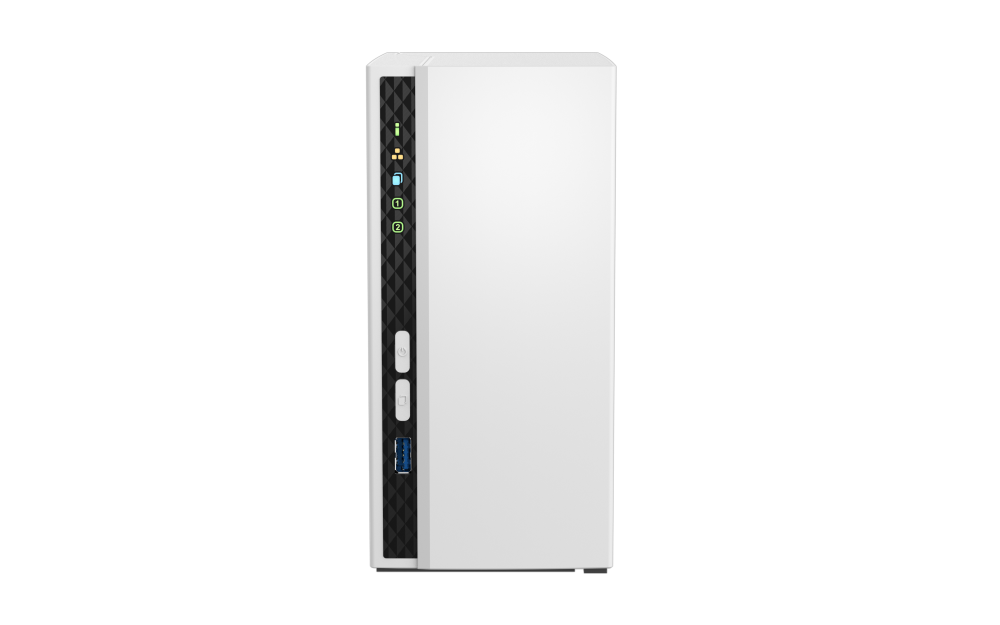
The official product-page image shows the white TS-233 tower and its covered front panel, but it does not reveal the drive trays, installed disks, RAM or package. QNAP's TS-x33 guide lists the NAS, power adapter, cord, mounting screws, Ethernet cable and quick-start guide; it does not list data drives. That describes the documented standard package, not every retailer bundle. Confirm the exact model, seller contents, drive selection, return terms and warranty before ordering.
Who should shortlist it?
Consider the TS-233 when two native SATA positions, a QTS mirror option and a straightforward gigabit path are the essentials, and fixed 2 GB memory is acceptable for the planned services. Its two bays allow a one-drive start or a later two-drive layout, but the actual migration path and data risk depend on the setup. If a 2.5GbE connection, more memory headroom or documented upgrade flexibility matters, compare a higher-tier two-bay model rather than treating the TS-233's compact tower shape as a substitute for those capabilities.
The main buying work is choosing compatible drives and deciding on the backup plan, not decoding a claimed capacity number. The TS-233 is a manufacturer-documented model reference; this assessment does not establish a current seller offer, stock, price, drive bundle or independent test result.
Key specifications
Key details at a glance
| Internal drive bays | 2 bays |
|---|---|
| Documented internal drive media | 3.5-inch SATA HDD / 2.5-inch SATA SSD |
| Built-in Ethernet ports | 1 x built-in 1GbE RJ45 |
| Fastest individual Ethernet port | 1 Gbps |
| Installed system memory | 2 GB |
| Maximum listed memory | 2 GB |
| Listed storage arrangements | QTS: JBOD, Single, RAID 0, RAID 1 |
| Internal file systems | EXT4 |
| USB 3.2 Gen 1 ports | 1 |
| Hardware warranty | 2 years |
| Data drives included in listed package | No |
| Processor | ARM Cortex-A55 |
| CPU cores | 4 |
| Installed memory type | 2 GB onboard and non-expandable; QNAP notes that some RAM is reserved for shared graphics memory. |
Use the exact model’s instructions for operating limits, supplied equipment and version differences.
Sources for this review
Sources for this assessment

Check your setup before choosing a NAS
Use the finder to check bay count, the network link you need, and whether a documented two-drive redundant arrangement is essential.