
Your needs, this model
Does it fit your priorities?
Can the TS-216G meet a two-bay, 2.5GbE and mirror requirement at the same time?
Yes, QNAP documents two native SATA positions, one built-in 2.5GbE port, and a QTS RAID 1 option for two compatible drives. The mirror uses both bays and retains half the combined capacity with equal drives. Data drives are not listed in the standard guide package, and RAID 1 does not replace an independent backup.
Explore this need in the finder →Will TS-216G provide a 2.5-Gbps file-copy rate on its own?
No. QNAP lists one built-in 2.5GbE port and a separate 1GbE port, but the 2.5GbE marking is a link rating, not a measured promise for this NAS, drive pair, client or workload. The switch or router, client adapter, cable and storage workload all need to support the intended path; the two Ethernet ports are not added into one faster link.
Explore this need in the finder →What should be checked before ordering a TS-216G mirror setup?
Check the exact TS-216G-US offer and whether the selected package is NAS-only or a separately configured drive option. Confirm each complete drive model and capacity in QNAP's current TS-216G compatibility selector, verify the 2.5GbE switch/router and client path, and plan a second backup copy. The memory is fixed at 4 GB, and a RAID 1 mirror consumes both native bays.
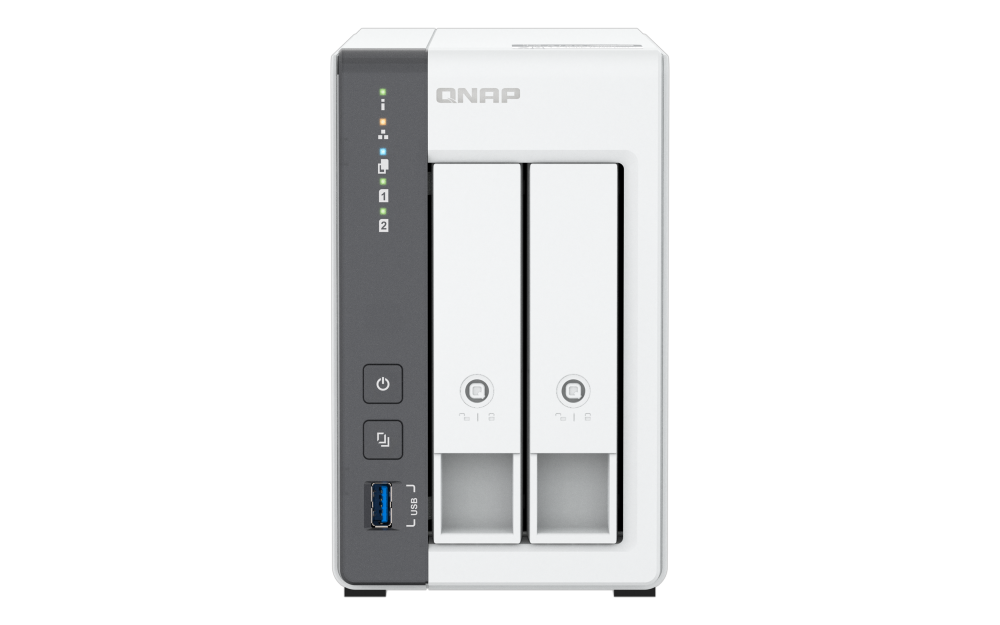
Explore this need in the finder →The QNAP TS-216G is a two-bay tower for someone who wants shared storage and a faster wired NAS link without moving to a larger chassis. Its useful distinction from the less expensive TS-233 family is not an extra bay: both have two native drive positions, but QNAP documents 4 GB of fixed memory and one 2.5GbE port on the TS-216G, alongside a separate 1GbE port. It also supports a two-drive QTS RAID 1 arrangement. This assessment is based on QNAP's U.S. product page, model guide and specifications—not hands-on use or independent performance testing.
Two native bays make the plan easy to understand—and hard to expand
QNAP lists two 3.5-inch SATA drive bays. Its current hardware table and the English TS-216G User Guide list 3.5-inch SATA hard drives and 2.5-inch SATA solid-state drives as supported media, and the guide says the bays are hot-swappable. That is a straightforward menu for a home share, computer backups, or a small workgroup repository. A two-bay chassis still imposes a real ceiling: there is no third internal position for a future data set, and the model's specification does not list M.2 slots. The separately compared TS-262A adds two M.2 positions, while QNAP's three-bay TS-364 changes the internal-drive layout; those are meaningful differences if you expect to grow rather than simply replace the original drives.
QNAP's standard user-guide package list names the NAS, power adapter, power cord, Ethernet cable, tray keys, mounting screws and quick guide, but not data drives. Confirm whether the exact offer includes separately selected disks before treating the NAS as ready to populate.
2.5GbE is a port rating, not a file-copy guarantee
The TS-216G has one 2.5GbE RJ45 port and one Gigabit RJ45 port. For a buyer whose requirement is “at least one 2.5GbE connection,” it clears that hardware threshold. That is a narrower claim than a promise of 2.5-gigabit file transfers: the switch or router, client adapter, cabling, drive arrangement, protocol and workload all affect the result. QNAP's published throughput page describes a specific manufacturer lab setup; the figures are not reproduced here as an independent result or a forecast for a household network. Nor should the second, 1GbE port be added to the 2.5GbE port and treated as one faster link.
Check the NAS-to-client path before paying for multigigabit hardware: a 1GbE switch or client remains the limiting link. If the network is all Gigabit and will stay that way, a less expensive two-bay system may be the more rational fit.
Fixed 4 GB memory is the main workload boundary
QNAP specifies a four-core, 2.0 GHz ARM Cortex-A55 processor and 4 GB of onboard RAM that is not expandable. That gives the TS-216G a clear distinction from the 2 GB TS-233, but the memory figure is fixed, not a starting point for a future upgrade. QNAP advertises an NPU for AI-assisted photo organization and describes backup, synchronization, media and surveillance applications. Those listed features are useful context, but they do not establish that every application, concurrent user count or AI indexing job will feel responsive on a particular installation.
For file sharing, scheduled computer backups and a few household services, this configuration may be enough. Memory-hungry containers, virtual machines or a growing collaboration workload make the non-expandable ceiling more important than the feature list. The TS-262A adds two M.2 positions, but QNAP's memory-expansion references differ; check the exact revision if that detail is essential.
A RAID 1 mirror helps with one drive failure; it does not preserve two-bay growth
QNAP's model-specific page and guide document RAID 1 on the TS-216G. QTS describes RAID 1 as a two-disk mirror: the same data is written to each member, one member-drive failure can be tolerated under the documented conditions, and usable capacity is roughly half the combined raw capacity when the drives are the same size. On this two-bay NAS, the pair occupies both native positions. That makes the mirror a sensible option if one failed drive should not immediately take the shared volume offline, but it also means the second bay is not a spare for extra capacity.
A mirror is not a second backup. It can reproduce accidental deletion, ransomware changes or corruption to both members, and it does not protect the entire NAS from theft, electrical damage or a controller failure. Keep another copy on a separate device or service and test that the copy can be restored. Before ordering disks, check each complete drive model and capacity in QNAP's current compatibility selector; the general media list does not certify every model or firmware version.
Who should shortlist it?
The TS-216G deserves a look when two bays are enough, a built-in 2.5GbE port matters, a documented two-drive mirror is wanted, and fixed 4 GB memory suits the planned apps. Setup, security updates, permissions and an off-NAS backup remain the owner's work.
It is a weaker fit for buyers needing three or more internal drives, expandable RAM, M.2 storage, or a built-in link above 2.5GbE. Compare the exact TS-216G, TS-233 and TS-262A packages: model suffixes and drive choices can change offer contents. A maintained U.S. model page does not guarantee seller stock or a specific bundle.
Bottom line: the TS-216G is a compact, well-defined two-bay QTS option whose strongest case is the combination of a 2.5GbE port and a documented RAID 1 plan. Its equally important limits are equally clear: a mirror fills both bays, the 4 GB RAM is fixed, and drives are not part of the guide's standard package. Check drive compatibility and the whole network path, then keep an independent backup plan.
Sources checked 2026-10-30: QNAP U.S. TS-216G product page; model-specific hardware specifications; English TS-216G User Guide; QNAP comparison; QTS 5.2 RAID reference; QNAP drive compatibility list. QNAP's hardware specification route returned a web access challenge to direct retrieval; the rendered first-party table and model guide were inspected separately.
Key specifications
Key details at a glance
| Internal drive bays | 2 bays |
|---|---|
| Documented internal drive media | 3.5-inch SATA HDD / 2.5-inch SATA SSD |
| Built-in Ethernet ports | 1 x built-in 2.5GbE RJ45 / 1 x built-in 1GbE RJ45 |
| Fastest individual Ethernet port | 2.5 Gbps |
| Installed system memory | 4 GB |
| Maximum listed memory | 4 GB |
| Listed storage arrangements | Single / JBOD / RAID 0 / RAID 1 |
| Internal file systems | EXT4 (QTS) |
| USB 3.2 Gen 1 ports | 1 |
| Dimensions (H × W × D) | 165 x 102 x 220.6 mm (excluding foot pads) |
| Weight | 1.45 kg |
| Hardware warranty | 2 years |
| Data drives included in listed package | No |
| M.2 NVMe slots | 0 |
| Processor | ARM Cortex-A55 |
| CPU cores | 4 |
| Installed memory type | 4 GB onboard RAM, non-expandable; QNAP notes that some RAM is reserved for shared graphics memory. |
Use the exact model’s instructions for operating limits, supplied equipment and version differences.
Sources for this review
Sources for this assessment
Check your setup before choosing a NAS
Use the finder to check bay count, the network link you need, and whether a documented two-drive redundant arrangement is essential.