
Your needs, this model
Does it fit your priorities?
Do the sixteen bays mean sixteen 3.5-inch positions, and are drives included?
The current exact selector lists sixteen native 3.5-inch SATA positions and says the system ships without HDDs. It lists 3.5-inch SATA HDDs and 2.5-inch SATA SSDs; the older English guide also mentions 2.5-inch HDDs in 3.5-inch trays, so that media option needs confirmation. QNAP's captured compatibility response did not expose exact drive/firmware rows. Verify every drive model and delivered package before calculating capacity or ordering media.
Explore this need in the finder →Do two 2.5GbE ports provide one 5Gbps link to a single client?
No. The fastest individual built-in Ethernet port is 2.5GbE. QNAP describes up to 5 Gbps through port trunking, which depends on the network and workload and does not turn one port or one client flow into a guaranteed 5Gbps path. Built-in 10GbE is not listed; optional NICs need a separate compatibility and slot check.
Explore this need in the finder →Can I create a two-drive mirror under either supported operating system?
QNAP's exact-model software selector lists RAID 1 in both its QTS and QuTS hero eight-bay-and-larger profiles; each chosen system can support an owner-created two-drive arrangement. Select two exact compatible SATA drives and configure the pool yourself: the standard package is listed without HDDs or a prebuilt array. Choosing one OS is a separate setup decision, and RAID 1 does not replace a separate backup.
Explore this need in the finder →Is the memory maximum 32 GB or 64 GB for this profile?
The current exact U.S. hardware selector says 16 GB installed and up to 64 GB using two 32 GB modules. The 2020 TS-x73AU guide agrees on the 16 GB order-code profile but says 32 GB maximum. Treat the upgrade ceiling as a source conflict, confirm the current approved module list with QNAP and verify the delivered revision before planning a memory purchase.
Which rail kit should I buy for a rack installation?
The current QNAP product page points to optional RAIL-S01, while the TS-x73AU manual lists RAIL-B02 as compatible and says rails are not included. Those labels are not enough to certify a kit for a particular cabinet; confirm the current rail SKU, post spacing/depth, unit depth, cable clearance, ventilation and loaded weight before ordering.
The QNAP TS-1673AU-RP-16G-US is a 16-bay, 3U rack NAS built around an AMD Ryzen Embedded V1500B and a 16 GB memory profile. QNAP’s current U.S. selector identifies the underlying configuration as TS-1673AU-RP-16G, and its Official Store page uses the exact U.S. SKU suffix. I treat these as one hardware profile, not separate machines or a claim that a particular seller currently has stock. This is a document-based assessment, not a hands-on review; I have not installed, owned or tested the unit. Start with QNAP’s U.S. TS-1673AU-RP product page and the English TS-x73AU User Guide.
Sixteen native SATA positions, with media caveats
The exact current selector lists sixteen native 3.5-inch SATA positions and says the NAS ships without HDDs. It names 3.5-inch SATA hard drives and 2.5-inch SATA SSDs installed in the trays. The 2020 guide also says 2.5-inch SATA hard drives can be installed in 3.5-inch trays, but that older line is absent from the current selector. A model-specific QNAP compatibility response captured on 5 November 2026 now exposes separate 3.5-inch HDD and SSD tables with drive model, capacity, interface and firmware fields. Check the complete planned drive SKU and firmware against QNAP’s current list instead of treating the bay count as blanket approval. The captured response has no separate 2.5-inch HDD category; that does not settle whether the older guide’s 2.5-inch HDD wording remains valid for this exact unit. Confirm with QNAP before building around that media.
QNAP lists both QTS with EXT4 and QuTS hero with ZFS as software alternatives for this model. The exact software profiles list RAID 1 among their supported layouts. Under either OS, a two-drive mirror is something the owner selects and creates from compatible drives; it is not a prebuilt array or a reason to skip an independent backup. QNAP’s operating-system references describe RAID 1 as a two-drive arrangement that can continue after one member fails, while usable capacity is limited by the mirror layout. Decide which OS to initialize before storing data and confirm the chosen drive set; QNAP says changing the system later requires removing drives. Read its QTS RAID reference and QuTS hero guide alongside the model selector.
2.5GbE is the built-in single-port ceiling
The current selector and model guide list two built-in 2.5GbE RJ45 ports. That makes one port sufficient for a 2.5-Gbps link-rating threshold, but it does not make a single client path a guaranteed 5 Gbps. QNAP discusses trunking multiple connections, whose useful rate depends on the network configuration and traffic; optional 5/10GbE adapters are additional cards, not installed base ports. QNAP’s product page also publishes lab figures for a specified 16-SSD RAID 5 setup using QTS 4.4.2 and an added 10GbE card. Those are manufacturer test conditions, not an independent benchmark or a prediction for this NAS configured with RAID 1, different drives, clients or network hardware.
For a 2.5GbE client path, check the switch port, cable, peer NIC, protocol, storage pool and workload end to end. For faster Ethernet, verify the adapter’s current compatibility, PCIe placement and any card conflicts before buying; QNAP lists two PCIe Gen3 x4 slots, but that alone does not confirm every adapter combination or performance result.
Memory, rack space and redundant power need a second look
The reviewed profile starts at 16 GB DDR4 UDIMM. A material source conflict affects upgrades: QNAP’s current exact hardware selector gives a 64 GB maximum using two 32 GB modules, while the 2020 guide lists 32 GB maximum for the exact 16G order profile. The shared starting total is not evidence that either upgrade ceiling is safe for every hardware revision. Confirm current supported module part numbers and the delivered unit revision before budgeting for memory.
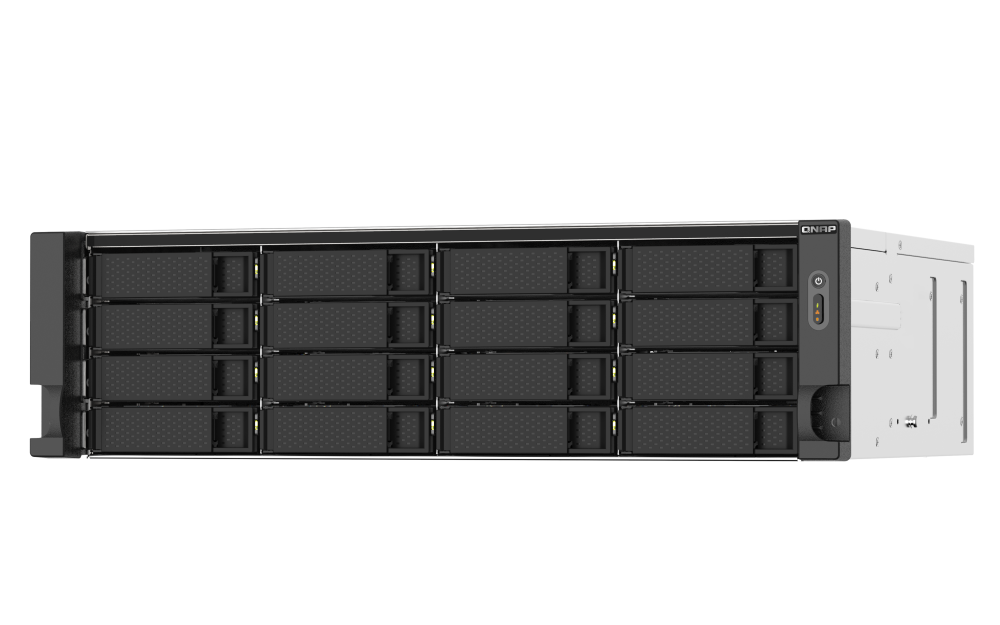
This is a full-depth 3U rack chassis, not a compact desk NAS. QNAP’s current selector gives body dimensions of 5.17 × 17.01 × 14.6 inches and a 29.83-pound net weight; the guide’s figures differ slightly and do not define the complete rack envelope. The selector lists two 550 W redundant supplies and three 80 mm fans. A supply’s rating is not typical wall draw or a guarantee against a shared circuit failure. QNAP’s product page points to RAIL-S01, whereas the guide lists RAIL-B02 and says the rails are not included. Confirm the correct current kit, cabinet depth, post spacing, ventilation, cable clearance and loaded-weight limits with QNAP before installation. The image shows the family chassis only; it does not establish installed drives, memory modules, rail kit or seller contents.
Who should shortlist it—and what to verify
This profile is worth shortlisting when sixteen native SATA positions, a rack installation and redundant power are more important than a compact footprint. Its dual 2.5GbE ports may be enough when the rest of the wired path is designed for that link class. It is a poor fit if the plan assumes included drives, a factory-configured mirror, 10GbE already installed, verified 2.5-inch HDD compatibility, a 64 GB upgrade without checking the manual conflict, or rails that are certain to fit a particular cabinet.
- Match the exact TS-1673AU-RP-16G-US suffix and ask for the seller’s written bill of materials; the standard guide package does not list data drives or rails.
- Confirm every drive model and firmware against QNAP’s current compatibility information. Treat the 2.5-inch HDD wording as unresolved until QNAP confirms it for the delivered revision.
- Choose QTS or QuTS hero, initialize the pool yourself, and keep an independent tested backup.
- Resolve the 32-versus-64 GB memory ceiling and RAIL-S01-versus-RAIL-B02 discrepancy before purchasing upgrades or installation hardware.
- For networking, verify the complete switch-to-client path and any required adapter rather than extrapolating from manufacturer lab figures.
The exact U.S. Store identity lists a three-year standard warranty, but written terms, seller eligibility and coverage for the delivered SKU should be checked directly. No price, stock, delivery estimate, independent performance result or seller-added bundle is asserted here.
Key specifications
Key details at a glance
| Internal drive bays | 16 bays |
|---|---|
| Documented internal drive media | 3.5-inch SATA HDD / 2.5-inch SATA SSD in a 3.5-inch tray |
| Built-in Ethernet ports | 2 x built-in 2.5GbE RJ45 |
| Fastest individual Ethernet port | 2.5 Gbps |
| Installed system memory | 16 GB |
| Maximum listed memory | 64 GB |
| Listed storage arrangements | QTS: RAID 1 in the eight-bay-and-larger software profile / QuTS hero: RAID 1 in the eight-bay-and-larger software profile |
| Hardware warranty | 3 years |
| Data drives included in listed package | No |
| Processor | AMD Ryzen Embedded V1500B |
| CPU cores | 4 |
| CPU threads | 8 |
| Installed memory type | 16 GB DDR4 UDIMM profile; QNAP lists ECC support, but verify the delivered module population and supported part numbers. |
Use the exact model’s instructions for operating limits, supplied equipment and version differences.
Sources for this review
Sources for this assessment
- QNAP U.S. Tower/SMB 95-card product grid
- TS-1673AU-RP — QNAP U.S. product page
- TS-1673AU-RP-16G rendered hardware selector — QNAP U.S.
- QTS and QuTS hero rendered software selectors — QNAP U.S.
- TS-1673AU-RP rendered package selector — QNAP U.S.
- TS-x73AU User Guide, English — QNAP
- TS-1673AU-RP-16G-US — QNAP U.S. Official Store
- RAID types — QTS 5.2.x User Guide
- QuTS hero h5.2.x User Guide, English (U.S.) — QNAP
- QNAP compatibility route queried for TS-1673AU-RP
- TS-873AU, TS-873AU-RP, TS-1273AU-RP and TS-1673AU-RP comparison — QNAP U.S.
- TS-1673AU-RP official product rendering — QNAP U.S.
- QNAP official exact-model compatibility data — TS-1673AU-RP

Check your setup before choosing a NAS
Use the finder to narrow documented desk/shelf or rack formats, internal-bay minimums, a single Ethernet-port rating and optional redundancy requirements.