
Your needs, this model
Does it fit your priorities?
Can the TS-133 make a two-drive in-device mirror?
No. QNAP documents one native SATA bay, so the TS-133 cannot place a second drive inside the chassis for a two-drive mirror. Its supported single-drive arrangement does not tolerate that disk's failure; keep a separate copy on another device or remote destination and verify recovery. Its USB ports are not additional internal drive bays.
Explore this need in the finder →Does one built-in TS-133 Ethernet port meet a 1-Gbps minimum?
Yes. QNAP lists one built-in Gigabit RJ45 interface, which meets a 1-Gbps single-port link-rating threshold. It does not meet a 1.5-Gbps or 2.5-Gbps minimum, and the port rating does not predict file-copy speed; the router or switch, client, cabling, disk and workload still matter.
Explore this need in the finder →What should be checked before using a one-drive TS-133 as a NAS?
Check the exact drive model and capacity in QNAP's current TS-133 compatibility selector, especially if considering a 2.5-inch SATA HDD because the current U.S. table and TS-x33 v6 guide list different media. Confirm whether the seller includes a drive, since the standard guide package does not. The one-disk QTS arrangement is not an internal mirror, so maintain a separate backup; fixed 2 GB memory and 1GbE are additional workload and network limits.
Explore this need in the finder →The QNAP TS-133 is a deliberately narrow kind of NAS: one internal drive, one gigabit network port and QTS software in a slim tower. That can make sense as a simple home file share or a destination for another device's backups, provided the data also has a copy elsewhere. It is not the right shape for someone expecting a two-disk mirror inside the same box or room to add another SATA drive later.
One bay is the defining limit
QNAP's U.S. hardware table identifies one 3.5-inch SATA position. It lists 3.5-inch SATA hard drives and 2.5-inch SATA solid-state drives, while the TS-x33 version 6 user guide also includes 2.5-inch SATA hard drives. Because the current product table and manual do not say exactly the same thing, check the full drive model and capacity in QNAP's live TS-133 compatibility selector—especially for a 2.5-inch HDD—rather than treating a shared SATA connector as universal approval.
That is a narrower layout than the two-bay QNAP TS-233. A single compatible disk can be enough for shared folders or a network backup target, but this chassis cannot keep a second internal disk as an identical mirror member. The USB ports are peripheral connections, not another native SATA bay. Expansion boxes or cloud mounts do not change the TS-133's internal-bay count in a bay comparison.
One disk is not a redundant array
QNAP's QTS documentation and product material describe single-disk storage. In this model, the practical arrangement is one drive in QTS Single: a failure of that disk can take the NAS copy with it. QNAP also describes snapshots, but a snapshot kept on the same one-drive system does not create an independent copy against disk failure, theft or loss of the NAS. Use a separate external drive, remote NAS or cloud destination when the files matter, and confirm that you can restore from it.
The TS-133 can receive backups from Windows or Mac and QNAP lists remote and cloud backup routes in its product material. Those are software options, not a supplied second drive or a finished backup plan. Decide what will hold the second copy, how often it will run and whether you can recover a needed file before relying on the NAS as the only location.
Gigabit networking, not multigig
There is one built-in Gigabit Ethernet jack. It meets a 1-Gbps single-port threshold but not a 1.5-Gbps, 2.5-Gbps or faster built-in-port requirement. Adding a faster switch cannot raise the NAS port's link rating. The switch or router, client adapter, cable, storage activity and file pattern also shape actual transfer speed, so QNAP's lab figure is not a promise for a particular home network.
QNAP lists one USB 3.2 Gen 1 port and one USB 2.0 port. Those can support peripherals or an external backup device, but they do not combine into a faster Ethernet path. If the NAS must serve several people on a faster wired network, compare a model with a documented multigigabit built-in port instead of treating the small chassis as a speed upgrade.
Fixed memory and an AI claim to verify
The TS-133 has 2 GB of onboard memory, listed as non-expandable, and QNAP notes that some RAM is reserved for shared graphics. The family guide identifies a four-core ARM Cortex-A55 processor at 1.8 GHz. These facts help narrow the sort of workload to consider; they do not establish how a particular mix of apps will perform or how much memory it needs.
There is a source wrinkle around the Neural Processing Unit. QNAP's feature page promotes an NPU for photo-recognition work, but the current hardware table does not show a positive NPU field. Treat that capability as unresolved until QNAP confirms it for the exact hardware revision and application; do not choose this system for a promised AI speed-up. The listed memory and one-drive layout remain clear even with that claim left open.
Drive installation and the documented package
The TS-x33 guide says the TS-133 does not support hot-swapping. Its drive-installation procedure starts by powering down, unplugging the NAS and opening the case, so a failed drive is not a tray-pull replacement while the system stays online. The manual's standard package list names the NAS, power adapter, power cord, drive screws, Ethernet cable and quick-start guide; it does not list a data drive. A seller may offer a different bundle, but this review has not established a retailer SKU or selected drive package.
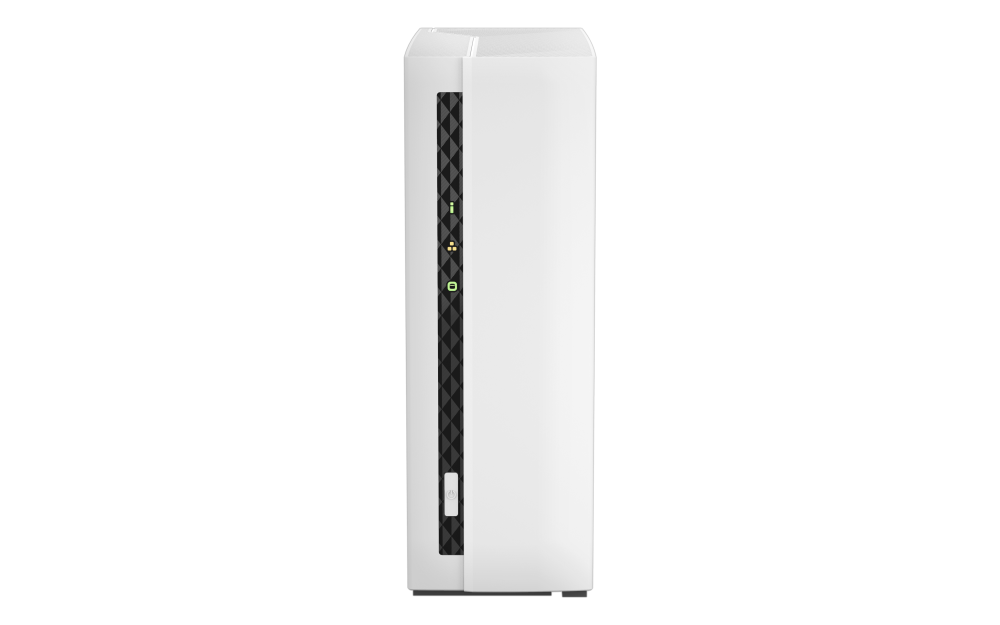
The exact QNAP gallery image shows the white tower's covered front face. It does not reveal an installed drive, the internal bay, the memory, the retail box or a selected bundle. Dimensions and net weight are omitted here because the current U.S. hardware table and the TS-x33 v6 guide conflict on those values. Confirm footprint and package details against the exact unit you are considering.
Who should keep it on the shortlist?
Consider the TS-133 only when one internal compatible SATA drive is enough, the 1GbE link fits the complete network path, the fixed 2 GB memory fits the services you intend to run and you have a separate backup destination. It is a poor match for an in-device two-drive mirror, fast replacement without downtime, an upgradeable memory plan or a built-in multigigabit connection. For a mirror-capable QNAP, compare the two-bay TS-233 assessment; for a one-bay alternative, the Synology DS124 has its own storage and installation caveats.
This assessment is based on current manufacturer pages, an English U.S. user guide and a model-specific comparison. It is not a hands-on test and does not establish a current seller offer, price, availability, included disk or exact drive compatibility. Check those details for the full model and seller package before ordering.
Key specifications
Key details at a glance
| Internal drive bays | 1 bays |
|---|---|
| Documented internal drive media | 3.5-inch SATA HDD / 2.5-inch SATA SSD |
| Built-in Ethernet ports | 1 x built-in 1GbE RJ45 |
| Fastest individual Ethernet port | 1 Gbps |
| Installed system memory | 2 GB |
| Maximum listed memory | 2 GB |
| Listed storage arrangements | QTS: Single (one disk) |
| Internal file systems | EXT4 |
| USB 3.2 Gen 1 ports | 1 |
| Manufacturer's idle noise figure | 19.8 dB(A) |
| Hardware warranty | 2 years |
| Data drives included in listed package | No |
| Processor | ARM Cortex-A55 |
| CPU cores | 4 |
| Installed memory type | 2 GB onboard and non-expandable; QNAP notes that some RAM is reserved for shared graphics memory. |
Use the exact model’s instructions for operating limits, supplied equipment and version differences.
Sources for this review
Sources for this assessment
- QNAP U.S. Creators & Home Users model listing
- QNAP U.S. TS-133 product page
- QNAP U.S. TS-133 hardware specification table
- QNAP U.S. TS-133 comparison page
- QNAP TS-x33 User Guide, version 6, English U.S., 2024-04-22
- QNAP QTS 5.2 RAID types reference
- QNAP drive compatibility lookup
- QNAP TS-133 product-page gallery image
- QNAP U.S. Store TS-133 offer access attempt

Check your setup before choosing a NAS
Use the finder to check bay count, the network link you need, and whether a documented two-drive redundant arrangement is essential.