
Your needs, this model
Does it fit your priorities?
Does the exact 1TB configuration meet a 24-bay, 25GbE, two-drive-mirror screen?
At the documented level, yes: the current selector lists 24 positions, two built-in 25GbE ports and the exact dual 4314 / 1 TB configuration; QuTS hero supports RAID 1. Only positions 17–24 also accept SATA, no SSD or mirror is included, and no exact compatible SSD row was verified.
Explore this need in the finder →Can all 24 positions take SATA SSDs?
No. QNAP specifies 16 U.2 NVMe-only positions and eight additional U.2 NVMe/SATA positions. Verify each proposed SSD code, capacity and firmware in QNAP’s exact compatibility list.
Explore this need in the finder →What memory ceiling should an upgrader use?
No ceiling is recommended here: the current exact hardware selector says 1 TB, while the older English guide says 2 TB for the platform. The observed 1 TB configuration is supported; get a revision-specific answer from QNAP before any memory change.
Explore this need in the finder →Scope and exact identity
This assessment is for the original QNAP TDS-h2489FU-4314-1TB-US, not the later TDS-h2489FU R2 reviewed elsewhere in this library. QNAP’s U.S. hardware selector identifies the 4314-1TB configuration as Legacy: two Xeon Silver 4314 processors and 1 TB of DDR4 ECC registered memory. Its similar family name is not a license to transfer the R2’s four-slot layout, newer package details or other revisions’ specifications. This is a source-based review of manufacturer material, not a hands-on test or a performance measurement.
Twenty-four positions do not mean twenty-four SATA drives
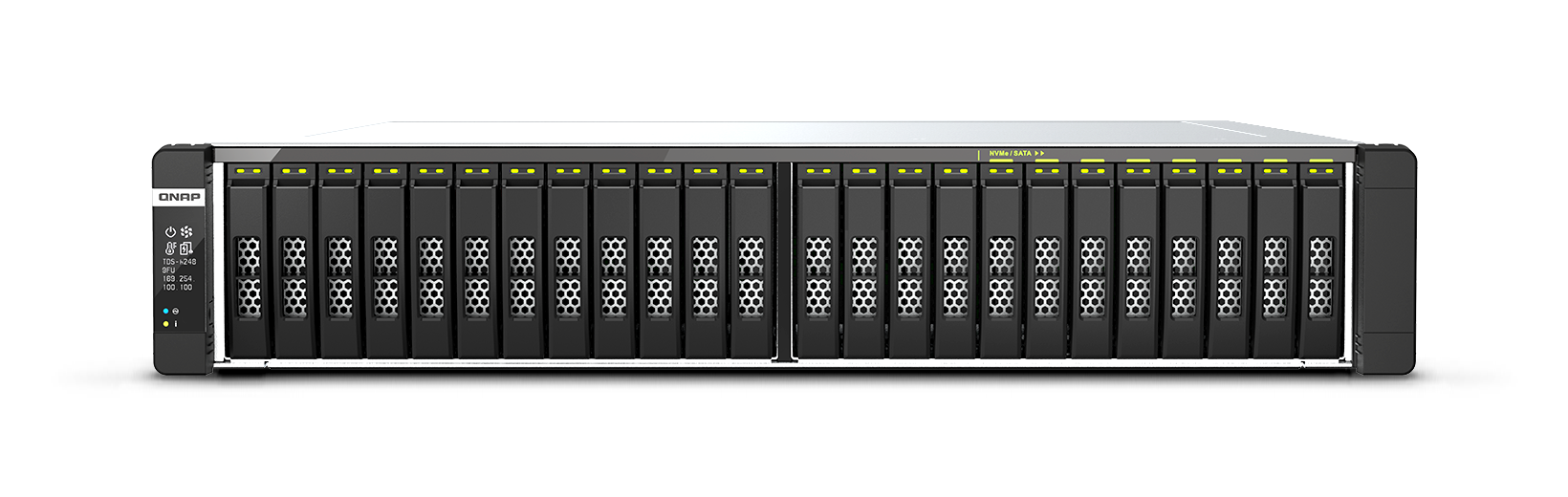
QNAP specifies 24 hot-swap 2.5-inch U.2 positions. Positions 1–16 are U.2 NVMe; positions 17–24 can take U.2 NVMe or 2.5-inch SATA media. A project that requires more than eight SATA trays is therefore a poor match even though the chassis is described as 24-bay. M.2 sockets, where used, are a separate internal layer and do not add front trays. The system is listed without SSDs, and the product guide says the 1 TB configuration is available only by customer request. Neither point establishes a present seller offer or its contents.
Do not buy a generic U.2 drive on the strength of the interface name alone. QNAP refers buyers to its compatibility list, but this research did not verify a complete drive-model, capacity and firmware row for this exact system. The guide also specifies a QDA-UMP4 adapter when installing M.2 media in a U.2 bay. That is a particular installation path, not evidence that every M.2 SSD is approved or that an adapter is included.
The exact 1 TB configuration needs an upgrade caveat
The current QNAP selector lists 1 TB installed and a 1 TB maximum for this selected package. The older English guide instead states a 2 TB platform maximum across the family. Because those official sources conflict, this review uses only the unambiguous installed 1 TB figure; it does not promise a higher upgrade ceiling or recommend memory modules. The selector and guide both identify the dual 16-core/32-thread Xeon Silver 4314 processors, but no workload-specific benchmark or independent test was performed here.
Fast networking has to be built around the rest of the system
QNAP lists four 2.5GbE RJ45 ports and a preinstalled dual-port 25GbE SFP28 adapter. For a minimum expressed as the fastest single built-in port, the 25GbE rating clears a 25Gbps floor; two ports do not add to one 50Gbps interface. The network card occupies PCIe slot 2, leaving a two-slot chassis with a shared-lane note for the remaining slot. Map any planned storage or network card against that layout before procurement. Switches, optics or direct-attach cables, clients and the storage workload all have to support the path; the port label is not a file-transfer guarantee.
Software, mirror planning and recovery
QNAP’s current software selector lists QTS and QuTS hero, while the older TDS-h2489FU guide is specifically written around QuTS hero. Check the exact firmware and supported operating-system path for the unit before designing a production deployment. A QuTS hero RAID 1 plan can use two separately selected compatible drives, but the drives and storage group are not supplied or preconfigured. A healthy two-drive mirror can tolerate one member-drive failure; it does not protect against deletion, malware, a site event or loss of the NAS. Keep an independent backup and a tested restore route.
Rack and procurement checks
The guide describes a 2U chassis, roughly 28 inches deep, at about 21.3 kg net, with two 1200 W supplies. Check the actual cabinet’s usable depth, rear-door and cable clearance, loaded-rail rating, lifting plan, cooling and power feeds. QNAP names RAIL-E03 but says the rail kit is not included. The manual’s maximum-memory conflict and the unverified exact SSD list matter more here than nominal capacity: request the full configuration identifier, firmware/support status, SSD compatibility evidence and written bill of materials before committing this legacy platform to a new deployment.
Who should keep it on a shortlist?
Consider this configuration only when a project genuinely needs a dense U.2-heavy rack NAS, can use the limited eight SATA-capable positions, has a justified use for the 1 TB dual-Xeon platform, and can support 25GbE plus the rack and power requirements. It is not a general 24-drive SATA box, and it should not be chosen from the “TDS-h2489FU” family name alone. For an ordinary SATA array, a current supported model with an exact drive list and an appropriately sized memory configuration is a more straightforward starting point.
Primary references
- QNAP TDS-h2489FU U.S. product page and exact hardware selector
- QNAP software selector
- QNAP TDS-h2489FU User Guide, English-U.S.
- QNAP drive compatibility lookup (check exact model and firmware before buying)
Key specifications
Key details at a glance
| Internal drive bays | 24 bays |
|---|---|
| Documented internal drive media | 2.5-inch U.2 PCIe NVMe SSD / 2.5-inch SATA SSD only in positions 17–24 |
| Built-in Ethernet ports | 4 x 2.5GbE RJ45 / 2 x 25GbE SFP28 via preinstalled dual-port SmartNIC |
| Fastest individual Ethernet port | 25 Gbps |
| Installed system memory | 1024 GB |
| Listed storage arrangements | RAID 1 |
| Dimensions (H × W × D) | {'height': 88.3, 'width': 446.2, 'depth': 713.2} |
| Weight | 21.31 kg |
| Data drives included in listed package | No |
| M.2 NVMe slots | 2 |
| Processor | 2 x Intel Xeon Silver 4314 |
| CPU cores | 32 |
| CPU threads | 64 |
| Installed memory type | DDR4 ECC RDIMM, 32 x 32 GB per exact hardware selector |
Use the exact model’s instructions for operating limits, supplied equipment and version differences.
Sources for this review
Sources for this assessment

Check your setup before choosing a NAS
Use the finder to narrow documented desk/shelf or rack formats, internal-bay minimums, a single Ethernet-port rating and optional redundancy requirements.