
Your needs, this model
Does it fit your priorities?
Does SB2 meet a 20-position, 10GbE and two-drive mirror screen?
At the current exact selector level, it has 16 front 3.5-inch positions plus four rear 2.5-inch SSD-only positions, four 10GbE SFP+ ports and a QTS RAID 1 option. The four rear locations are a special cache area, not ordinary HDD bays; check exact support and drive compatibility.
Explore this need in the finder →Can a hard drive go in one of the four rear positions?
No. QNAP’s exact SB2 specification lists the rear positions for 2.5-inch SATA/SAS solid-state drives only. The 16 front trays are the general SATA/SAS hard-drive positions.
Explore this need in the finder →Are the SB2 and R2 the same model?
No. The observed SB2 is the original legacy platform with two E5-2630 v3 processors and 128 GB RDIMM. Do not transfer the R2’s E5-2600 v4 processors, memory, flash or other fields.
Explore this need in the finder →Scope: original SB2, not an R2
This review addresses the exact observed configuration TDS-16489U-SB2-US, a legacy QNAP rack NAS. It is distinct from the TDS-16489U R2 and from the SB3 package: the SB2 hardware sheet specifies two Xeon E5-2630 v3 processors and 128 GB of DDR4 RDIMM. QNAP labels SB2 EOL. This is a review of current manufacturer documentation about an older platform, not a hands-on test, benchmark or assertion that an exact seller has a complete supported unit.
Sixteen front trays plus four restricted rear positions
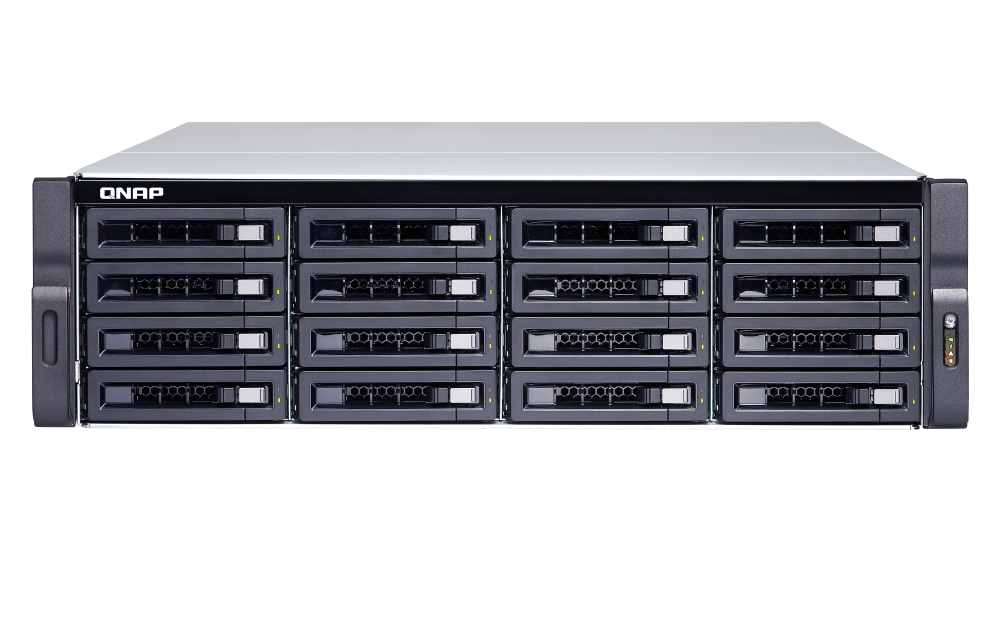
The exact QNAP hardware sheet lists 16 front 3.5-inch bays and four rear 2.5-inch positions. The rear positions support SATA/SAS SSDs only; they should not be treated as four more general-purpose HDD trays. For a count of physical internal drive positions the documented total is 20, but the media split matters: the front bays accept compatible SATA/SAS HDDs and 2.5-inch media, whereas the rear positions are SSD-only. QNAP describes SSD cache acceleration. The older hardware guide instead tabulates sixteen hard-drive slots and four internal cache ports, so the naming differs even though it describes the special rear cache area. The front-and-rear distinction is the useful planning boundary.
QNAP’s User Guide lists RAID 1; a buyer can create a mirror from two compatible drives in the main storage trays. No drive set or configured pool is implied by the product code. An exact drive-and-firmware compatibility row was not verified here; check QNAP’s current list before ordering. A mirror is a single-disk-failure arrangement, not an independent backup or protection against the loss of the chassis or site.
Two CPUs do not make it a dual-controller NAS
The SB2 configuration has two eight-core Xeon E5-2630 v3 processors and 128 GB installed DDR4 RDIMM across the system. This “double server” CPU arrangement is not the same architecture as QNAP’s separate dual-controller ES family. Do not infer independent storage controllers, automatic failover or tested virtualization performance from the processor count. QNAP’s current software page lists QTS; any application, hypervisor, GPU or accelerator plan needs confirmation for the exact system revision and firmware.
QNAP lists 16 memory slots and a 1 TB platform maximum, but a large theoretical ceiling is not a recommendation to upgrade. The unit is EOL, and compatible module type, mix and firmware should be confirmed before buying parts. The current hardware PDF shows a proprietary 10GbE network card in slot 1; an older guide reports a different slot count. Verify the exact board and occupied-slot map before planning add-in cards.
10GbE and the physical installation
The exact SB2 specification lists four built-in 10GbE SFP+ ports, two 1GbE RJ45 ports and separate IPMI management. The fastest single built-in data port is 10Gbps; multiple ports are not one aggregate 40Gbps connection. Plan switch ports, transceivers or DACs, client connectivity and storage workload as one end-to-end path. QNAP’s current exact hardware sheet enumerates five PCIe slots and identifies a preinstalled proprietary 10GbE adapter, while the older guide counts four. Because that difference affects expansion, check the exact hardware revision and documentation before assigning slot space.
At 3U, about 29.3 inches deep and 49.4 pounds net, the chassis needs a proper rack and service plan. QNAP lists redundant, hot-swap 770 W power supplies. Verify cabinet depth, rear access, airflow, loaded rail rating, lifting method, electrical feeds and the exact rail kit. The photograph shows the front chassis, not the four rear SSD positions, installed media or PSU state.
Who should consider this legacy profile?
It belongs in comparisons for a specific legacy environment that needs the SB2’s dual-CPU QTS platform, 16 large front trays, restricted rear SSD cache positions and 10GbE. Before deployment, verify firmware and security-update availability, parts, service, warranty and the written seller bill of materials. QNAP’s Legacy/EOL label does not prove that a used or remaining unit is unavailable or unusable, but it does make the support horizon a first-order procurement check. It is not a generic twenty-drive chassis: storage media, the rear cache role and exact revisions must match the design.
Primary references
- QNAP TDS-16489U U.S. page and exact SB2 hardware specification
- QNAP software selector
- QNAP TDS-16489U Hardware Manual
- QNAP drive compatibility lookup
Key specifications
Key details at a glance
| Internal drive bays | 20 bays |
|---|---|
| Documented internal drive media | Front 16: 3.5-inch SATA/SAS HDD, 2.5-inch SATA/SAS HDD or SSD / Rear 4: 2.5-inch SATA/SAS SSD only |
| Built-in Ethernet ports | 4 x 10GbE SFP+ / 2 x 1GbE RJ45 / IPMI management port |
| Fastest individual Ethernet port | 10 Gbps |
| Installed system memory | 128 GB |
| Maximum listed memory | 1024 GB |
| Listed storage arrangements | RAID 1 / RAID 5 / RAID 6 / RAID 10 / RAID 50 / RAID 60 |
| Data drives included in listed package | No |
| Processor | 2 x Intel Xeon E5-2630 v3 |
| CPU cores | 16 |
| CPU threads | 32 |
| Installed memory type | DDR4 RDIMM, 8 x 16 GB per exact hardware sheet |
Use the exact model’s instructions for operating limits, supplied equipment and version differences.
Sources for this review
Sources for this assessment

Check your setup before choosing a NAS
Use the finder to narrow documented desk/shelf or rack formats, internal-bay minimums, a single Ethernet-port rating and optional redundancy requirements.