
Your needs, this model
Does it fit your priorities?
How many internal positions does this profile provide?
Five E1.S NVMe positions. The M.2 adapter route uses the same positions, not extra bays; this is not a SATA HDD tray system.
Explore this need in the finder →Can one built-in Ethernet interface meet 10Gbps?
Yes. QNAP lists a 10GBASE-T port and a separate 2.5GbE port; neither adding them nor counting Thunderbolt as Ethernet gives one faster Ethernet link. Network components and workload determine actual transfer results.
Explore this need in the finder →Is a supported two-drive mirror possible?
The English-U.S. guide lists RAID 1 for two drives with one-drive failure tolerance. Verify media and create the array yourself; maintain a separate backup. Current-reference status does not guarantee seller stock.
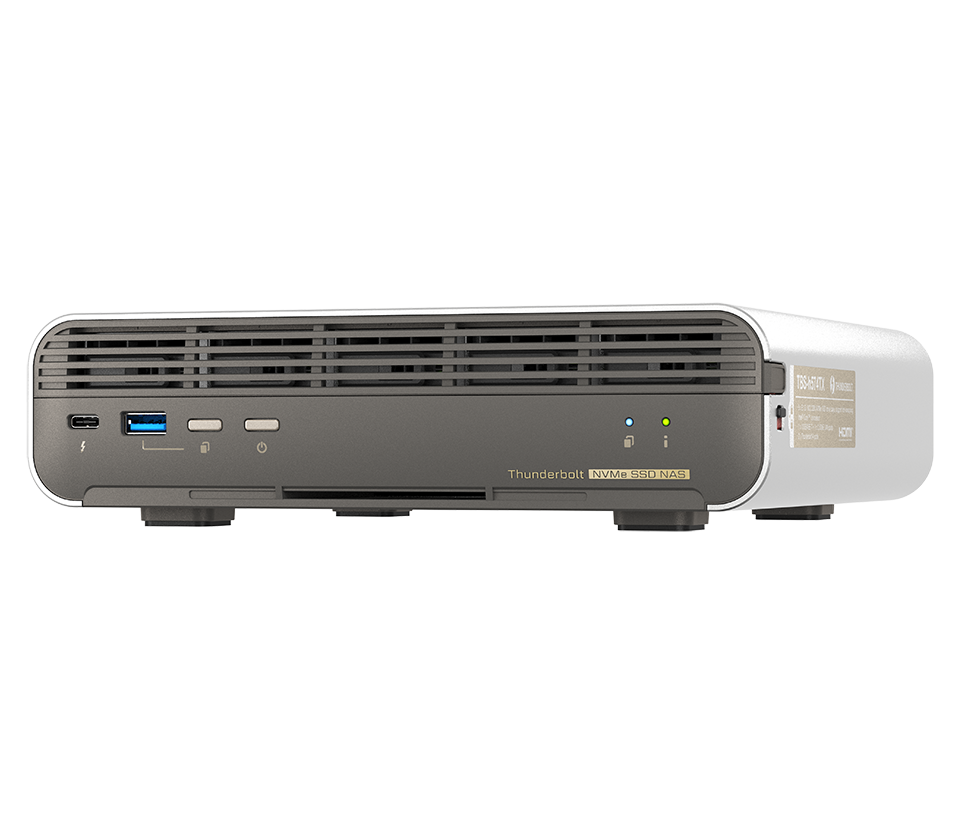
Explore this need in the finder →The TBS-h574TX-i5U-16G-US is QNAP’s current-reference, diskless configuration of a compact all-flash NASbook. The “i5U” part identifies the Core i5-1235U profile; the U.S. Official Store item identifies this exact suffix, while QNAP’s selector and comparison describe its hardware. This is a network-storage appliance with QuTS hero preinstalled, not merely a Thunderbolt dock or a DAS shelf. The matching family image shows the chassis only, so it cannot prove this CPU, memory, SSD contents or a seller’s delivered package.
Five E1.S positions, with an M.2 option
QNAP documents five E1.S NVMe positions using PCIe Gen 3 x2. The bare configuration has QDA-E1SM adapters installed so a supported M.2 2280 PCIe NVMe SSD can be used in a position. The adapter is a format conversion within the existing five slots: M.2 media does not add a sixth bay. The user guide says E1.S media may be up to 15 mm thick and separately specifies M.2 heat-sink clearance; a third-party SSD that physically fits is not automatically a validated drive. Check the exact capacity, model and firmware against QNAP’s current compatibility data. This is not a generic 3.5-inch or 2.5-inch SATA NAS.
Five bays can suit a small editing room or creative team that wants a compact local storage pool and fast direct-attached workflows, but the number alone says nothing about usable capacity. QNAP’s two loaded packages describe raw sums of 9.6 TB or 19.2 TB. This i5U-US configuration is the diskless one, and the usable capacity of any later RAID layout depends on the chosen drives and setup. No disks or initialized pool are included in the standard configuration record. A RAID 1 choice needs two compatible drives, occupies two positions, and is an owner-created setup rather than a promise that a mirror arrives ready. A mirror is not a backup of deleted or encrypted files.
10GbE is one wired link; Thunderbolt is a different path
The selected hardware has one 10GBASE-T port and one separate 2.5GbE port. Ten gigabits per second is the rating of its fastest individual Ethernet port; the second jack is not added to make a single 12.5-Gbps client connection. Practical file transfer also depends on the workstation, switch, cable, protocol, drives, and concurrent workload. The two Thunderbolt 4 ports are data-only. They may fit a direct-connected editing workflow, but should not be mistaken for Ethernet ports or a guaranteed benchmark. Confirm the actual Thunderbolt compatibility and operating-system workflow for the specific workstation before making it a dependency.
The current i5U profile uses a 10-core/12-thread Core i5-1235U and 16 GB of onboard, non-expandable memory. That is a real configuration difference from the two earlier profiles: the legacy i5 uses a Core i5-1340P/PE with 16 GB, while the legacy i3 uses an i3-1320PE with 12 GB. Those model names and published core counts are evidence about the installed configuration, not a reliable substitute for testing a particular editing, transcoding, or virtual-machine workload. QNAP’s product marketing figures are not independent results for this exact package.
Choose the operating system and drives deliberately
QNAP lists QuTS hero as the preinstalled system and says QTS can be installed as an alternative. They use different filesystems, so changing systems is a migration decision rather than a casual toggle; preserve data elsewhere before reinitializing. QNAP’s guide table lists RAID 1 for two drives. The buyer must select compatible media and create the pool; it does not list a prepared volume or data drives in this diskless profile. RAID protects only against some member-drive failures, not mistakes, malware, theft or chassis loss. Plan and test a separate backup.
Body size is a compact 60 × 215 × 199 mm, but still allow room for cabling, cooling and access around the enclosure. QNAP lists a 120 W adapter and standard items such as a power cord, Ethernet cable and quick-start material; verify the seller’s written bill of materials for the exact suffix. No storage drives, optional adapters, network switch, or workstation accessories are inferred here. This profile is a plausible candidate when five all-flash positions, non-expandable 16 GB memory, a single 10GbE port and a Thunderbolt-capable desktop workflow all suit the plan. It is a poor choice if the requirement is inexpensive large SATA disks, expandable memory, or a ready-made redundant array.
Key specifications
Key details at a glance
| Internal drive bays | 5 bays |
|---|---|
| Documented internal drive media | E1.S NVMe SSD / M.2 2280 PCIe NVMe SSD via compatible adapter |
| Built-in Ethernet ports | 1 x 10GBASE-T Ethernet / 1 x 2.5GbE Ethernet / 2 x Thunderbolt 4 data-only |
| Fastest individual Ethernet port | 10 Gbps |
| Installed system memory | 16 GB |
| Listed storage arrangements | RAID 1 (two-drive arrangement; owner chooses media and creates storage) |
| Processor | Intel Core i5-1235U |
| CPU cores | 10 |
| CPU threads | 12 |
| Installed memory type | Onboard, non-expandable |
Use the exact model’s instructions for operating limits, supplied equipment and version differences.
Sources for this review
Sources for this assessment
- QNAP U.S. Tower/SMB grid — TBS-h574TX family card
- QNAP U.S. Official Store SMB Desktop page 3
- TBS-h574TX — QNAP U.S. product page
- TBS-h574TX profiles — QNAP U.S. comparison
- Rendered TBS-h574TX hardware selector observation
- TBS-h574TX User Guide, English U.S., v5 (2025-04-09)
- TBS-h574TX official family chassis image
- QNAP U.S. Official Store item — i5U-16G-US

Check your setup before choosing a NAS
Use the finder to narrow documented desk/shelf or rack formats, internal-bay minimums, a single Ethernet-port rating and optional redundancy requirements.