
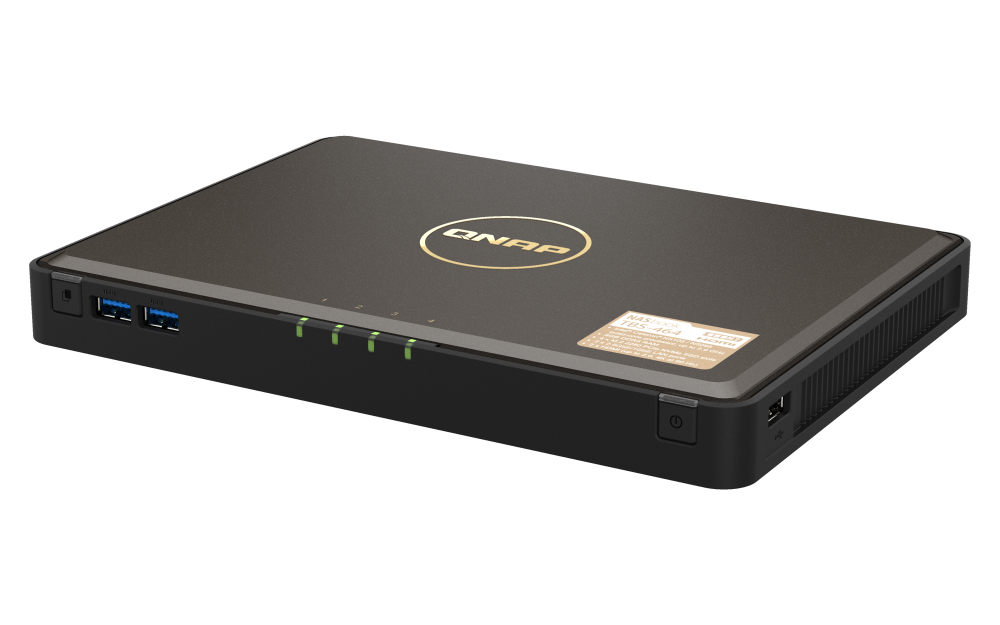
Your needs, this model
Does it fit your priorities?
Do the TBS-464's four M.2 slots count toward an internal-bay minimum?
For this NAS, the four internal 2280 PCIe NVMe positions are its four internal drive positions, so it meets a four-bay floor and falls short of five. They are SSD slots, not SATA trays. QNAP says SSDs are not included; check the exact SSD model and firmware in QNAP's compatibility list and use the specified heatsinks and thermal pads.
Explore this need in the finder →Can two TBS-464 SSDs provide a documented mirror?
Yes, in a buyer-created QTS/EXT4 RAID 1 arrangement using two compatible, separately purchased M.2 NVMe SSDs. The QTS selector lists RAID 1 for four-bay NAS; it does not mean an array arrives configured. A mirror can help with one drive failure but is not an independent backup.
Explore this need in the finder →Does dual 2.5GbE give the TBS-464 a single 5GbE port?
No. The current U.S. selector lists two separate 2.5GbE RJ45 interfaces. QNAP describes an SMB Multichannel arrangement using both, but a network floor for one built-in port should still be treated as 2.5GbE, not 5GbE. Check the full client, switch, cabling, protocol and storage path; no file-transfer result is promised.
Explore this need in the finder →This is a source-based assessment of QNAP's TBS-464-8G profile and the exact U.S. retail name TBS-464-8G-US. I have not owned, installed, measured or tested the appliance. Its unusual proposition is a small NAS built around four internal M.2 NVMe slots instead of conventional SATA trays. That can suit a compact workgroup using compatible SSDs, but it is the wrong starting point if your plan assumes desktop hard drives or interchangeable trays.
Identify the exact profile before comparing it
QNAP's U.S. product selector currently exposes one TBS-464-8G profile, while the Official Store identifies the matching retail item as TBS-464-8G-US. The two records describe one NAS, not separate hardware configurations. Current-reference means that this is the profile on the reviewed U.S. product page; it does not promise stock, price, a particular seller bundle or a support horizon. The TBS-464 should also not be confused with the TS-464. The latter is a tower with native SATA trays and separate M.2 slots; the similar “464” name does not make their storage layouts interchangeable.
One detail remains unsettled at the individual-unit level: the current U.S. overview and hardware selector name an Intel Celeron N5105, but the English-U.S. user guide lists N5105/N5095 for TBS-464-8G. I use the current selector's N5105 profile in this assessment, but do not infer which silicon revision a particular box contains. If that distinction matters to your workload or software plan, confirm it with QNAP for the exact unit before ordering.
Four internal slots, all for M.2 NVMe
The hardware table lists four M.2 2280 NVMe Gen3 x2 positions and explicitly says the system ships without SSDs. These are the NAS's internal drive positions for the bay-count comparison, but they are not four 3.5-inch SATA trays, and the model page does not list SATA drive positions. That difference changes the buying list: someone with spare SATA hard drives cannot simply slide them into this chassis. You need suitable M.2 NVMe SSDs, purchased separately.
QNAP points owners to its compatibility list rather than approving every SSD by size alone. Check the exact drive model, firmware and any relevant capacity restriction before buying a set. The English-U.S. guide also describes installation below the chassis, after powering off and removing the bottom cover. It discusses heatsinks and thermal pads, and the QNAP package panel lists four heatsinks and twelve pads. This is an installation task, not a hot-swap service bay workflow. Its compact form saves shelf space, but adds a small-component and thermal-fit checklist that a SATA-tray NAS does not share.
Capacity choices and the mirror question
Four slots do not tell you how much space will remain after setup. Drive size, filesystem overhead and the chosen array matter. QNAP's model-specific QTS software view lists RAID 1 and EXT4 for the four-bay class. A buyer can therefore plan a two-SSD mirror in two of the four M.2 positions, leaving the other positions for a later plan if the storage design supports it. The product does not arrive with SSDs or an initialized array in the evidence reviewed here; verify both compatible drives and create the pool during setup.
RAID 1 uses the pair to maintain a mirrored copy; it does not make the second SSD a separate backup. It will not undo a mistaken deletion, malware, theft, power damage or loss of the whole NAS. Keep another restorable copy on a separate device or in another location. QNAP's overview also describes QuTS hero as an alternative operating system, but the matching plan here is deliberately the clearly documented default QTS/EXT4 path. Treat an operating-system change as its own configuration decision rather than blending its storage behavior into the QTS plan.
Two 2.5GbE links are not one faster port
The U.S. selector lists two built-in 2.5GbE RJ45 ports. For a requirement that asks for the speed of one built-in Ethernet port, the supported maximum is 2.5Gbps: a 3Gbps individual-port threshold excludes the TBS-464. QNAP discusses SMB Multichannel using both ports, but that is a different network arrangement requiring compatible endpoints and configuration. It does not turn an individual interface into a 5GbE port, and the product-page description is not a transfer guarantee. A switch or router, client NIC, cabling, protocol, SSDs and workload all shape a real path.
There is more than storage connectivity here. QNAP lists two HDMI 2.0 outputs up to 4K at 60Hz, two USB 3.2 Gen 1 ports, three USB 2.0 ports and a one-touch-copy button. Those features can be useful in a desk or meeting-room workflow, but they do not change the storage medium or network-port floor. The hardware table lists fixed 8GB DDR4 with no expansion path; buyers needing more memory should compare another model rather than assuming a future upgrade.
Placement, contents and source conflicts
QNAP describes a set-top chassis and lists dimensions of 1.18 × 9.06 × 6.5 inches (H × W × D). That helps screen a shelf, but leaves room to check cable routing and ventilation at the intended location. It is not a rack appliance. The product page, hardware selector and guide disagree on weight, and the selector's minimum-adapter figure differs from the guide's included-adapter rating. I omit both as settled buying specifications; check the current package and power requirements for the exact item rather than choosing among conflicting numbers.
The strongest fit is a small office or creator workstation where four internal NVMe positions, a compact footprint, QTS and two separate 2.5GbE links matter more than SATA compatibility, memory expansion or a faster single Ethernet port. Before committing, verify the exact TBS-464-8G-US identity, compatible SSD models and firmware, heatsink clearance, the delivered accessory list, the intended QTS or QuTS hero configuration, and the network path. The available sources support a NAS with a four-slot NVMe design; they do not establish an exact SSD bundle, a preconfigured mirror, a measured transfer rate or the unit-level CPU revision.
Key specifications
Key details at a glance
| Internal drive bays | 4 bays |
|---|---|
| Documented internal drive media | M.2 2280 PCIe NVMe Gen3 x2 SSD |
| Built-in Ethernet ports | 2 x built-in 2.5GbE RJ45 |
| Fastest individual Ethernet port | 2.5 Gbps |
| Installed system memory | 8 GB |
| Maximum listed memory | 8 GB |
| Internal file systems | EXT4 (QTS view) |
| USB 3.2 Gen 1 ports | 2 |
| Hardware warranty | 2 years |
| M.2 NVMe slots | 4 |
| Processor | Intel Celeron N5105 (current U.S. selector) |
| CPU cores | 4 |
| CPU threads | 4 |
| Installed memory type | DDR4, non-expandable |
Use the exact model’s instructions for operating limits, supplied equipment and version differences.
Sources for this review
Sources for this assessment
- QNAP U.S. Tower / SMB grid — TBS-464 family row
- QNAP TBS-464 U.S. product page
- QNAP TBS-464 U.S. hardware selector — rendered TBS-464-8G profile
- QNAP TBS-464 U.S. software selector — QTS view
- QNAP TBS-464 U.S. package selector
- QNAP TBS-464 English-U.S. User Guide
- QNAP Official U.S. Store — TBS-464-8G-US identity page
- QNAP Official U.S. Store SMB Desktop category
Check your setup before choosing a NAS
Use the finder to narrow documented desk/shelf or rack formats, internal-bay minimums, a single Ethernet-port rating and optional redundancy requirements.