
Your needs, this model
Does it fit your priorities?
How does the QVP-85B use its eight drive bays?
It has eight native 3.5-inch SATA bays that support the media classes listed by QNAP. A two-drive RAID1 uses two positions; a QVP RAID6 arrangement needs at least four disks and tolerates two member failures. These are buyer-selected layouts, and none replaces a separate backup.
Explore this need in the finder →Does the QVP-85B include 64 camera licenses?
No. QNAP lists eight embedded channels and a maximum of 64; its guide says additional channel licenses can be purchased in the License Center. No camera is listed in the standard package. Validate the supported stream mix and total license requirement for the actual installation.
Explore this need in the finder →Is QVP-85B a general-purpose QTS NAS with extra camera software?
No. QNAP describes QVP as a NAS device dedicated to QVR Pro surveillance and gives it QVP OS with storage, network and file-management utilities. Do not assume QTS/QuTS hero application support for a non-surveillance task; verify that exact service and its recovery path.
Explore this need in the finder →Assessment basis: this is a model-specific review based on QNAP's QVP-85B product page, current hardware specifications and shared QVP-xxB User Guide, plus the U.S. Store listing identity. It is a research assessment, not a hands-on test. The QVP-85B is QNAP's largest of the three observed QVP tower NVRs here, and the software is dedicated to QVR Pro surveillance.
Eight bays and a 64-channel limit
QNAP lists eight 3.5-inch SATA bays and up to 64 IP-camera channels for the QVP-85B. Its guide lists eight embedded channels, with additional channels available through separately purchased licenses. Do not equate the 64-channel maximum with 64 included camera licenses or with a tested full-resolution workload. QNAP also lists a 1,686 Mbps maximum throughput and local display figures at specific H.264 stream settings. Use these manufacturer figures to narrow a design, then validate actual cameras, resolution, frame rate, recording retention and required channel licenses. This assessment has no independent benchmark.
The eight native trays are the largest fixed drive count among the QVP-41C, QVP-63B and QVP-85B. QNAP lists support for 3.5-inch SATA hard drives and 2.5-inch SATA drives in those bays. The unit also has two M.2 2280 PCIe Gen 4 x4 positions, but M.2 devices do not add ordinary SATA capacity. Drives are not included in the standard package list. A buyer should price and verify the exact compatible drives, choose an array layout and estimate usable space after redundancy, formatting and retention needs before relying on a camera-storage budget.
It is still a specialist NAS, not an all-purpose QTS tower
QNAP calls QVP a NAS device dedicated to QVR Pro, and the current product page describes the QVP-85B as a QVR Pro network-surveillance server. The QVP system includes storage, network and file-management tools, but the product is built around video recording, monitoring and camera management. It should not be treated as a drop-in replacement for a QTS/QuTS hero NAS or assumed to run the same application library. If the enclosure is meant to handle home backups, general shared folders, virtual machines or a particular app as well as cameras, check that precise QVP support and the planned restore path first.
The hardware starting point is an Intel Core i5-12400 six-core/12-thread processor and 32GB of DDR4 SODIMM memory. QNAP's guide lists two memory slots and a maximum of 64GB, with a warning to use QNAP modules. That is more memory and more processing headroom on paper than the six-bay QVP-63B's 16GB/Core i3 configuration, but published component specifications do not establish a particular camera count at every setting. QVP-85B has two built-in 2.5GbE ports and one HDMI 1.4b output. Two 2.5GbE ports do not equal a guaranteed 5Gbps single flow, and the local HDMI display has a separate set of published live/playback limits.
Choose the storage layout, not just the bay count
The QVP documentation lists RAID 1, RAID 5, RAID 6 and RAID 10. With eight trays, the buyer can consider a larger RAID group while reserving additional positions for growth or another volume, but no one layout follows automatically from the product name. RAID 5 or RAID 6 trades some raw capacity for parity protection; the QVP guide states RAID 6 requires at least four disks and tolerates two member-drive failures. RAID 1 is also documented for two drives, and that can meet a two-drive-mirror requirement while leaving six bays not yet used. None of these modes replaces a separate backup: an array can be lost through deletion, compromise, site damage or an enclosure failure. Plan an independent copy and test it.
QNAP says the QVP-85B can expand storage with specified TL SATA JBOD units and expansion cards. Those are separate products and require exact compatibility checks; their capacity should not be confused with the eight internal bays. The manual's package list includes power cords, cable, drive screws, M.2 heatsinks, drive tray keys and a quick-install guide, but not data drives. Seller-specific bundles and preconfigured arrays are not established here.
When the larger chassis is justified
The case for the 85B is strongest when an installation genuinely needs the higher channel ceiling and eight internal recording-drive positions, or a larger local storage design without immediately adding a shelf. The QVP-63B supplies six bays and a 36-channel maximum; the four-bay QVP-41C is smaller and lists 24 channels, but it has two HDMI outputs and a current documentation conflict about memory expansion. The 85B's one HDMI output and dedicated QVP software may be a poor fit for a general workstation-style NAS role or a multi-monitor local control room unless the external display setup is planned separately. A higher specification is not a promise of higher real-world camera capacity under every codec, retention or failure condition.
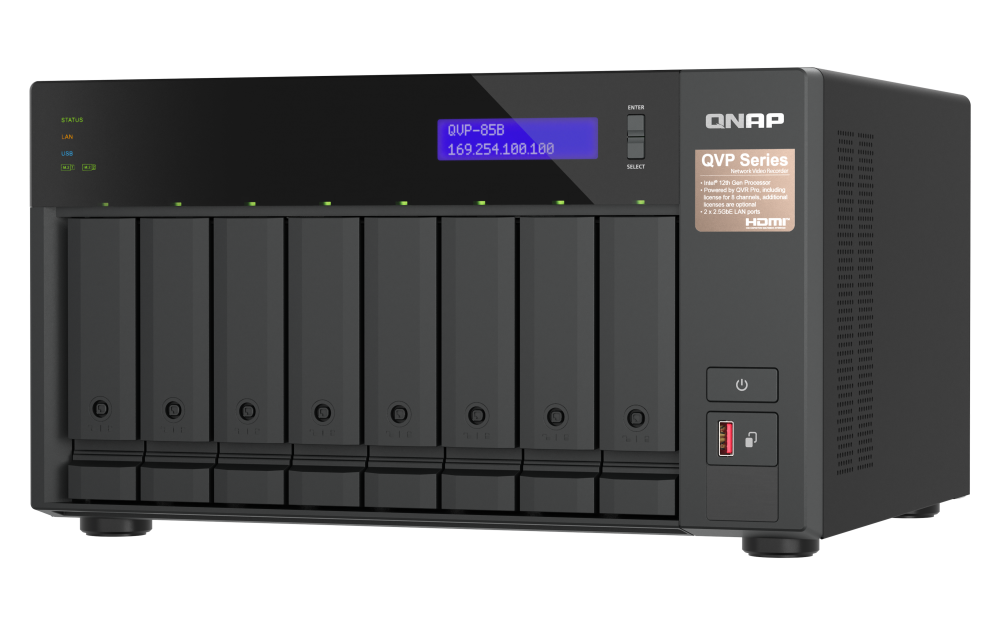
Before ordering, verify camera compatibility and exact channel licensing; compute storage with the target bitrate and retention days; check the supported drive list, power and cooling requirements, network path and independent backup. The official model image shows an eight-tray chassis and front display, not installed media or a prepared array. No price, current availability, seller package additions, tested throughput, noise, power measurement, reliability result or customer account is claimed.
Primary references: QNAP's QVP-85B product page, hardware specifications, the QVP-xxB User Guide, and QNAP's About QVP documentation.
Key specifications
Key details at a glance
| Internal drive bays | 8 bays |
|---|---|
| Documented internal drive media | 3.5-inch SATA hard disk drives / 2.5-inch SATA hard disk drives in the SATA bays / 2.5-inch SATA solid-state drives in the SATA bays |
| Built-in Ethernet ports | 2 x built-in 2.5GbE RJ45 |
| Fastest individual Ethernet port | 2.5 Gbps |
| Installed system memory | 32 GB |
| Listed storage arrangements | RAID 0 / RAID 1 / RAID 5 / RAID 6 / RAID 10 |
| Data drives included in listed package | No |
| M.2 NVMe slots | 2 |
| Listed expansion unit | QNAP-compatible TL SATA JBOD units when supported for the exact model |
| Processor | Intel Core i5-12400 |
| CPU cores | 6 |
| CPU threads | 12 |
| Installed memory type | DDR4 SODIMM, 2 x 16GB preinstalled |
Use the exact model’s instructions for operating limits, supplied equipment and version differences.
Sources for this review
Sources for this assessment

Check your setup before choosing a NAS
Use the finder to narrow documented desk/shelf or rack formats, internal-bay minimums, a single Ethernet-port rating and optional redundancy requirements.