
Your needs, this model
Does it fit your priorities?
Do the QBoat-300's three M.2 slots count toward an internal-bay minimum?
The QBoat-300 has three built-in M.2 2280/22110 PCIe NVMe SSD positions. For an internal-drive-position minimum it meets three and fails four, but those are not conventional SATA trays. Check the exact SSD model, capacity and firmware against QNAP's live compatibility list before choosing the unit.
Explore this need in the finder →Does the QBoat-300's dual Gigabit LAN make one 2-Gbps port?
No. QNAP lists two individual 1GbE ports. The device meets a 1-Gbps single-port floor, but it does not meet 1.5 Gbps for one built-in port; two jacks, link aggregation or redundancy do not turn either physical port into a faster single link.
Explore this need in the finder →Can two QBoat-300 SSDs provide a documented owner-created mirror?
A two-drive QTS RAID 1 plan is supported by combining QNAP's exact-model QTS/three-slot NAS evidence with its current QTS guide, which defines RAID 1 for two disks. The owner must confirm both exact SSD models and firmware, supply/install them and create the pool. The sources do not show an included SSD pair or preconfigured array, and RAID 1 is not a separate backup.
Explore this need in the finder →Does the supplied power adapter cover the full QBoat-300 temperature range?
No. QNAP gives the chassis an operating range of -20 to 70 C, but names the included 48-W adapter as rated only from -10 to 55 C. Above 55 C QNAP requires the optional 96-W adapter. Verify the actual adapter and ask QNAP about operation below -10 C rather than treating the chassis rating as the whole power-system rating.
Explore this need in the finder →The QNAP QBoat-300-US is a compact, fanless NAS for buffering data near industrial equipment. QNAP positions it for Industry 4.0 edge computing, including manufacturing systems, sensors and optical inspection. This is a document-based assessment, not a hands-on test; I did not measure noise, power draw, throughput, temperature or reliability.
A DIN-rail edge node, not a small desktop tower
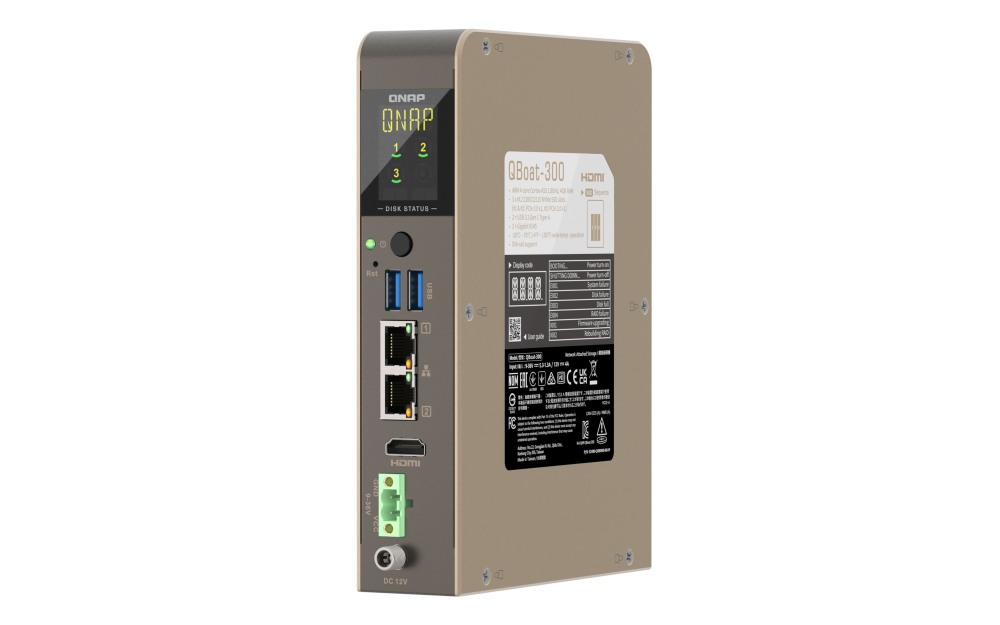
Its standard 35 mm DIN-rail interface, passive metal cooling, status display, two USB 3.2 Gen 1 ports, HDMI and 9–36 V DC terminal block suit a control cabinet where mounting and power are part of the design. QNAP frames it as an edge-data buffer between local equipment and central systems; it is not a consumer NAS in an unusual case.
There is no conventional rack unit or documented SATA tray. QNAP calls the exact QBoat-300 a QTS NAS with three built-in M.2 NVMe positions, so it is not merely a direct-attached USB enclosure. Its target is more specialized than shared folders and household backups. Buyers needing hot-swappable 3.5-inch disks or multi-gigabit home networking should look at conventional NAS models.
Three M.2 positions, with an important bay-count qualification
The three M.2 positions accept 2280 or 22110 PCIe NVMe SSDs: two slots are Gen 3 x1 and one is Gen 2 x1. The site counts them as three internal positions, so the QBoat clears a three-bay floor but misses four. These are not SATA trays; the count does not imply SATA fit or hot-swap service.
Drive selection remains an important check. QNAP's exact-model compatibility route rendered a dynamic shell without named SSD, capacity or firmware rows. That does not prove no SSDs work; it means I cannot certify a specific one. Check the exact model and firmware in QNAP's live tool and verify the final package. The page's barebone description is not treated as a full shipment list.
QTS, owner-created RAID and a separate-backup requirement
The exact-model page says this NAS runs QTS and reports a QNAP-lab configuration using three PCIe SSDs in RAID 5; that is not an independent test or a speed promise. QNAP's generic QTS 5.2 guide defines RAID 1 as two disks with identical copies, one-disk failure tolerance and half the raw capacity. Those sources support an owner-created two-SSD QTS mirror using compatible drives. The product-specific setup guide and U.S. software selector did not load in this research, so confirm the intended setup before buying.
A mirror is not a backup against deletion, malware, theft, unit damage or pool failure. It uses two of three slots and half of the paired capacity. The buyer must verify, install and configure SSDs and keep another restorable copy. No included pair or initialized array is asserted.
Two Gigabit ports do not make one faster port
The two built-in Gigabit Ethernet interfaces are each rated at 1 Gbps. The QBoat meets a 1-Gbps floor for one port, not 1.5 Gbps. QNAP describes network redundancy and link aggregation, but those use separate interfaces; they do not make one 2-Gbps port or guarantee file-copy speed. Peer, switch, cable, storage and workload all shape the path.
Check the complete temperature and power system
The chassis is rated -20 to 70 °C, but QNAP names the included PWR-ADAPTER-48W-01 as rated from -10 to 55 °C ambient; above 55 °C it specifies the optional PWR-ADAPTER-96W-A02. Check the supply in the delivered box and ask QNAP about operation below -10 °C rather than assuming the chassis rating covers the adapter. The regional exact-model table lists 4 GB onboard, non-expandable memory, so review applications and concurrent clients before treating this as a general-purpose server.
Who should shortlist it?
Shortlist it for a fanless, DIN-rail QTS edge NAS where three internal NVMe positions and one 1GbE port are sufficient. The specialized mounting, local status display and wide-voltage input fit the industrial brief. The limits matter just as much: no documented SATA trays, fixed 4 GB memory, unresolved SSD approvals and an adapter range narrower than the chassis rating. The U.S. manual route was not retrievable this cycle; that is not proof no manual exists.
Bottom line: this is an industrial edge NAS, not a general three-bay home file server. Verify SSDs and power supply and plan a separate backup. The exact QNAP Store SKU establishes the QBoat-300-US identity, not stock, price or final package contents.
Primary documents consulted
- QNAP QBoat-300 U.S. product page for the NAS role, QTS, ports, M.2 slots, mounting, ambient range and adapter caveat.
- QNAP's regional exact-model hardware table for corroborating fixed-memory and dimensional fields; regional details are not used to infer U.S. package contents.
- QTS 5.2 RAID types for generic two-disk RAID 1 behavior, not an exact-model drive approval.
Key specifications
Key details at a glance
| Internal drive bays | 3 bays |
|---|---|
| Documented internal drive media | M.2 2280 PCIe NVMe SSD / M.2 22110 PCIe NVMe SSD |
| Built-in Ethernet ports | 2 x built-in 1GbE RJ45 |
| Fastest individual Ethernet port | 1 Gbps |
| Installed system memory | 4 GB |
| Maximum listed memory | 4 GB |
| Internal file systems | EXT4 (QTS) |
| USB 3.2 Gen 1 ports | 2 |
| Weight | 0.87 kg |
| M.2 NVMe slots | 3 |
| Installed memory type | 4 GB onboard, non-expandable |
Use the exact model’s instructions for operating limits, supplied equipment and version differences.
Sources for this review
Sources for this assessment
- QNAP U.S. Tower / SMB grid — QBoat-300 family card
- QBoat-300 U.S. product page | QNAP
- QBoat-300-US exact U.S. Store item | QNAP
- QNAP U.S. NAS Store category — QBoat-300-US item card
- QBoat-300 exact-model hardware specification | QNAP Philippines
- QBoat-300 model-specific compatibility route | QNAP
- RAID types | QTS 5.2.x User Guide | QNAP
- Creating a storage pool | QTS 5.2.x User Guide | QNAP
- QBoat-300 U.S. product image | QNAP

Check your setup before choosing a NAS
Use the finder to narrow documented desk/shelf or rack formats, internal-bay minimums, a single Ethernet-port rating and optional redundancy requirements.