
Your needs, this model
Does it fit your priorities?
Does the QAI-16700 meet a 16-position, 10GbE and required two-drive mirror screen?
Yes as a documented capability screen: the one QAI-16700-R9-32G hardware profile has sixteen internal positions (twelve SATA plus four separate U.2 NVMe), built-in 10GBASE-T ports and a QuTS hero RAID 1 plan that the owner can configure using two selected, compatibility-checked SATA HDDs. The exact purchase-page drive/GPU contents and exact drive firmware remain checks; the mirror is not a backup.
Explore this need in the finder →Are all sixteen front positions the same kind of drive bay?
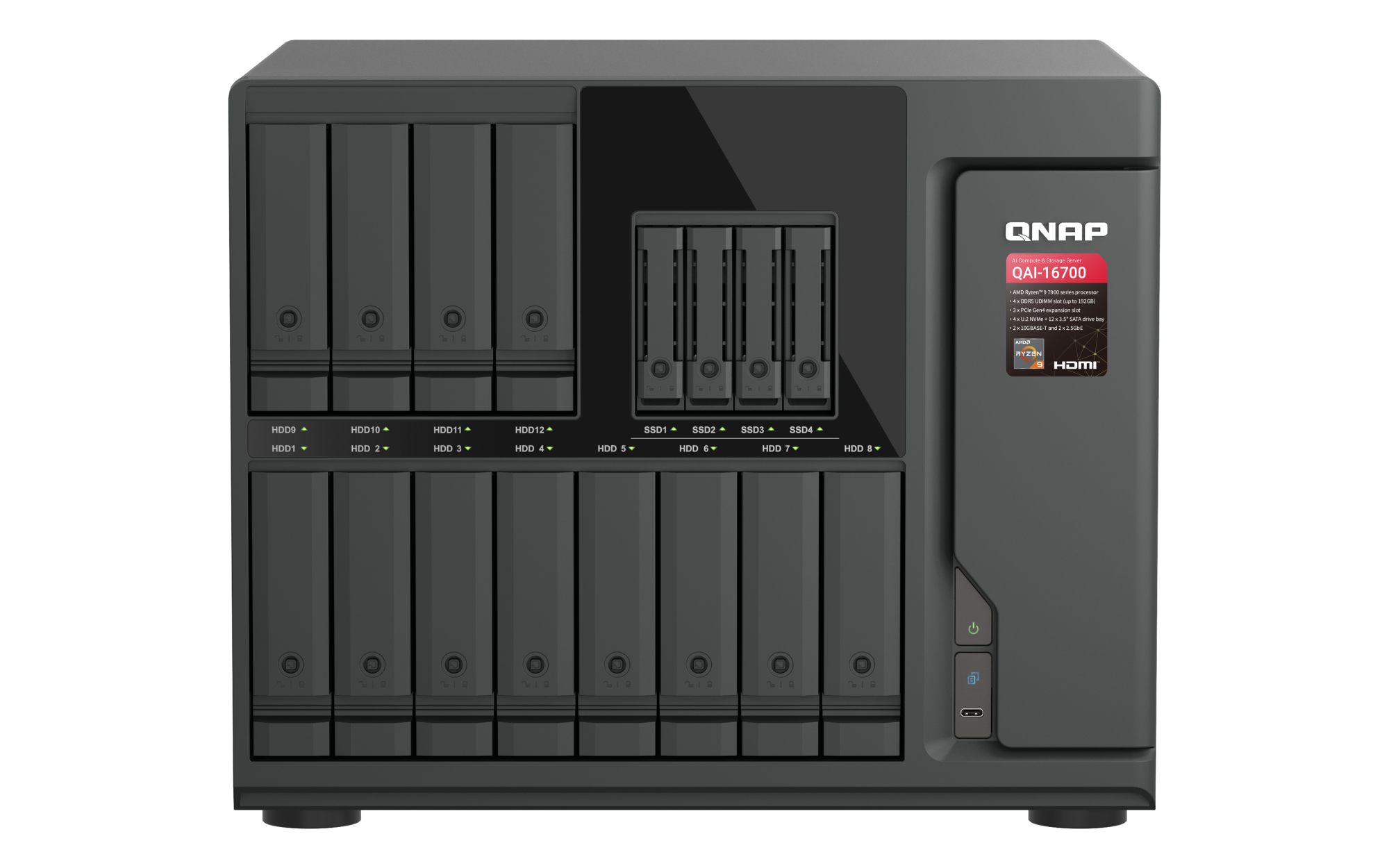
No. QNAP lists twelve SATA positions that accept 3.5-inch SATA HDDs or 2.5-inch SATA SSDs, plus four smaller U.2 positions for PCIe Gen4/Gen5 U.2 NVMe SSDs. Those four are not extra SATA HDD trays. Verify each full drive model, capacity and firmware on QNAP's live QAI-16700 compatibility list.
Explore this need in the finder →Does the manufacturer's AI demonstration prove a 70B/120B workload will perform as shown for my setup?
No. QNAP publishes a local AI story and performance figures using a specified NVIDIA accelerator, but this review is not an independent LLM benchmark. The public selector lists AMD Radeon Graphics without naming an installed discrete GPU, while the product page says the QAI-16700 ships with the NVIDIA RTX PRO 6000 Blackwell Max-Q 96 GB. Confirm the exact GPU in the current order document, its model-specific compatibility, required power and cooling, operating-system and application versions, and expected workload before budgeting around the demo.
Explore this need in the finder →Can two 10GbE ports deliver 20Gb/s to one workstation?
The hardware selector lists two built-in 10GBASE-T links, but each is a single 10GbE port and the combined nameplate is not one client's measured throughput. Switch/router, peer NIC, link aggregation configuration, cable, protocol, disk layout and workload all affect transfer speed; optional 25GbE is a separate adapter, not a built-in port.
Explore this need in the finder →Does the QAI-16700 ship with a configured RAID 1 or known data-drive package?
No factory mirror is established in the sources reviewed. QNAP's QuTS hero guide has the owner select a RAID type and disks when creating a storage pool, and it warns that selected-disk data is erased. Exact QAI package contents were not retrieved, so confirm whether the specific order includes data drives before planning the initial setup.
Explore this need in the finder →The QNAP QAI-16700-R9-32G-US is an unusually specialized tower NAS: it combines a sixteen-position hybrid storage layout, virtualization features and a local-GPU computing story in one large chassis. The reviewed identity comes from QNAP's rendered QAI-16700-R9-32G selector and the exact U.S. Store title/SKU; those sources point to one profile, not several hardware variants. This is a document-based assessment, not a hands-on test, and the captured Store page showed an out-of-stock status on the check date. That status can change and is not a price or availability promise.
Sixteen positions, but two different storage paths
QNAP's exact-model selector divides the sixteen native positions into twelve 3.5-inch SATA bays and four 2.5-inch U.2 NVMe positions. The twelve larger positions list SATA hard drives or 2.5-inch SATA SSDs; the four U.2 positions are a separate PCIe Gen4 x2 path for U.2 NVMe SSDs, with QNAP specifying Gen4 or Gen5 devices. Do not count the four small positions as ordinary SATA HDD bays, and do not assume a drive that fits physically is approved for this model. The model-filtered compatibility entry point is the place to check full part numbers, capacities and firmware; no exact drive-and-firmware row was captured for this review.
There is also an operational nuance for the U.2 positions: QNAP says an SSD intended for hot-swap after startup must be installed before the system is powered on. The captured selector does not establish that this instruction applies to the SATA trays, so I would not generalize it. Confirm the exact installation and replacement workflow in a QAI-16700-specific guide before planning maintenance. The filtered Download Center view inspected here did not expose such a guide, but that observation and a failed raw request do not prove that no manual exists.
10GbE is a port rating, not a file-copy forecast
The hardware selector lists two built-in 10GBASE-T ports plus two 2.5GbE ports. That gives the NAS a documented fastest built-in individual link of 10 Gbps: it meets a 10-Gbps port-rating requirement but not a 10.5-Gbps minimum. QNAP also advertises optional 25GbE adapter support, which is an expansion purchase rather than a native port. The two 10GbE sockets do not automatically become one 20-Gbps workstation link, and none of these labels predicts application throughput. The switch or direct link, client NIC, cable, protocol, drive layout and workload still shape the result.
Expansion planning deserves more than a glance at the slot count. The selector lists three PCIe slots, but says slot 1 operates at x8 only when slot 2 is unused; with slot 2 populated it operates at x4. A proposed accelerator, storage adapter or faster network card therefore needs model-specific slot, power, physical-clearance and coexistence checks. QNAP lists two USB 2.0 ports, two USB-C 10-Gbps ports and HDMI 1.4b up to 4K at 30 Hz, but those I/O features do not demonstrate compatibility with any particular camera, display or workload.
AI positioning and an important GPU ambiguity
QNAP's U.S. product page promotes local AI and publishes a lab scenario using an NVIDIA RTX PRO 6000 Blackwell Max-Q with 96 GB of graphics memory; its benchmark notes describe a 70B-to-120B class scenario. The page says the QAI-16700 ships with the same GPU in that scenario. However, the exact rendered hardware selector's graphics row says “AMD Radeon Graphics” and does not identify an installed discrete NVIDIA card. The official Store SKU confirms the R9-32G product identity but does not resolve what GPU is physically included in a particular order. I therefore treat the discrete GPU as an order-document question, not a verified package fact or a reason to expect the published results. Confirm the exact GPU part number, included-or-optional status, power and cooling requirements, supported software versions and model-specific compatibility before budgeting for a local inference workload. No independent AI or virtualization benchmark was performed here.
QuTS hero and a mirror require owner setup
QNAP presents this system as a QuTS hero NAS, and the current QuTS hero h5.3 guide documents RAID 1 as a two-disk mirrored layout. A plausible plan is to select two compatible SATA HDDs from the twelve larger positions, choose RAID 1 in QuTS hero and create a storage pool. QNAP's pool workflow has the owner choose a RAID type and disks and warns that data on selected disks will be erased. This supports a configurable mirror, not a factory-configured array; exact QAI package contents were not retrieved, so verify whether a particular order includes any data drives. The mirror uses capacity for duplication and helps with a covered member-drive failure, but it is not a second backup. Keep another copy on separate storage or an appropriate remote target and test restoring it.
The selector lists one 32 GB DDR5 UDIMM profile, four memory slots and a 192 GB maximum using four 48 GB modules, with optional ECC support. QNAP identifies the processor on its U.S. page as a Ryzen 9 7900; the selector labels it Ryzen 9 7000-series and gives 12 cores, 24 threads and up to 5.4 GHz. These are manufacturer specifications, not application results. If the system is a virtualization host, choose the memory capacity, ECC configuration, storage pool and network path around the intended virtual machines rather than assuming the base profile will suit an unspecified load.
Placement, power and the purchase checks that matter
This is a large, heavy tower: the selector gives 294.3 × 369.9 × 319.8 mm (H × W × D), 10.98 kg net, a 750 W power supply, three 80 mm system fans and two 60 mm CPU fans. It lists a five-year standard warranty. Those figures do not state actual power draw, noise or required service clearance. Measure the shelf and allow room for cables, intake/exhaust airflow, drive replacement and any discrete card; do not treat chassis dimensions as installation clearance. The 750 W rating is not a prediction of consumption.
Before choosing this configuration, reconcile the GPU wording against a current exact-order document; verify every intended SATA and U.2 drive part and firmware on QNAP's live compatibility list; obtain the QAI-specific installation and replacement instructions; and decide whether QuTS hero and a two-drive mirror fit the capacity, maintenance and separate-backup plan. Map the 10GbE path all the way to the client. Check which PCIe slot and power connections an accelerator or NIC would occupy, and confirm the exact warranty and seller package. The QAI-16700 can make sense on paper for a specialist team that genuinely needs this unusual combination of NAS storage and local compute. For a conventional shared-folder or backup job, the GPU-oriented complexity, large chassis and unresolved exact package details are substantial reasons to compare simpler NAS options instead.
Key specifications
Key details at a glance
| Internal drive bays | 16 bays |
|---|---|
| Documented internal drive media | 3.5-inch SATA hard disk drive / 2.5-inch SATA solid-state drive in a 3.5-inch bay / 2.5-inch U.2 NVMe PCIe Gen4 or Gen5 SSD |
| Built-in Ethernet ports | 2 x 10GBASE-T RJ45 / 2 x 2.5GbE RJ45 |
| Fastest individual Ethernet port | 10 Gbps |
| Installed system memory | 32 GB |
| Maximum listed memory | 192 GB |
| Listed storage arrangements | RAID 1 (owner-configured with two selected disks) |
| Internal file systems | ZFS (QuTS hero) |
| Hardware warranty | 5 years |
| Processor | AMD Ryzen 9 7900 (QNAP hardware selector: Ryzen 9 7000-series) |
| CPU cores | 12 |
| CPU threads | 24 |
| Installed memory type | DDR5 UDIMM |
Use the exact model’s instructions for operating limits, supplied equipment and version differences.
Sources for this review
Sources for this assessment
- QNAP U.S. QAI-16700 product page
- QNAP QAI-16700 hardware selector, one rendered configuration
- QNAP Official U.S. Store QAI-16700-R9-32G-US product page
- QuTS hero h5.3 User Guide: RAID types
- QuTS hero h5.3 User Guide: creating a storage pool
- QNAP U.S. model-filtered compatibility-list entry point
- QNAP U.S. Download Center query for QAI-16700
- QNAP official QAI-16700 front product rendering

Check your setup before choosing a NAS
Use the finder to narrow documented desk/shelf or rack formats, internal-bay minimums, a single Ethernet-port rating and optional redundancy requirements.