
Your needs, this model
Does it fit your priorities?
How many native drive bays does the HS-264 have, and should its HDMI or USB connections count as storage positions?
QNAP lists two internal 3.5-inch SATA bays. The model has HDMI and USB ports for display/peripheral uses, not extra drive positions, and its hardware table lists no onboard M.2 bays. The U.S. base package ships without data drives; check the exact SATA drive model and capacity in QNAP's live HS-264 compatibility list before ordering.
Explore this need in the finder →Does the HS-264 meet a 2.5GbE port requirement, and do its two ports guarantee 5Gbps to one client?
The HS-264 has two built-in 2.5GbE RJ45 ports, so one port meets a 2.5GbE link-rating screen. QNAP describes up to 5Gbps with port trunking, but that is an aggregate configuration figure, not the rating of one port or proof of a 5Gbps transfer to one client. The switch/router, wired client adapter, cables, disks and workload still determine the complete path.
Explore this need in the finder →Can the same HS-264 arrangement meet two bays, a 2.5GbE port and a required two-drive mirror?
Yes. The default QTS plan can use both native SATA positions for two compatible drives in RAID 1, while the chassis provides a built-in 2.5GbE port. The reviewed U.S. package is diskless, so the mirror must be populated and created; it protects against one member-drive failure while healthy but does not replace a separate backup.
Explore this need in the finder →Is a fanless HS-264 guaranteed silent beside a television, and is a remote included?
QNAP describes the enclosure as fanless and set-top shaped, but a populated HDD adds its own sound and vibration. The product page recommends 5400-RPM or low-noise/low-temperature NAS drives to limit heat and vibration. QNAP lists an IR sensor and names RM-IR004 as an accessory; its guide's package-contents table does not list a remote control, so confirm exact offer contents if infrared operation matters.
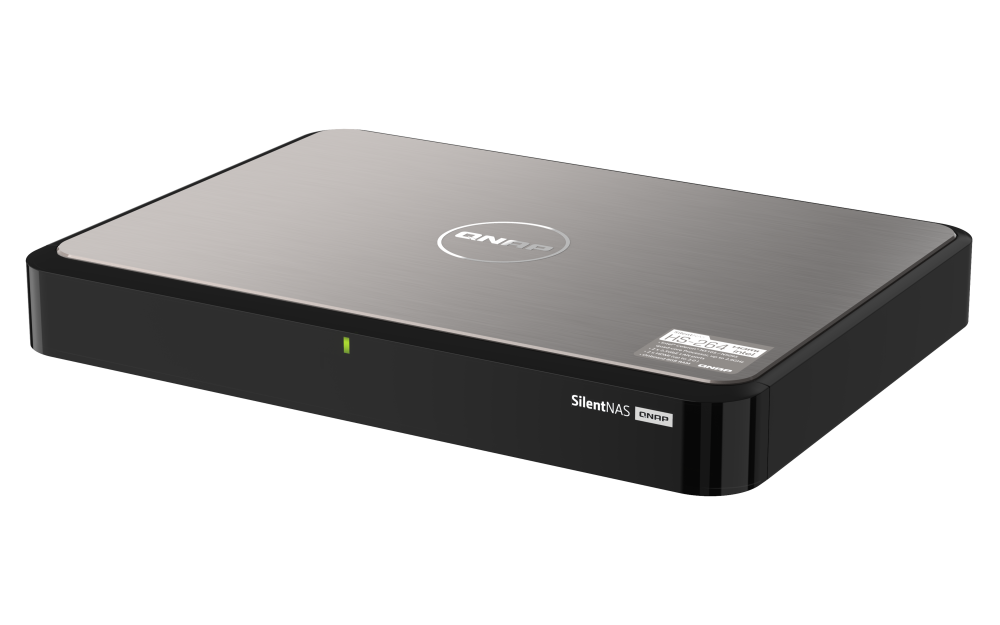
Explore this need in the finder →The QNAP HS-264-8G-US is a two-bay network storage appliance dressed like a small set-top box. Its unusual selling point is not extra storage expansion, but a fanless chassis, dual HDMI 2.0 outputs and two built-in 2.5GbE ports. That makes it a model to examine when a living-room display and a wired file-sharing role belong in the same plan. This is a documentation-based assessment of QNAP's exact model and U.S. package references, not a hands-on test; the official product page describes the HS-264 as a multimedia NAS, while the exact U.S. store route returned a sold-out page when checked.
Two native SATA bays, with a drive-fit check still required
QNAP lists two 3.5-inch SATA bays, ships the base package without data drives, and names 3.5-inch SATA hard disks and 2.5-inch SATA SSDs in its detailed media table. The product overview also describes 3.5/2.5-inch SATA bays, but the narrower hardware compatibility list does not establish support for every 2.5-inch hard drive. Do not buy by the connector label alone: check the complete model code, capacity and current HS-264 entry in QNAP's drive compatibility tool. A mirror requires two individually compatible disks and uses both of the model's native positions; a two-bay number is not a capacity estimate.
At default settings, the HS-264 runs QTS and QNAP lists a two-drive RAID 1 option. A healthy mirror can keep the volume available after one member drive fails, but it does not recover a deleted file, undo ransomware, or replace a separate copy. QTS file services include SMB/CIFS and NFS, so local clients can access the NAS over a wired network even when the chassis is also connected to a television. The base package is diskless, so the buyer must budget for and install the drives rather than assume an out-of-box mirror.
A quiet design does not make the disks silent
QNAP calls the HS-264 fanless and describes its low-vibration, set-top design. That can be useful in a shared room where a conventional fan noise is unwelcome, but the installed disks remain mechanical devices: their seeks and vibration still matter, and a hot drive can raise the enclosure's temperature. QNAP recommends 5400-RPM or low-temperature/low-noise NAS drives to reduce heat and vibration. Its user guide also says not to obstruct ventilation. Check the cabinet dimensions, power-adapter position, cable clearance, tray access and airflow instead of treating “fanless” as permission to tuck it into a sealed space.
The product page describes HDMI 2.0 output up to 4K at 60 Hz and a home-theater workflow through QNAP's HybridDesk Station. Its processor also supports hardware-assisted H.264 video work according to QNAP, but playback quality depends on format, software, system load and available bandwidth. HDMI is a direct display connection; it does not replace the NAS's network services. QNAP lists an IR sensor and names RM-IR004 as an accessory, while the model guide's package list does not include a remote. If couch control matters, confirm whether the exact offer includes one instead of assuming it comes in the box.
Two 2.5GbE ports, not a guaranteed 5Gbps file copy
Each of the two built-in RJ45 interfaces is rated up to 2.5GbE. QNAP describes an aggregate figure of up to 5Gbps when port trunking is configured, but that does not change a single port's negotiated rate or prove that one client will transfer at 5Gbps. A compatible switch or router, client adapter, cabling, storage workload and selected network mode all matter. If a single workstation is the priority, evaluate the whole path and model-specific performance evidence, not the sum printed beside two ports.
The HS-264 is comparatively constrained as an upgrade platform: QNAP's detailed hardware specification says its 8 GB DDR4 memory is not expandable, and the model page lists no onboard M.2 positions or PCIe expansion slot. The two SATA trays therefore remain its native internal drive positions. The 8 GB configuration meets QNAP's published baseline for optional QuTS hero, but that OS's inline-deduplication threshold is 16 GB and QNAP recommends 32 GB for optimal performance. This fixed-memory model cannot reach those levels. QTS is the default; the optional QuTS hero/ZFS route is a separate operating-system choice, and QNAP says switching requires a backup and disk removal. Make that decision before populating it, not as a casual toggle after setup.
Who should shortlist it—and who should compare another NAS?
Consider the HS-264 if a two-bay file server, multigigabit wired ports, a fanless enclosure and direct HDMI output form one coherent home setup. It can host two supported drives in a documented QTS mirror, stream files to other clients, and connect directly to a display. Its main compromises are fixed 8 GB RAM, no listed internal M.2 or PCIe expansion, two bays total, no data drives in the base package, and a drive-media list that should be checked against the exact SKU. A RAID 1 mirror consumes both trays and is still not a second backup location.
Compare it closely with QNAP's TS-264-8G-US if storage flexibility matters more than fanless placement. The TS-264 is also a two-bay, dual-2.5GbE NAS, but its reviewed configuration lists separate M.2 positions and PCIe expansion; its own memory documentation conflict is a separate model-specific question. The HS-264's appeal is its set-top/fanless construction and fixed multimedia I/O, not a larger storage ceiling. Also compare the HS-264's exact 3.5-inch HDD / 2.5-inch SSD list with your planned drive, and check network hardware before paying for a faster link.
For this U.S. model, QNAP's product page and v4 user guide are the useful references for ports, installation and package contents; the live compatibility list is the next step for a specific drive. The direct U.S. store route showed a sold-out/404 response on the review date, so this assessment makes no claim about current retail stock, seller price or offer contents. Check the exact HS-264-8G-US suffix, drives, optional remote and any other bundle items on the seller's own page. The site's registered BuyerShortlists purchase details are an assessment path, not a compatibility certificate or guarantee of availability.
Primary references
- QNAP HS-264 U.S. product page for the default/optional operating systems, fanless design, HDMI capabilities, video caveats and drive-noise recommendation.
- QNAP HS-264 hardware specifications for bays, media, CPU, memory, network, physical dimensions, adapter and warranty.
- QNAP HS-264 User Guide v4 for package contents, installation and RAID recovery details.
- QNAP HS-264 software specifications and the QTS RAID reference for file-service and two-bay RAID options.
- QNAP Drive Compatibility List for the exact drive and capacity check that this review does not perform on a particular disk SKU.
Key specifications
Key details at a glance
| Internal drive bays | 2 bays |
|---|---|
| Documented internal drive media | 3.5-inch SATA HDD / 2.5-inch SATA SSD |
| Built-in Ethernet ports | 2 x built-in 2.5GbE RJ45 |
| Fastest individual Ethernet port | 2.5 Gbps |
| Installed system memory | 8 GB |
| Maximum listed memory | 8 GB |
| Listed storage arrangements | QTS: RAID 1 / QuTS hero: RAID 1 |
| Internal file systems | EXT4 (QTS, default) / ZFS (QuTS hero, optional alternative OS) |
| Dimensions (H × W × D) | 39 × 302 × 220 |
| Weight | 2.06 kg |
| Hardware warranty | 2 years |
| Data drives included in listed package | No |
| System drives included (not data-bay drives) | |
| M.2 NVMe slots | 0 |
| Processor | Intel Celeron N5105 |
| CPU cores | 4 |
| CPU threads | 4 |
| Installed memory type | 8 GB DDR4, not expandable |
Use the exact model’s instructions for operating limits, supplied equipment and version differences.
Sources for this review
Sources for this assessment
- QNAP U.S. Creators & Home Users catalogue observation
- QNAP U.S. Tower / SMB product grid
- QNAP U.S. HS-264 model page
- QNAP U.S. Official Store HS-264-8G-US listing and exact offer route
- QNAP HS-264 U.S. hardware specifications
- QNAP HS-264 English U.S. User Guide, version 4, 2024-04-22
- QNAP HS-264 U.S. software specifications
- QNAP QTS 5.2 RAID types
- QNAP QuTS hero h5.2 RAID types
- QNAP Drive Compatibility List
- QNAP U.S. Product Support Status page
Check your setup before choosing a NAS
Use the finder to check bay count, the network link you need, and whether a documented two-drive redundant arrangement is essential.