
Your needs, this model
Does it fit your priorities?
Does the FS6806X meet a six-position internal-storage minimum?
Yes, if the question is about physical internal storage positions: ASUSTOR lists six M.2 2280 NVMe slots, and the U.S. comparison does not list SATA drive bays. It is not a six-tray HDD NAS. The manufacturer specification's generic 108-TB figure is calculated from six 18-TB HDDs, so it is not used here as an SSD capacity limit.
Explore this need in the finder →Does one built-in FS6806X Ethernet port meet a 10-Gbps floor?
The U.S. comparison lists one individual 10-Gigabit port, so it meets a 10-Gbps link-rating minimum and not a 10.5-Gbps minimum. The two USB4 ports are not Ethernet ports, and the 10-Gbps rating is not a measured file-copy speed or guarantee for the rest of the network path.
Explore this need in the finder →Can two FS6806X SSD positions form a redundant setup while meeting a six-bay, 10-GbE screen?
The exact selector lists M.2 Volume and RAID 1, so two buyer-selected, compatible M.2 NVMe SSDs could form a possible owner-created mirror. This arrangement uses two of the six M.2 positions and one built-in 10-GbE port, leaving four positions open. The package lists no data SSDs or initialized array; check exact model/firmware compatibility, back up before initialization because it erases data on installed SSDs, and keep a separate backup because RAID 1 is not a backup.
Explore this need in the finder →ASUSTOR · documentation-based model assessment · U.S.-scope manufacturer reference
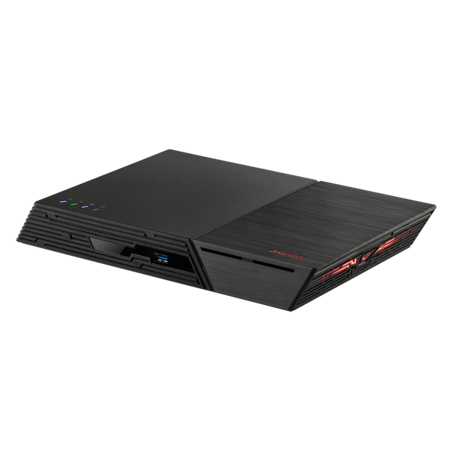
The FLASHSTOR 6 Gen2 (FS6806X) is a compact NAS for a particular kind of storage plan: six internal M.2 NVMe positions, one built-in 10-Gigabit Ethernet port, and two USB4 Type-C ports. Those are useful capabilities on paper, but they do not make this a six-tray hard-drive enclosure. This review is based on ASUSTOR's product, hardware, U.S. comparison, package and installation documents; the device was not purchased, installed or tested for this assessment.
Six M.2 positions are not six SATA bays
ASUSTOR's exact model specification identifies six M.2 slots for 2280 NVMe SSDs. Its 2026 U.S.-English product comparison lists six PCIe NVMe 2280 positions, says they support PCIe 4.0, and leaves the ordinary drive-bay and expansion rows blank. For the site's physical-position count, this is a six-position system, but all six positions are M.2 NVMe; there are no listed 2.5-inch or 3.5-inch SATA trays. If your plan depends on a collection of HDDs or conventional SATA SSDs, the drive interface is the wrong fit even though the simple bay count reads “six.”
The hardware selector describes the M.2 interface distribution as one PCIe 4.0 x4 connection, three x2, and two x1. It does not map those widths to numbered slots in the evidence used here, so do not assume that every SSD receives a four-lane link. The same selector includes a generic 108-TB calculation explicitly based on six 18-TB HDDs. Because the comparison shows six M.2 positions and no ordinary SATA bays, that HDD arithmetic is not treated as an FS6806X NVMe capacity limit. Exact compatible SSD model, capacity and firmware combinations still need to be checked; no maximum usable M.2 volume is asserted here.
One 10GbE link and fast USB do different jobs
The U.S. comparison and model selector list one built-in 10-Gigabit Ethernet port. That meets a 10-Gbps minimum for one individual port, but not a 10.5-Gbps minimum, and it is a link rating rather than a file-transfer result. A 10GbE client adapter, switch or direct connection, suitable cabling, SSDs, storage layout, file sizes and concurrent traffic all affect the path. The product page also lists 802.3ad and other link aggregation modes, but the comparison lists only one built-in Ethernet port, so link aggregation is not a way to turn this chassis into two native 10GbE interfaces.
Two USB4 Type-C ports are a separate feature: ASUSTOR specifies up to 40 Gbps per port and 20 Gbps per channel, and the exact page says host-to-host connectivity is not supported. The U.S. comparison also lists three USB 3.2 Gen 2 10-Gbps Type-A ports, two at the front and one at the rear. These external ports do not add internal M.2 positions or increase the Ethernet link rating. The model comparison lists no display output, so buyers looking for an HDMI-connected NAS media box should not infer one from the USB-C sockets.
CPU, RAM and ECC are worth reading literally
The exact selector lists a quad-core AMD Ryzen Embedded V3C14 at 2.3 GHz with burst up to 3.8 GHz, 8 GB of DDR5-4800 SO-DIMM memory installed, two memory slots and a 64-GB maximum. These are component specifications, not a test of virtual machines, file-serving throughput, video processing or any particular application. The U.S. comparison describes the installed memory as non-ECC while noting that ECC memory is supported. The hardware selector adds an important condition: ECC functionality is disabled if a non-ECC module remains installed or if ECC and non-ECC modules are mixed. So “ECC supported” is not the same as an ECC-enabled factory configuration; verify the memory compatibility list and replace or match modules appropriately before relying on ECC.
ASUSTOR lists a 90-W adapter, 17.9-W operation figure, 1.2-W sleep figure, 18.6-dB noise figure, and a 48.3 × 308.26 × 193-mm chassis weighing 1.4 kg. These are published reference values, not measurements made for this review. The internal SSD choice, cooling, workload, settings and room affect real power and noise. Leave room for airflow, the external adapter and cable bends; the chassis dimensions are not an installation-clearance recommendation.
Plan the mirror and the package yourself
The exact software selector lists M.2 Volume and RAID 1, among other volume types. That supports a possible owner-created mirror using two compatible buyer-selected SSDs, leaving four of six slots open. It does not establish that a compatible pair is included or that an array is created before delivery. The base package lists the FS6806X, a Quick Installation Guide, one AC power cord, one adapter, one Cat 6a 10GbE cable and a cord tie; it lists no data SSDs or initialized volume. Optional SSD heatsinks are sold separately. The QIG warns that initializing the NAS or creating a volume deletes data already stored on installed M.2 SSDs, so back up any reused drives before setup. A mirror can help with one drive failure, but it is not protection from accidental deletion, malware, theft or a site-level loss; keep a separate, recoverable backup.
Which Flashstor should you compare?
The first-generation FLASHSTOR 6 (FS6706T) is not interchangeable with this model by name alone: the U.S. comparison gives it two individual 2.5-GbE ports, while FS6806X has one 10GbE port and moves to PCIe 4.0 M.2 storage and USB4. The larger FLASHSTOR 12 Pro Gen2 (FS6812X) is another chassis, with twelve M.2 positions and two 10GbE ports in that same comparison; the exact model code matters. ASUSTOR's support table lists FS6806X as Generally Available with software and technical support Supported and a three-year entry, but this is manufacturer lifecycle information, not proof of stock, price, seller additions or a U.S. channel warranty. Confirm the offered SKU, SSD compatibility, package, return route and warranty with the actual seller before ordering.
Key specifications
Key details at a glance
| Internal drive bays | 6 bays |
|---|---|
| Documented internal drive media | M.2 2280 NVMe SSD |
| Built-in Ethernet ports | 1 x built-in 10-Gigabit Ethernet port |
| Fastest individual Ethernet port | 10 Gbps |
| Installed system memory | 8 GB |
| Maximum listed memory | 64 GB |
| Listed storage arrangements | Single / JBOD / RAID 0 / RAID 1 / RAID 5 / RAID 6 / RAID 10 |
| Dimensions (H × W × D) | 48.3 x 308.26 x 193 mm (H x W x D) |
| Weight | 1.4 kg |
| Hardware warranty | 3 years |
| Data drives included in listed package | No |
| M.2 NVMe slots | 6 |
| M.2 SSD storage-pool support | Yes |
| Processor | AMD Ryzen Embedded V3C14 |
| CPU cores | 4 |
| Installed memory type | 8 GB DDR5-4800 SO-DIMM, one 8-GB non-ECC module installed |
Use the exact model’s instructions for operating limits, supplied equipment and version differences.
Sources for this review
Sources for this assessment
- ASUSTOR FLASHSTOR 6 Gen2 (FS6806X), exact product page, product ID 90
- ASUSTOR 2026 All Product Comparison, U.S. English
- ASUSTOR FS6806X exact hardware and software specification, product ID 90
- ASUSTOR FS6806X package contents, product ID 90
- ASUSTOR Product Support Status, FS6806X row
- ASUSTOR FS68XX Quick Installation Guide, English, applicable to FS6806X and FS6812X
- ASUSTOR FLASHSTOR 6 Gen2 (FS6806X) product datasheet
- ASUSTOR FS6806X exact-model official product image

Check your setup before choosing a NAS
Use the finder to check bay count, the network link you need, and whether a documented two-drive redundant arrangement is essential.