
Your needs, this model
Does it fit your priorities?
Does the FS6712X take twelve SATA hard drives?
No. ASUSTOR lists twelve internal M.2 2280 NVMe positions and no SATA drive bays. Count it as twelve physical internal positions only if M.2 NVMe is the media you intend to use; it is not a twelve-tray 3.5-inch HDD NAS. Check each intended SSD and firmware in the exact model's compatibility list.
Explore this need in the finder →Can two FS6712X positions be used for drive redundancy while retaining ten positions for future SSDs?
ASUSTOR lists M.2 Volume and RAID 1, so two buyer-selected, exact-model-compatible NVMe SSDs could form a possible owner-created mirror using two of twelve positions and leaving ten unoccupied. The base package lists no data SSDs or prepared volume. Check the compatibility and firmware records, back up before initialization because creating a volume deletes data on installed SSDs, and keep a separate backup; RAID 1 is not a backup.
Explore this need in the finder →Does one built-in FS6712X port meet a 10-Gbps requirement, and does the 12-slot layout guarantee that speed?
The exact selector lists one built-in 10-Gigabit Ethernet port, so a 10-Gbps single-port floor is supported; a 10.5-Gbps floor is not. It is a link rating, not measured throughput. Client NIC, switch or direct link, cabling, SSDs, storage layout and workload all affect the path.
Explore this need in the finder →ASUSTOR · current-reference profile · documentation-based assessment
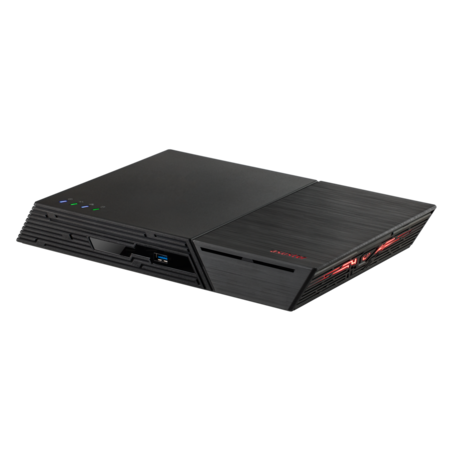
FLASHSTOR 12 Pro (FS6712X) is an unusual NAS even within ASUSTOR's lineup: its twelve internal data-drive positions are all M.2 NVMe, while its network connection is one built-in 10-Gigabit Ethernet port. ASUSTOR's U.S.-English comparison and exact product-ID-80 page identify this model, but they do not establish a particular retailer's SKU or what a seller adds to the box. This is a document-based evaluation, not a hands-on test; it makes no claim about measured file speed, installed SSDs, seller stock or a live U.S. offer.
Twelve positions means twelve M.2 modules
The key buying decision is whether an all-M.2 layout matches the storage job. The exact hardware selector specifies twelve M.2 2280 NVMe slots connected over PCIe 3.0 x1. The U.S. comparison leaves the standard SATA Drive Bays row blank. So, in a questionnaire counting physical internal positions, FS6712X has twelve; in a drive-selection plan, that means twelve compatible M.2 NVMe modules, not twelve 2.5- or 3.5-inch SATA trays. It will not take the conventional large SATA hard drives a buyer might expect from a twelve-bay rack NAS. This difference affects the full cost and setup. The exact manufacturer package list lists the NAS, quick guide, AC cord, 90-W adapter, one Cat 6a 10GbE cable and a cord tie, but no data SSDs or initialized volume. Filling all twelve positions therefore requires a separately researched SSD set, and a partially populated NAS can still have twelve physical positions while using far fewer of them. Do not count an external shelf or imagine the SSDs are bundled because they appear in a manufacturer diagram.Do not turn HDD arithmetic into an NVMe capacity promise
ASUSTOR's exact specification page displays a generic maximum raw-capacity line calculated as twelve 18-TB HDDs. That arithmetic is not a documented M.2 SSD compatibility ceiling: the same product's drive-type field and U.S. comparison describe M.2 NVMe slots and no SATA bays. The page also has generic expansion figures whose labels are not an exact FS6712X M.2 capacity guarantee. This review therefore does not publish a maximum supported or usable SSD volume. Check each intended M.2 model, capacity and firmware in ASUSTOR's current compatibility list, then calculate usable space for the chosen volume and RAID layout. The manufacturer table's number cannot certify an unlisted 18-TB M.2 device.A mirror can be planned, but it is not in the box
ASUSTOR's exact hardware/software selector lists M.2 Volume support and RAID 1 for this model. One possible owner-created arrangement is to install two compatible 2280 NVMe SSDs, create a RAID 1 volume and leave ten of the twelve slots empty. This is a useful way to preserve room for later modules without pretending that a diskless system arrives protected. It is also only one possible setup: a capacity-focused multi-drive layout would be a different decision and needs its own drive compatibility, replacement, rebuild and backup planning. The FS67XX installation guide applies to both FS6706T and FS6712X and specifically describes slots 1–12 on the FS6712X. It instructs the owner to remove the enclosure cover and insert M-key 2280 NVMe SSDs; it also identifies optional SSD heatsinks as separately sold. Most important before repurposing old modules, the guide warns that initializing the NAS or creating a volume deletes data on installed SSDs. Back up anything valuable before setup. A RAID 1 mirror can help with one member-drive failure, but it does not protect against accidental deletion, malware, theft, a lost chassis or a shared electrical event. Keep a separate copy and make a restore plan.One 10-GbE link, not a transfer-rate guarantee
The hardware selector and U.S. comparison list one built-in 10-Gigabit Ethernet port. That is a substantial distinction from the two individual 2.5-GbE ports on the smaller six-slot FS6706T, but it remains a single rated network link. A 10-Gbps threshold for one built-in port is supported on the documented profile; a 10.5-Gbps single-port requirement is not. Neither two USB 10-Gbps ports nor the number of SSD positions changes the rating of that Ethernet interface. Plan the complete connection before treating 10GbE as useful: the client needs a suitable NIC, the switch or direct link must support the intended rate, and the cable and configuration must be appropriate. SSD models, RAID layout, file sizes and concurrent traffic can affect real transfers. The rating is a component specification, not a benchmark or promise that a workstation will copy files at ten gigabits per second. If the existing network is 1GbE or 2.5GbE, the NAS can negotiate down, but the extra port capability may not justify the cost of upgrading the path.Useful parts, with limits to keep in view
ASUSTOR specifies a quad-core Intel Celeron N5105 at 2.0 GHz with burst up to 2.9 GHz, 4 GB of DDR4 SO-DIMM memory, two memory slots and a 16-GB maximum. These specifications describe components, not a virtualization, transcoding or application test. Its other connections include two 10-Gbps USB 3.2 Gen 2 ports, two USB 2.0 ports, HDMI 2.0b and S/PDIF. Those may matter for local display, audio or attached-device workflows, but they are not substitutes for the NAS's Ethernet path and the package list does not turn them into included peripherals. The manufacturer lists a 48.3 × 308.26 × 193 mm chassis, 1.37 kg weight, 26-W operating-power figure and 18.7-dB noise figure. Those are reference specifications, not measurements from this review and not a prediction for every drive set or workload. Leave room for ventilation, cable bends, the adapter and optional SSD cooling. The support-status table checked on November 2, 2026 lists the FS6712X as Generally Available, with software and technical support Supported and a three-year entry. That manufacturer lifecycle row is not proof of a U.S. retailer's stock, seller warranty or exact bundle.Who should compare it?
FS6712X makes sense on paper when a buyer deliberately wants twelve internal NVMe positions, can select and install compatible SSDs, and has a network path where one 10-GbE link is useful. It is not a general-purpose substitute for a twelve-tray SATA system. The FS6706T offers six M.2 positions and two separate 2.5-GbE links in a similar compact style; the newer-named FS6812X is a separate product, so verify the complete model code rather than purchasing by “Flashstor 12” alone. For this FS6712X profile, exact compatible drive-and-firmware combinations, SSD capacity ceiling, seller-added drives, live offer, price, stock and U.S. channel warranty remain unverified. Check those details before ordering, and buy only after confirming the seller's actual model and package.Key specifications
Key details at a glance
| Internal drive bays | 12 bays |
|---|---|
| Documented internal drive media | M.2 2280 NVMe SSD |
| Built-in Ethernet ports | 1 x built-in 10-Gigabit Ethernet port, individually rated up to 10 Gbps |
| Fastest individual Ethernet port | 10 Gbps |
| Installed system memory | 4 GB |
| Maximum listed memory | 16 GB |
| Listed storage arrangements | Single / JBOD / RAID 0 / RAID 1 / RAID 5 / RAID 6 / RAID 10 |
| Dimensions (H × W × D) | 48.3 x 308.26 x 193 mm (H x W x D) |
| Weight | 1.37 kg |
| Hardware warranty | 3 years |
| Data drives included in listed package | No |
| M.2 NVMe slots | 12 |
| M.2 SSD storage-pool support | Yes |
| Processor | Intel Celeron N5105 |
| CPU cores | 4 |
| Installed memory type | 4 GB DDR4 SO-DIMM, one 4-GB module installed |
Use the exact model’s instructions for operating limits, supplied equipment and version differences.
Sources for this review
Sources for this assessment

Check your setup before choosing a NAS
Use the finder to check bay count, the network link you need, and whether a documented two-drive redundant arrangement is essential.