
Your needs, this model
Does it fit your priorities?
Does the FS6706T meet a six-position internal-drive minimum?
For the finder's physical-position count, yes: ASUSTOR lists six internal M.2 2280 NVMe slots, so it reaches six and falls short of seven. These are not SATA trays; the U.S. comparison leaves Drive Bays blank, and this model has no 2.5-inch or 3.5-inch SATA positions.
Explore this need in the finder →Can two FS6706T SSD positions be used for a redundant arrangement?
ASUSTOR lists M.2 Volume and RAID 1 support, so two buyer-selected compatible NVMe SSDs could form a possible owner-created mirror while four M.2 positions remain unused. No SSDs or volume are included in the manufacturer package; check the exact drive model and firmware, back up before initialization because creating a volume erases installed data, and keep a separate backup.
Explore this need in the finder →Is one FS6706T port faster than 2.5 Gbps because it has two Ethernet sockets?
No. The exact U.S. comparison lists two separate 2.5-Gigabit Ethernet ports, so a 2.5-Gbps floor for one port is supported but a 3-Gbps floor is not. SMB Multichannel can use multiple links only under compatible endpoint and network conditions; it is not one 5-Gbps jack or a measured transfer result.
Explore this need in the finder →ASUSTOR · current-reference profile · documentation-based assessment
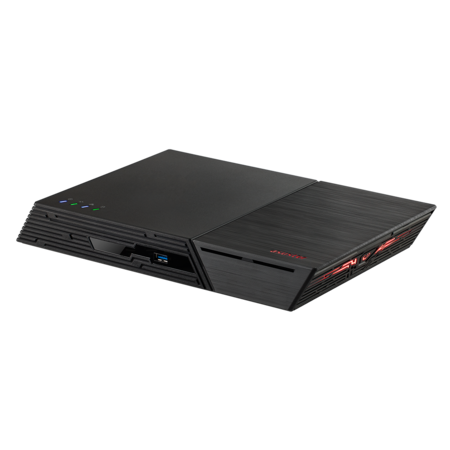
The ASUSTOR FLASHSTOR 6 (FS6706T) is a compact network storage appliance built around six M.2 NVMe positions. It is a different kind of “six-bay NAS” from a tower with six front SATA trays: ASUSTOR's U.S. comparison leaves its ordinary Drive Bays field blank and lists six M.2 2280 NVMe slots instead. This assessment follows the manufacturer profile, not an exact seller configuration. It does not claim hands-on use, measured throughput, installed drives, live stock, a particular U.S. retail SKU or reseller package.
Six internal positions, but no SATA trays
The most important fit question is the storage interface. ASUSTOR specifies six M.2 2280 NVMe SSD slots connected over PCIe 3.0 x1. That gives the FS6706T six internal positions for the finder's physical-position count, but zero 2.5-inch or 3.5-inch SATA bays. A visitor whose “six bays” means six SATA trays for large hard drives should not treat the number alone as a match. The U.S.-English product comparison shows the blank SATA Drive Bays row and the six M.2 slots together; the exact model specification lists the same M.2 2280 interface. This is an all-flash storage design, not a conventional hard-drive tower with cache slots added. The interface is not a small footnote. An M.2 NVMe SSD must be selected for the exact NAS compatibility list, and a buyer needs six compatible modules to populate all six positions. The FS67XX installation guide instructs the owner to remove the bottom cover, align the M-key SSDs and secure them in the numbered slots. It also warns that initializing the NAS or creating a volume deletes data already on the installed SSDs. Back up any reused drive before creating a volume; do not plan to insert an old disk and preserve its contents automatically.Capacity needs a model-specific check
I would not use the generic “108 TB” maximum line on the specification page as the FS6706T's supported NVMe capacity. Its parenthetical is six 18-TB HDDs, while the same exact page and the U.S. comparison identify six M.2 NVMe positions and no SATA drive bays. That arithmetic is not an SSD capacity certification, a promise of compatible 18-TB M.2 devices, or a usable RAID volume size. The source set did not establish an authoritative maximum capacity per FS6706T M.2 slot or an exact compatible SSD-and-firmware combination, so those values remain unclaimed here. Check the current compatibility table for each intended module, including its firmware and capacity, before budgeting a full system. Then calculate usable space from the chosen RAID layout rather than multiplying a headline figure.A two-drive mirror is possible, not preinstalled
ASUSTOR's exact hardware/software specification lists M.2 Volume support and RAID 1 among its storage modes. One plausible owner-created arrangement is two compatible NVMe SSDs in RAID 1, with four of the six M.2 positions empty. This can provide redundancy against a supported member-drive failure, but it is a configuration choice rather than a feature that arrives already initialized. The manufacturer package list lists the FS6706T, quick guide, AC cord, 65-W adapter, two Cat 5e network leads and a cord tie; it does not list data SSDs or an initialized array. The specification also treats M.2 volume expansion separately: it lists drive-replacement expansion for RAID 1, 5, 6 and 10, while adding drives to an existing volume is listed for RAID 5, 6 and 10. That distinction matters if a buyer plans to start with a mirror and grow it later. Verify the current ADM storage instructions and the intended drive tuple before changing a live volume. RAID 1 is not a backup: deletion, malware, a lost chassis or a shared electrical event can affect the whole NAS. Keep a separate copy and test a restore.Two 2.5-GbE ports remain two links
The exact U.S. comparison lists two built-in 2.5-Gigabit Ethernet ports. For a requirement that asks for the speed of one built-in port, the documented ceiling is 2.5 Gbps. The presence of a second port does not turn either connector into 5 GbE; ASUSTOR describes SMB Multichannel and link aggregation as multi-link features, whose benefit depends on the NAS, client, network equipment, cabling, protocol and workload. Neither the label nor a manufacturer's chart is a file-transfer test. A three-gigabit single-port requirement rules this model out; the current comparison lists no expansion slot for an optional NIC. For a desktop editing workflow, plan the entire path before buying: compatible NICs on the NAS and workstation, a suitable switch (or a direct connection where supported), correct cabling, and a workload that can use the link. SSDs may remove one storage bottleneck, but do not guarantee a particular network speed, render time or editing experience.Memory, local connections and physical placement
ASUSTOR lists a quad-core Intel Celeron N5105 at 2.0 GHz with boost up to 2.9 GHz, 4 GB of DDR4-2933 memory, two SO-DIMM slots and a 16-GB maximum. Those are component specifications, not a virtualization or application-performance result. If the intended use includes heavier services, check the memory requirements of each app and any supported upgrade module before choosing this unit. It also has two USB 3.2 Gen 2 ports rated at 10 Gbps, two USB 2.0 ports, HDMI 2.0b and S/PDIF. The ports are options for particular workflows; they do not imply drives, a display, media software or other accessories are included. The published dimensions are 48.3 × 308.26 × 193 mm (H × W × D), and the listed device weight is 1.35 kg. The 65-W adapter is external. The comparison sheet gives 18.2 W in operation and 0.83 W in sleep, but these are manufacturer reference figures rather than my measurements and do not predict draw with a chosen set of SSDs. Leave room for the device, its cables, ventilation and SSD cooling needs. ASUSTOR's specification notes that compatible heatsinks may be purchased separately if needed; check exact clearance and compatibility rather than assuming a heatsink or SSD is bundled.Which six-slot NAS are you comparing?
The closest category trap is confusing the FS6706T with a six-tray SATA NAS such as ASUSTOR's separately assessed LOCKERSTOR 6 Gen2 (AS6706T). The latter has six native SATA trays and four separate M.2 positions; the FS6706T has six M.2 slots and no SATA bays. They are not interchangeable just because both model names include “6.” The exact product page calls this product FLASHSTOR 6 (FS6706T), and the current manufacturer support-status row lists it as Generally Available with software and technical support Supported and a three-year entry. That status does not prove a retailer has stock or that a seller's U.S. warranty terms match the manufacturer table.Who should consider it?
Consider the FS6706T if the attraction is six internal M.2 NVMe positions, a compact footprint and a documented RAID-capable M.2 volume, and if an individual built-in 2.5-GbE port is enough for the network plan. Pass if the requirement is SATA hard drives or trays, a built-in 5- or 10-GbE port, or a capacity claim that depends on the generic HDD arithmetic. Before ordering, confirm the exact model, SSD compatibility and firmware, memory requirements, heatsink clearance, exact seller contents, return terms and warranty path. The product page and lifecycle table are manufacturer evidence; they do not identify a live offer or price. The right comparison is the actual interface and operating plan, not the “six bay” shorthand.Key specifications
Key details at a glance
| Internal drive bays | 6 bays |
|---|---|
| Documented internal drive media | M.2 2280 NVMe SSD |
| Built-in Ethernet ports | 2 x built-in 2.5-Gigabit Ethernet (2.5G/1G/100M each) |
| Fastest individual Ethernet port | 2.5 Gbps |
| Installed system memory | 4 GB |
| Maximum listed memory | 16 GB |
| Listed storage arrangements | Single / JBOD / RAID 0 / RAID 1 / RAID 5 / RAID 6 / RAID 10 |
| Dimensions (H × W × D) | 48.3 x 308.26 x 193 mm (H x W x D) |
| Weight | 1.35 kg |
| Hardware warranty | 3 years |
| Data drives included in listed package | No |
| M.2 NVMe slots | 6 |
| M.2 SSD storage-pool support | Yes |
| Processor | Intel Celeron N5105 |
| CPU cores | 4 |
| Installed memory type | 4 GB DDR4-2933 SO-DIMM, one 4-GB module installed |
Use the exact model’s instructions for operating limits, supplied equipment and version differences.
Sources for this review
Sources for this assessment
- ASUSTOR FLASHSTOR 6 (FS6706T), exact product page, product ID 79
- ASUSTOR 2026 All Product Comparison, U.S. English
- ASUSTOR FS6706T exact hardware and software specification, product ID 79
- ASUSTOR FS6706T package contents, product ID 79
- ASUSTOR Product Support Status, FS6706T row
- ASUSTOR RAID calculator, exact FS6706T recommendation row
- ASUSTOR drive compatibility lookup, current table
- ASUSTOR FS67XX Quick Installation Guide, English, applicable to FS6706T and FS6712X
- ASUSTOR FS6706T official exact-model front image
- ASUSTOR FS6706T official exact-model rear image


Check your setup before choosing a NAS
Use the finder to check bay count, the network link you need, and whether a documented two-drive redundant arrangement is essential.