
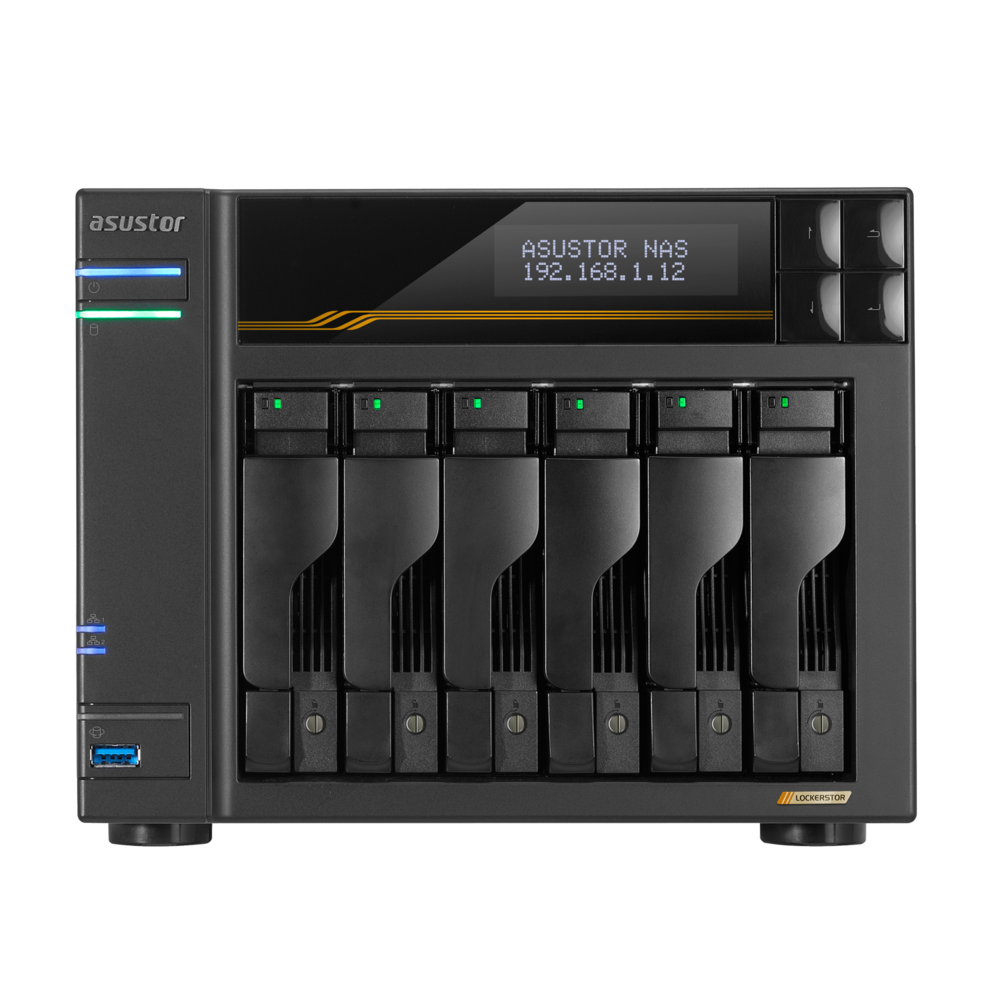
Your needs, this model
Does it fit your priorities?
How many native SATA drive bays does AS6806T provide, and do its M.2 slots count?
ASUSTOR documents six internal SATA positions for 3.5-inch HDDs, 2.5-inch HDDs or 2.5-inch SATA SSDs. Four M.2 2280 NVMe positions are separate, so the six-bay chassis meets a six-bay minimum but not a seven-bay minimum. Its 108-TB manufacturer figure is raw capacity for six 18-TB drives, not usable space or included capacity.
Explore this need in the finder →What is the fastest individual Ethernet link built into AS6806T?
The exact hardware table lists two individual 10-GbE ports and two individual 5-GbE ports. The top single-port rating is 10 Gbps, not 10.5 Gbps; other ports cannot be added together to meet a one-port floor, and link rate is not promised file-transfer speed.
Explore this need in the finder →Can the current-reference six-bay AS6806T satisfy a six-bay, 10-GbE and two-drive-redundancy shortlist together?
Yes, as one possible owner-created arrangement: six SATA trays are native, the listed RAID 1 volume can use two buyer-supplied compatible SATA drives and one built-in 10-GbE port is available in the same enclosure. Four SATA bays remain open and the four M.2 slots are separate. The package lists no data drives or initialized array; verify exact drive firmware and the complete network path, and keep another backup because a mirror is not one.
Explore this need in the finder →The ASUSTOR LOCKERSTOR 6 Gen3 (AS6806T) combines six native SATA positions, four M.2 NVMe slots, two built-in 10-Gigabit Ethernet ports and two more 5-Gigabit ports. This is a paper assessment based on the exact product-ID-87 pages, datasheet and setup guide, not an ownership or performance report. Link labels do not promise file-transfer rates, and the exact U.S. retail suffix or seller bundle remains unverified.
Six native trays make this more than a four-bay upgrade
The hardware table lists six SATA bays for 3.5-inch HDDs, 2.5-inch HDDs or 2.5-inch SATA SSDs. Four M.2 2280 NVMe positions are separate connectors, not extra SATA trays. The AS6806T meets a six-position minimum but not seven. Its listed 108 TB (six 18-TB drives) is raw capacity that varies with RAID layout, not usable space, certified drive/firmware support or included capacity.
The specification lists up to 18 total bays and 360 TB raw with an expansion unit. That is a separate shelf arrangement, not eighteen trays inside this chassis; verify the shelf and package separately. For a four-bay alternative, the AS6804T shares the Gen3 network and M.2 approach but has only four native SATA positions.
Four M.2 positions are useful, but not free SATA bays
The exact table identifies four M.2 2280 NVMe slots on PCIe 4.0 x1 and lists M.2 volumes as well as storage or caching use. Check an SSD against the current compatibility list and distinguish M.2 storage from an HDD RAID set. The QIG requires shutdown, cable disconnection and opening the chassis for installation. No NVMe drive is listed in the base package.
Fast ports still need a matching network path
ASUSTOR lists two individual 10-GbE RJ45 ports and two individual 5-GbE ports. That supplies a built-in 10-Gbps single-port ceiling: it meets a 10-Gbps floor but not 10.5 Gbps. Four sockets do not become one 30-Gbps port. Aggregation or SMB Multichannel depends on compatible clients, switches, cables, storage and configuration; throughput was not measured.
USB4 has a caveat: ASUSTOR's driver note describes external storage and direct connections to another Lockerstor Gen3 or Flashstor Gen2 NAS, not a direct USB4 or Thunderbolt computer link. Re-check current documentation if that host connection is essential.
Memory and processor specifications are not workload promises
The system includes one 16-GB ECC DDR5-4800 SO-DIMM, with two slots and a listed 64-GB maximum. ASUSTOR warns ECC is disabled if non-ECC memory is installed or mixed with ECC. Check a supported module and service terms before an upgrade. The four-core Ryzen Embedded V3C14 is listed at 2.3 GHz, boost to 3.8 GHz; these clocks do not establish a workload or stream count.
A two-drive mirror can coexist with the six-bay layout
ASUSTOR lists RAID 1, and its calculator limits one RAID 1 volume to two drives. A possible owner-created setup uses two selected compatible SATA drives, occupies two of six bays and leaves four open; a built-in 10-GbE port can coexist in the same chassis. No disks or configured array are included in the listed package. Mirroring may help after a drive failure, but it does not protect against deletion, malware, theft or loss of the enclosure. Keep a separate backup and check drives and firmware before initialization, which the QIG says erases disk data.
Package details, chassis size and a real source discrepancy
The product-ID-87 package page lists one AS6806T, a quick guide, AC cord, four Cat 6a cables and screws for both drive sizes. Its QIG specifies 24 screws each for 3.5- and 2.5-inch drives and no separate adapter or cord bracket. No drives or prepared volume are listed, and a reseller may change the box. Confirm model, SKU, drive contents, returns and warranty with the seller.
The HTML specification lists dimensions of 185.5 × 233 × 230 mm (H × W × D). It gives a 4.4-kg weight, while the English datasheet lists 4.6 kg; the sources disagree, so no single figure is chosen. Allow cable and airflow clearance beyond the chassis dimensions. Datasheet power figures (45-W operation, 20-W disk hibernation, 2.3-W sleep) are not measurements of a particular setup.
Who should shortlist the AS6806T?
Shortlist it if you need more than four native SATA trays, can build a 10-GbE path and have a use for the four M.2 slots. ASUSTOR's support table calls the exact model Generally Available and Supported with a three-year entry, which is not proof of U.S. seller stock or channel warranty. A 1-GbE network may leave its fastest ports unused; a requirement for more than six internal bays exceeds the chassis even though a separate expansion unit raises the total. Choose around your drive count, full network path and confirmed applications—not a port label or raw-capacity headline.
Key specifications
Key details at a glance
| Internal drive bays | 6 bays |
|---|---|
| Documented internal drive media | 3.5-inch SATA HDD / 2.5-inch SATA HDD / 2.5-inch SATA SSD |
| Built-in Ethernet ports | 2 x built-in 10-Gigabit Ethernet (10G/2.5G/1G/100M each) / 2 x built-in 5-Gigabit Ethernet (5G/2.5G/1G/100M each) |
| Fastest individual Ethernet port | 10 Gbps |
| Installed system memory | 16 GB |
| Maximum listed memory | 64 GB |
| Listed storage arrangements | Single / JBOD / RAID 0 / RAID 1 / RAID 5 / RAID 6 / RAID 10 / RAID 1 + spare drive / RAID 5 + spare drive / RAID 6 + spare drive / RAID 10 + spare drive |
| Dimensions (H × W × D) | 185.5 x 233 x 230 mm (H x W x D) |
| Hardware warranty | 3 years |
| Data drives included in listed package | No |
| M.2 NVMe slots | 4 |
| M.2 SSD storage-pool support | Yes |
| Processor | AMD Ryzen Embedded V3C14 |
| CPU cores | 4 |
| Installed memory type | 16 GB ECC DDR5-4800 SO-DIMM, one 16-GB module pre-installed |
Use the exact model’s instructions for operating limits, supplied equipment and version differences.
Sources for this review
Sources for this assessment
- ASUSTOR Home/SOHO directory observation for LOCKERSTOR 6 Gen3 (AS6806T)
- ASUSTOR LOCKERSTOR 6 Gen3 (AS6806T), product ID 87
- ASUSTOR AS6806T exact hardware and software specification, product ID 87
- ASUSTOR AS6806T package contents, product ID 87
- ASUSTOR AS6806T manufacturer datasheet page, product ID 87
- ASUSTOR LOCKERSTOR 6 Gen3 (AS6806T) English datasheet
- ASUSTOR AS68XXT English Quick Installation Guide, applicable model list and hardware installation instructions
- ASUSTOR product support-status table, AS6806T row
- ASUSTOR RAID calculator, model ID 87, and RAID 1 drive limit
- ASUSTOR drive-compatibility selector and drive guidance
- Official ASUSTOR AS6806T product-page image

Check your setup before choosing a NAS
Use the finder to check bay count, the network link you need, and whether a documented two-drive redundant arrangement is essential.