
Your needs, this model
Does it fit your priorities?
Does the AS6706T v2 meet a six-native-bay minimum?
Yes. ASUSTOR's exact product-ID-96 specification lists six 2.5-/3.5-inch SATA positions. Four separate M.2 2280 NVMe connectors are not SATA bays, and a seven-bay minimum excludes this chassis.
Explore this need in the finder →Does AS6706T v2 have one built-in Ethernet port rated at 5 Gbps?
Yes. The exact-model specification lists two individual 5-Gigabit ports, each also supporting lower link modes. This is a port rating, not a guaranteed file-transfer speed. Two ports or SMB Multichannel are not one faster port; the optional 10GbE card is a separate route with an M.2-daughterboard tradeoff.
Explore this need in the finder →Can the six-bay AS6706T v2 meet a current-only six-bay, 5-Gbps and two-drive-redundancy screen?
The manufacturer lists six SATA bays, two separate 5-Gigabit ports and RAID 1. A possible owner-created pair of compatible SATA drives uses two bays and leaves four open. The package lists no drives or initialized array; check exact disk/firmware support, wire the rest of the path for the chosen link and keep an independent backup.
Explore this need in the finder →This is a source-based assessment of the exact LOCKERSTOR 6 Gen2+ configuration ASUSTOR identifies as AS6706T v2, product ID 96. It is not the earlier LOCKERSTOR 6 Gen2 (AS6706T), product ID 78: the original profile lists two individual 2.5-Gigabit Ethernet ports, while the v2 specification lists two individual 5-Gigabit ports. Confirm the v2 suffix on the offer or chassis before applying this assessment. I have not used, measured or independently tested this NAS; performance claims here are limited to manufacturer-listed interfaces and specifications.
Start with the exact six-bay identity
The official product page and its separate hardware specification identify the six-bay Gen2+ as AS6706T v2. The current support table labels that model Generally Available and Supported, which is evidence of manufacturer lifecycle status, not proof that a retailer has it, that a particular U.S. seller is authorized, or that the seller's warranty is intact. The observed U.S.-facing product family supports a U.S. model-level comparison, but these sources do not establish an exact U.S. retail SKU or seller package. This is why the v2 label matters more than a near-match in a search result.Six SATA bays and four M.2 positions do different jobs
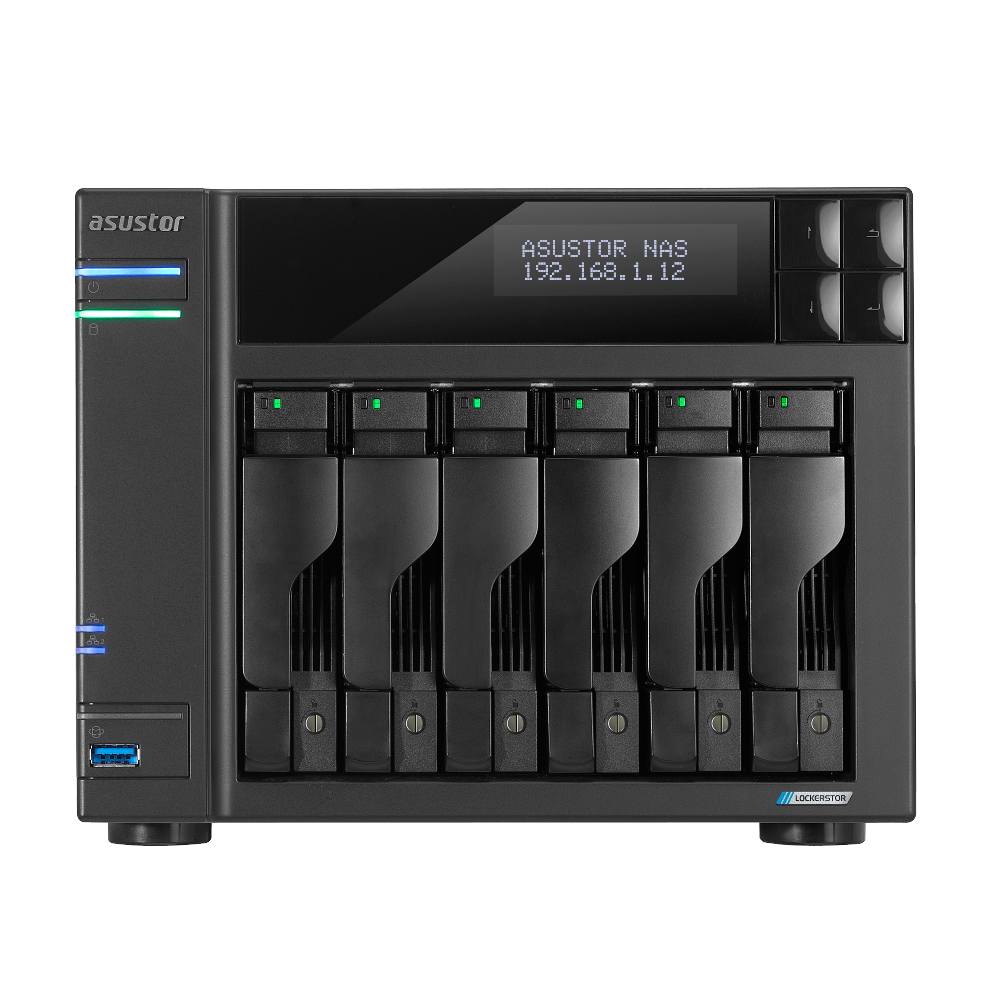
ASUSTOR's exact-model specification lists six internal SATA positions for 3.5-inch and 2.5-inch hard drives and 2.5-inch SATA SSDs. It separately lists four M.2 2280 NVMe positions on a PCIe 3.0 interface. Those are not bays seven through ten, and optional expansion does not change the number of trays in the desktop chassis. The manufacturer lists up to fourteen total positions when an expansion unit is used, but that is a different, separately planned setup—not an included shelf or a fourteen-bay enclosure. RAID 1 is among the documented arrangements in the model datasheet, and ASUSTOR's calculator explains that a single RAID 1 volume uses at most two drives. A buyer could therefore build a two-drive mirror in this six-bay NAS while leaving four SATA bays physically unused. This is a possible owner-created configuration, not an installed array: the listed package contains no data drives or prepared volume. The exact compatible drive model, firmware, usable capacity, and initialization steps need checking before migration; initializing disks can erase existing data. Mirroring can help with one drive failure but does not make another copy against deletion, malware, theft or loss of the NAS. Keep an independent backup.The useful network distinction is one 5-Gbps port
The exact specification lists two built-in 5-Gigabit Ethernet ports, each also supporting 2.5G, 1G and 100M link modes. That makes the product a paper match for a requirement of one individual 5-Gbps port; it does not guarantee that a file copy will run at 5 Gbps. The client NIC, switch or router, cable, storage, protocol, file size, configuration and simultaneous workload all matter. ASUSTOR promotes SMB Multichannel across the two ports, but that is conditional on compatible clients and network equipment. The two sockets do not become one 10-Gbps connection simply because their nominal rates add up. There is a separate optional 10GbE path through the PCIe slot. It is not built in, and the exact datasheet says installing the card requires removal of the M.2 daughterboard. The applicable v2 quick-install guide also treats this as an internal hardware change rather than a hot-swap task. Buyers who want both the faster card and M.2 storage should verify the precise card and resulting board configuration before ordering. The model also lists HDMI 2.0b output, two 10-Gbps USB Type-A ports and one rear USB 2.0 port; these are useful connectors, not evidence of a particular editing, streaming or backup result.Plan the package, room and ownership checks
ASUSTOR's package page names the unit, quick-install guide, AC cord, two Cat 5e LAN cables and mounting screws. It does not list data drives or an initialized storage pool, so treat the base package as an enclosure until an exact seller listing proves otherwise. The hardware page lists a 250-W supply, 185.5 × 233 × 230 mm dimensions and 4.4 kg chassis weight. Leave clear airflow around the enclosure and budget for the six chosen disks separately; do not mistake the product's six SATA bays for six included drives. One documentation conflict is worth preserving rather than smoothing over: the current hardware page lists 48.5 W operation, 27.7 W disk hibernation and 0.81 W sleep, while the model datasheet lists 35.8 W, 24.8 W and 1.16 W for those states. I do not choose one set as a settled consumption figure. Installed drives, load and firmware also affect actual draw. The live compatibility list and the applicable QIG do not certify a particular drive-and-firmware tuple for your intended setup.Who should shortlist it?
The strongest evidence-backed case is a buyer who wants six native SATA bays, a separate four-slot NVMe layer, 8 GB of installed memory, and at least one built-in 5-Gbps link—and who is ready to source compatible drives and build the storage arrangement. It is a weaker fit if you need 10GbE built in, expect a disk-populated/preconfigured purchase, or cannot give the optional PCIe card its documented M.2-board attention. Compared with original AS6706T, the v2's clearest documented change for this questionnaire is the individual 5-Gbps port rating; do not infer a corresponding file-speed multiple. Compare exact suffix, offer contents, drive compatibility, network path and warranty before treating a listing as this model.Key specifications
Key details at a glance
| Internal drive bays | 6 bays |
|---|---|
| Documented internal drive media | 3.5-inch SATA HDD / 2.5-inch SATA HDD / 2.5-inch SATA SSD |
| Built-in Ethernet ports | 2 x built-in 5-Gigabit Ethernet (5G/2.5G/1G/100M each) |
| Fastest individual Ethernet port | 5 Gbps |
| Installed system memory | 8 GB |
| Maximum listed memory | 16 GB |
| Listed storage arrangements | Single / JBOD / RAID 0 / RAID 1 / RAID 5 / RAID 6 / RAID 10 / RAID 1 + spare drive / RAID 5 + spare drive / RAID 6 + spare drive / RAID 10 + spare drive |
| Dimensions (H × W × D) | 185.5 x 233 x 230 mm (H x W x D) |
| Weight | 4.4 kg |
| Hardware warranty | 3 years |
| Data drives included in listed package | No |
| M.2 NVMe slots | 4 |
| M.2 SSD storage-pool support | Yes |
| Processor | Intel Celeron N5105 |
| CPU cores | 4 |
| Installed memory type | 8 GB DDR4-2933 SO-DIMM, one 8-GB module pre-installed |
Use the exact model’s instructions for operating limits, supplied equipment and version differences.
Sources for this review
Sources for this assessment
- ASUSTOR Home/SOHO directory entry for LOCKERSTOR 6 Gen2+ (AS6706T v2)
- ASUSTOR LOCKERSTOR 6 Gen2+ (AS6706T v2), product ID 96
- ASUSTOR AS6706T v2 exact hardware and software specification, product ID 96
- ASUSTOR AS6706T v2 package contents, product ID 96
- ASUSTOR AS6706T v2 manufacturer datasheet page, product ID 96
- ASUSTOR LOCKERSTOR 6 Gen2+ (AS6706T v2) English datasheet
- ASUSTOR AS67XXT v2 English Quick Installation Guide; applicable models and component installation
- ASUSTOR product support-status table, AS6706T v2 row
- ASUSTOR RAID calculator and model-specific two-drive RAID 1 limit
- ASUSTOR drive-compatibility selector and drive guidance
- Official ASUSTOR AS6706T v2 product-page image

Check your setup before choosing a NAS
Use the finder to check bay count, the network link you need, and whether a documented two-drive redundant arrangement is essential.