
Your needs, this model
Does it fit your priorities?
Can a two-drive mirror leave two native bays free in the AS6704T?
Yes, as a possible owner-created arrangement: ASUSTOR lists four native SATA bays and RAID 1, and its RAID calculator lists a two-drive maximum for one RAID 1 volume. A pair of buyer-selected supported drives would occupy two bays and leave two SATA positions unused. The package list contains no data drives or configured array; confirm the exact drive and firmware, and keep a separate backup because RAID is not backup.
Explore this need in the finder →Does AS6704T have a built-in 10-Gigabit Ethernet port?
No. Its two built-in Ethernet ports are each rated at 2.5 Gbps. ASUSTOR documents a PCIe slot for an optional 10GbE card, but that add-on is not a built-in Ethernet port; its datasheet also says installing a 10GbE NIC requires removing the M.2 daughterboard. The finder therefore uses 2.5 Gbps as the model's single built-in-port ceiling.
Explore this need in the finder →Do the four M.2 positions make this an eight-bay SATA NAS?
No. The model page lists four native SATA bays and four separate M.2 2280 NVMe slots. ASUSTOR describes M.2 positions for cache or storage, but they use a different connector and do not count as extra SATA trays in the four-bay floor.
Explore this need in the finder →Does the AS6704T package include hard drives or a ready RAID volume?
The product-ID-77 package list names the enclosure, quick guide, AC cord and adapter, two Cat 5e network cables, 3.5-inch and 2.5-inch drive screws, and a power-cord bracket. It does not list data drives or a configured volume. A reseller could add components, but no particular retail bundle was verified; check the exact package and drive models before purchase.
Explore this need in the finder →Is original AS6704T the same product as AS6704T v2?
No. The observed product is LOCKERSTOR 4 Gen2 (AS6704T), manufacturer product ID 77. ASUSTOR separately lists LOCKERSTOR 4 Gen2+ (AS6704T v2) as a different model. Confirm the full model suffix on a listing; these assessments do not transfer specifications or seller packaging between generations.
Explore this need in the finder →Source-based model assessment · U.S. English manufacturer evidence checked November 2, 2026
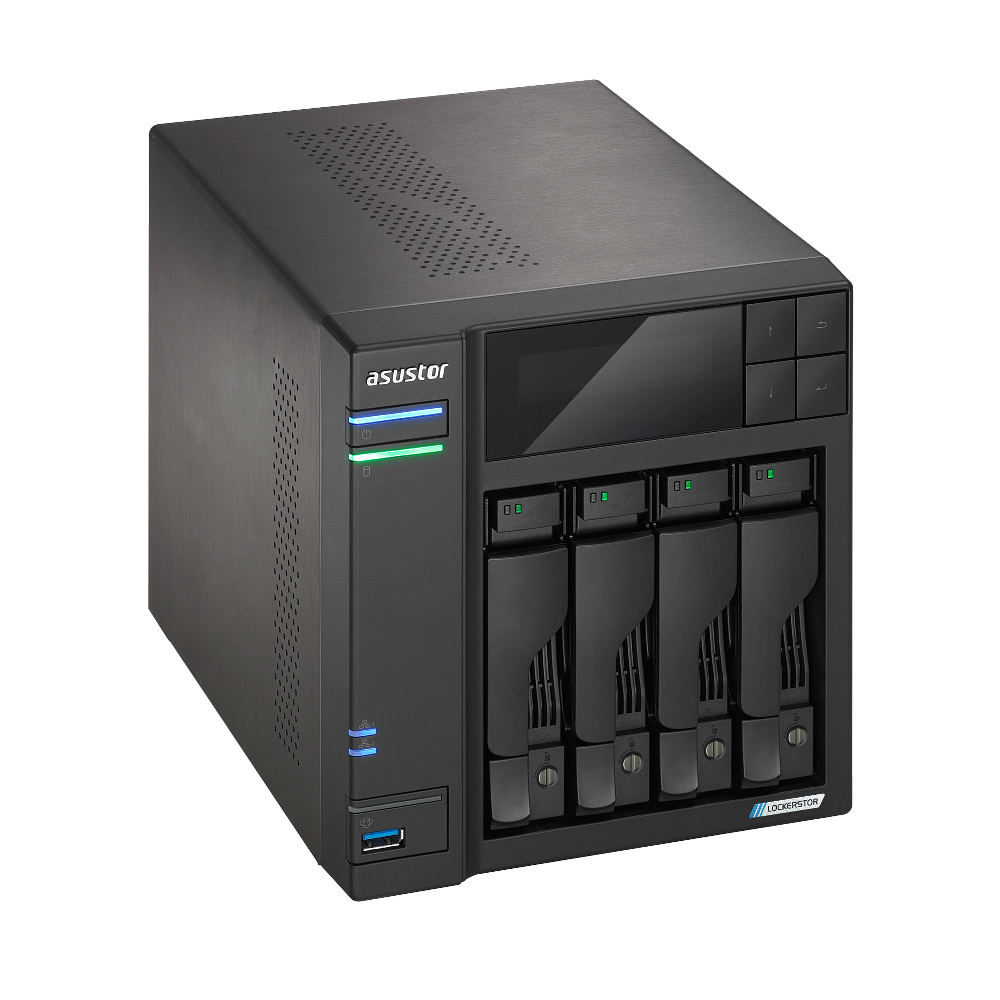
The ASUSTOR LOCKERSTOR 4 Gen2 (AS6704T) is a desktop NAS built around four internal SATA drive positions. It is the original Gen2 model, manufacturer product ID 77, not the separately listed LOCKERSTOR 4 Gen2+ (AS6704T v2). ASUSTOR's current support-status table marks both names as generally available, so the suffix matters: do not transfer a specification from one generation to a listing for the other. This assessment uses model-level U.S.-English manufacturer documentation; it does not establish a seller SKU, active offer or retailer package.
Four SATA bays are the useful starting point
The model specification identifies four 2.5- or 3.5-inch SATA HDD/SSD positions, along with four separate M.2 2280 NVMe slots using a PCIe 3.0 x1 interface. ASUSTOR describes M.2 use for cache, storage or both, but those connectors are not four extra SATA trays. The distinction matters when planning a pool or answering a four-bay requirement: the AS6704T has four native bays, not eight. The advertised 72 TB maximum is the manufacturer's raw-capacity arithmetic of four 18 TB drives, with a warning that usable capacity varies by RAID type; it is not a current compatibility guarantee or a promise about what ships in the carton.
ASUSTOR also lists a possible maximum of twelve bays with an expansion unit. That is an attached expansion scenario, not a twelve-bay chassis, and this review does not verify a particular expansion unit, seller bundle or current availability. Keep the model's four internal positions separate from any later expansion decision. The exact-model hardware specification is the authoritative place to recheck the base-bay and media details before choosing drives.
A two-drive mirror leaves two native positions open
ASUSTOR lists RAID 1 among the AS6704T's volume types and its calculator includes the model in a two-drive RAID 1 arrangement. A buyer could select two compatible SATA drives, install them in the owner's preferred setup and create a RAID 1 volume. That plan uses two of the four native bays, leaving two positions physically empty. It is a planning example, not a preconfigured array, and it does not assume that a second volume will be added later.
A mirror keeps the selected data on both members and can help a volume remain available after one supported drive failure. It does not protect against accidental deletion, ransomware, theft, enclosure damage or an administrative mistake. Do not count the mirror as a backup; keep a separate, restorable copy. NAS initialization erases disks, so do not put drives with files on them into a new array without a separate verified copy. ASUSTOR's exact RAID calculator and the model's storage instructions should be checked against the actual plan.
2.5GbE is built in; 10GbE is an add-on with a tradeoff
The AS6704T has two individual 2.5-Gigabit Ethernet ports. For a requirement about one built-in port, its ceiling is 2.5 Gbps: two ports do not become one 5-Gbps interface. ASUSTOR discusses SMB Multichannel as a way to combine compatible links, but that depends on the client, network equipment, configuration and workload. It is not a measured file-copy result or a guarantee that a particular computer will see a combined rate. Trace the complete path through the switch or router, cable and client adapter before paying for a faster NAS link.
This four-bay model differs from its two-bay AS6702T sibling in an important expansion detail. ASUSTOR lists one PCIe slot for an optional 10GbE card on the AS6704T; the exact English datasheet says installing the NIC requires removal of the M.2 daughterboard. The card is not factory-installed or a built-in port in this assessment, and a buyer should verify the exact supported card and the M.2-storage tradeoff before planning simultaneous use. It would be misleading to enter 10 Gbps as the model's built-in Ethernet capability. The manufacturer's AS6704T datasheet documents that distinction.
Hardware and placement considerations
ASUSTOR lists a quad-core Intel Celeron N5105 processor at 2.0 GHz with burst up to 2.90 GHz, one 4 GB DDR4-2933 SO-DIMM, two memory slots and a 16 GB maximum. Those are vendor specifications, not a benchmark of a particular backup, media or virtual-machine workload. The same specification lists four M.2 NVMe positions, two USB 3.2 Gen 2 ports (one front, one rear), HDMI 2.0b, a 90 W AC adapter, and one PCIe expansion slot. A memory upgrade may require opening the chassis; follow the exact guide and module compatibility notes rather than assuming any SO-DIMM will work.
The published chassis dimensions are 185.5 × 170 × 230 mm (H × W × D) and listed weight is 2.94 kg. ASUSTOR's reference consumption figures are 35 W in operation, 17.3 W in disk hibernation and 0.88 W in sleep; they are not measurements from this assessment and change with the drives, activity and settings. Leave room for airflow, the cable bend and drive access. A four-bay enclosure plus the selected drives is a different placement commitment from a compact two-bay system.
What the manufacturer package list does and does not say
The product-ID-77 package page lists one AS6704T unit, a quick installation guide, an AC power cord, a 90 W AC adapter, two Cat 5e network cables, sixteen screws for 3.5-inch HDDs, sixteen screws for 2.5-inch HDDs and a power-cord bracket. It does not list data drives or a configured volume. A retailer could assemble a different bundle, but that has not been verified here. Confirm the exact listing, number and model of drives, included accessories, seller return terms and warranty before ordering; do not infer a drive bundle from the chassis photo.
The applicable AS67XXT quick-installation guide covers the AS6704T and shows separate SATA and M.2 installation steps. It directs the owner to ASUSTOR's compatibility information, which is why this review does not endorse a specific disk, SSD or firmware combination. Check the exact drive model and firmware against the current compatibility list before buying a multi-drive set. Save existing data elsewhere before initialization, and make an independent backup plan before relying on the NAS.
Who should keep it on the shortlist?
The strongest documented case is a buyer who wants four internal SATA positions, two 2.5GbE links and flexibility to choose a four-bay layout, while understanding that M.2 slots are separate and drives are not included in the manufacturer's package. A two-drive RAID 1 setup is one plausible starting arrangement; it leaves two bays open but gives up the second drive's raw capacity to mirroring. Buyers who require a factory-built 10GbE port should look elsewhere or carefully price and validate the optional expansion path. Buyers who need a specific tested drive combination, included drives, a confirmed U.S. seller warranty or a measured transfer rate do not get those assurances from this model-level evidence.
For a practical comparison, the AS6704T adds two native SATA positions over the two-bay AS6702T while sharing the four-M.2 concept and two individual 2.5GbE ports. It also differs from four-bay ASUSTOR NIMBUSTOR and DRIVESTOR models in CPU, memory and expansion details; a bay count alone is not a substitute for comparing those exact profiles. Use the finder for the requirements that matter, then open the exact review and verify the package and compatibility notes. This is a research-based interpretation of manufacturer material, not a hands-on test, ownership report or performance measurement.
Key specifications
Key details at a glance
| Internal drive bays | 4 bays |
|---|---|
| Documented internal drive media | 3.5-inch SATA HDD / 2.5-inch SATA HDD / 2.5-inch SATA SSD |
| Built-in Ethernet ports | 2 x built-in 2.5-Gigabit Ethernet (2.5G/1G/100M each) |
| Fastest individual Ethernet port | 2.5 Gbps |
| Installed system memory | 4 GB |
| Maximum listed memory | 16 GB |
| Listed storage arrangements | Single / JBOD / RAID 0 / RAID 1 / RAID 5 / RAID 6 / RAID 10 / RAID 1 + hot spare / RAID 5 + hot spare |
| Dimensions (H × W × D) | 185.5 x 170 x 230 mm (H x W x D) |
| Weight | 2.94 kg |
| Hardware warranty | 3 years |
| Data drives included in listed package | No |
| M.2 NVMe slots | 4 |
| M.2 SSD storage-pool support | Yes |
| Processor | Intel Celeron N5105 |
| CPU cores | 4 |
Use the exact model’s instructions for operating limits, supplied equipment and version differences.
Sources for this review
Sources for this assessment
- ASUSTOR LOCKERSTOR 4 Gen2 (AS6704T), product ID 77
- ASUSTOR AS6704T hardware and packaging specification, product ID 77
- ASUSTOR AS6704T package contents, product ID 77
- ASUSTOR 2026 U.S.-English product comparison
- ASUSTOR AS67XXT Quick Installation Guide, English, version 4.0.0108
- ASUSTOR product support-status table
- ASUSTOR NAS RAID calculator
- ASUSTOR drive-compatibility selector
- ASUSTOR LOCKERSTOR 4 Gen2 (AS6704T) English datasheet
- Official ASUSTOR AS6704T product-page image

Check your setup before choosing a NAS
Use the finder to check bay count, the network link you need, and whether a documented two-drive redundant arrangement is essential.