
Your needs, this model
Does it fit your priorities?
Can the AS6702T provide redundancy with two SATA drives?
Yes, as an owner-created possibility: ASUSTOR lists RAID 1 for the AS6702T and two native SATA bays, so a buyer-selected compatible pair can occupy both bays. The manufacturer package page lists no data drives or configured array, initialization erases disk data, and a mirror is not a separate backup. The four M.2 NVMe positions are separate and do not become spare SATA trays.
Explore this need in the finder →Do the two Ethernet ports give the AS6702T one 5-Gbps or 10-Gbps port?
No. The AS6702T lists two separate 2.5-Gigabit Ethernet links, so the fastest single built-in port is 2.5 Gbps. SMB Multichannel may combine compatible links under suitable network and client conditions, but that is not one faster port or a measured transfer rate. ASUSTOR's exact model-family note states that the AS6702T and AS6702T v2 do not support 10GbE.
Explore this need in the finder →Do the four M.2 slots make the AS6702T a six-bay SATA NAS?
No. The model has two 2.5-/3.5-inch SATA bays plus four distinct M.2 2280 NVMe slots. ASUSTOR describes the M.2 positions for cache, storage or both, but they are a different connector and media path; the two-native-bay finder result remains two bays.
Explore this need in the finder →What arrives in the manufacturer-listed AS6702T package for the drives?
ASUSTOR lists the NAS, quick guide, power cord and adapter, two Cat 5e network cables, screws for 3.5-inch and 2.5-inch drives, and a power-cord bracket. It does not list data drives or a configured volume. A particular retailer could add items, so check the exact offer instead of assuming a disk bundle.
Explore this need in the finder →What is the practical limit of a two-drive RAID 1 plan here?
A possible SATA RAID 1 plan uses both of the AS6702T's two native drive bays; there is no unused SATA bay for a separate third disk or in-chassis hot spare. RAID 1 can help tolerate a member-drive failure, but not accidental deletion, malware, theft or enclosure failure. Keep a separate restorable backup and verify the exact drive model and firmware before building the volume.
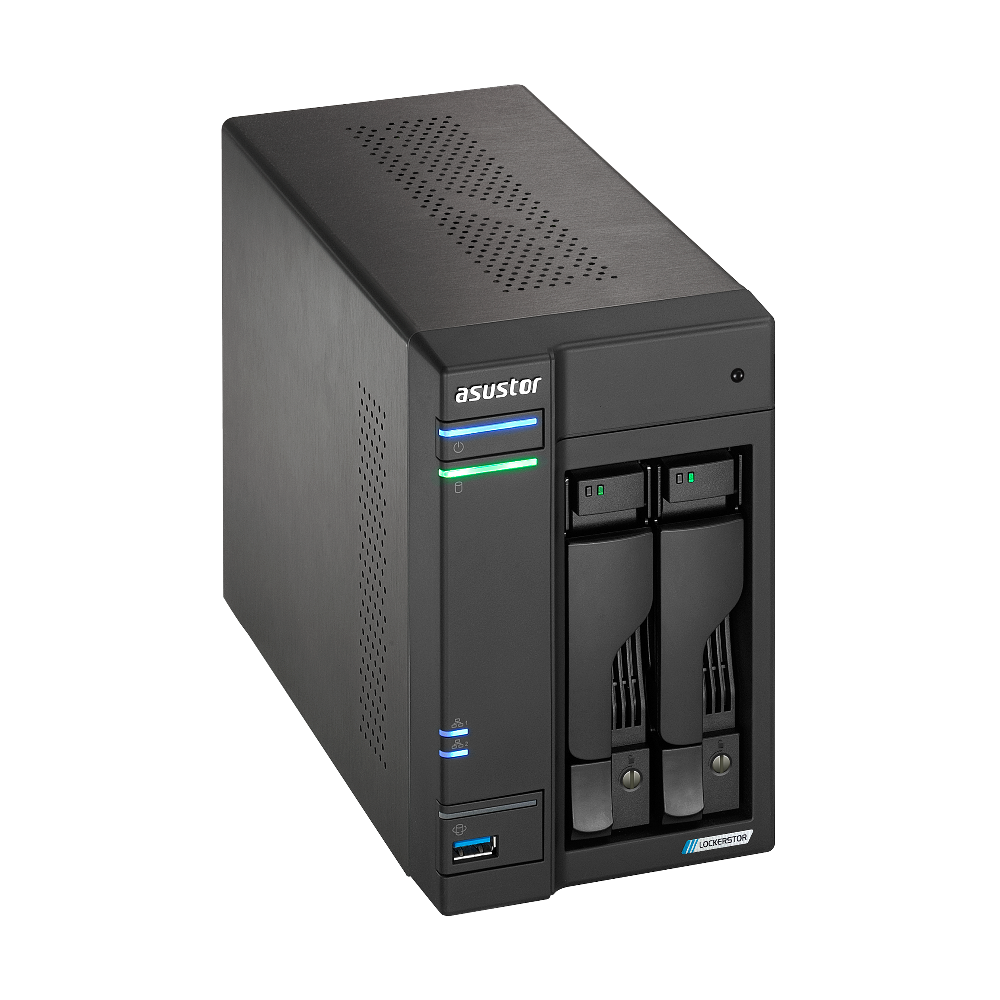
Explore this need in the finder →The ASUSTOR LOCKERSTOR 2 Gen2 (AS6702T) is a two-bay desktop NAS whose unusual feature is not a larger SATA count but four separate M.2 NVMe positions. That can make sense for a buyer comparing a compact two-disk mirror with optional flash storage, but it is important to keep those storage interfaces distinct. This is a source-based assessment of the exact AS6702T model, not a hands-on test; it does not claim a benchmark, personal ownership, a compatible drive pair, or a particular U.S. retail offer.
Keep the two SATA bays and four M.2 slots separate
ASUSTOR’s product-ID-76 hardware page and current U.S.-English comparison list two 2.5-/3.5-inch SATA bays plus four M.2 2280 NVMe positions. The company describes M.2 use for cache, storage, or a mixture. That is a flexible media layout, not a six-bay SATA enclosure: the finder’s two-bay field counts only the native SATA positions. A separate M.2 pool or cache also has its own compatibility, setup, and cooling questions; it should not be silently folded into a SATA RAID plan.
The manufacturer specification quotes 36 TB of raw internal capacity as two 18-TB HDDs, with a warning that capacity varies by RAID type. Treat that as the manufacturer’s stated configuration basis, not a current approved-drive list or usable space promise. A two-drive mirror duplicates data across its members, so its usable capacity is not the sum of both raw drives, and formatting and filesystem overhead are separate. Check the current compatibility page for the exact drive model and firmware before committing to a layout.
A mirror fills the two native drive positions
The AS6702T’s listed SATA volume choices include RAID 1. A buyer can plan an owner-created two-drive RAID 1 volume using compatible disks, but both native bays are then occupied. There is no third SATA position for a separate in-chassis disk or a hot spare. The four M.2 slots remain a separate option; this assessment does not assert that a particular NVMe model will work in a particular cache or storage arrangement.
RAID 1 can help a volume remain accessible after one member drive fails. It does not undo a mistaken deletion, protect against malware or theft, or replace an independent backup. ASUSTOR’s installation guide also warns that initializing the drives erases existing data. Back up anything important before setup, verify both drive identities and firmware, and maintain a separately restorable copy after the mirror is running.
Its network ceiling is per port, not per pair
The exact model specification lists two individual 2.5-Gigabit Ethernet ports. A 2.5-Gbps floor for one built-in interface is met; a 3-Gbps or 5-Gbps floor for one interface is not. ASUSTOR’s materials discuss SMB Multichannel across multiple compatible links, but aggregation is not one faster jack, and the network path still depends on a capable client, switch, cabling, configuration, storage and workload. No throughput result is measured here.
There is an easy model-family trap: the larger four- and six-bay LOCKERSTOR Gen2 models have an optional 10GbE-card note in the manufacturer comparison, but ASUSTOR’s exact-model-family documentation explicitly says the AS6702T and AS6702T v2 do not support 10GbE. Do not transfer the larger sibling’s expansion capability to this two-bay NAS, and do not confuse this original AS6702T with the separately named AS6702T v2. If a single 10-Gigabit port is essential, this configuration is the wrong fit.
Memory and physical setup need planning
The listed processor is a quad-core Intel Celeron N5105 running at 2.0 GHz with boost up to 2.9 GHz. The standard memory is 4 GB DDR4-2933, with two slots and a 16-GB maximum (2 × 8 GB). The quick guide warns that third-party memory is not guaranteed and advises owners who are unfamiliar with upgrades not to install a module themselves. No specific memory part is assessed here, so verify any upgrade through current manufacturer material rather than buying by form factor alone.
Four M.2 positions sound convenient, but adding a module is not an outside-the-case tray swap: ASUSTOR’s guide says to shut the NAS down, disconnect its cables and power, remove three rear screws, then access the internal board. The SATA trays likewise require suitable screws for the selected drive format. The chassis includes HDMI 2.0b and two USB 3.2 Gen 2 ports (one front, one rear), which may suit local display or peripheral plans, but the connectors do not establish app support or a particular workflow.
What the standard package and reference figures say
The AS6702T package page lists the NAS, quick installation guide, AC cord and adapter, two Cat 5e LAN cables, eight 3.5-inch HDD screws, eight 2.5-inch HDD screws, and a power-cord bracket. It does not list data drives or an initialized array. That describes the manufacturer’s package contents, not every seller bundle; inspect the exact seller listing and ask what is included before comparing a drive-included kit with a bare enclosure.
ASUSTOR publishes a 65-W adapter and reference draw of 21 W in operation, 13.5 W in disk hibernation and 0.79 W in sleep mode. These are manufacturer figures, not measurements from this assessment; actual consumption varies with installed drives and workload. The listed chassis dimensions are 163.5 × 108 × 230 mm (H × W × D) and listed weight is 2 kg. Allow for the attached cables and unobstructed ventilation rather than treating the case measurements as all the space the installation needs.
Where it sits beside related models
Within the LOCKERSTOR Gen2 family, the U.S. comparison lists the AS6704T with four SATA bays and the AS6706T with six, versus two here; all three list four M.2 slots and the N5105, while the six-bay profile starts with 8 GB of memory. The two-bay AS6702T is the smallest native SATA layout, and a two-drive mirror leaves no SATA position open for later use. Choose the larger chassis if additional native SATA slots matter more than the smaller footprint, but check each sibling’s distinct power, memory, network-expansion and package details rather than assuming the models are interchangeable.
The manufacturer support table currently marks AS6702T generally available and supported, with a three-year entry. This is a dated reference to the manufacturer’s model status, not proof that a seller has stock or honors a particular warranty. No exact U.S. seller SKU, active offer, price, bundle, return path or channel warranty was verified. Confirm the label says AS6702T (not AS6702T v2), verify the seller’s terms and exact package, check the model-and-firmware compatibility of each planned disk or SSD, and budget for a separate backup.
Primary references checked 2 November 2026: ASUSTOR’s exact AS6702T product page, hardware specification, package contents, U.S.-English product comparison, applicable AS67XXT installation guide, drive compatibility route, and ASUSTOR’s two-bay 10GbE limitation note. Specifications and support states can change; none of these references establish a current retailer offer.
Key specifications
Key details at a glance
| Internal drive bays | 2 bays |
|---|---|
| Documented internal drive media | 3.5-inch SATA HDD / 2.5-inch SATA HDD / 2.5-inch SATA SSD |
| Built-in Ethernet ports | 2 x built-in 2.5-Gigabit Ethernet (2.5G/1G/100M each) |
| Fastest individual Ethernet port | 2.5 Gbps |
| Installed system memory | 4 GB |
| Maximum listed memory | 16 GB |
| Listed storage arrangements | Single / JBOD / RAID 0 / RAID 1 |
| Dimensions (H × W × D) | 163.5 x 108 x 230 mm (H x W x D) |
| Weight | 2 kg |
| Hardware warranty | 3 years |
| Data drives included in listed package | No |
| M.2 NVMe slots | 4 |
| M.2 SSD storage-pool support | Yes |
| Processor | Intel Celeron N5105 |
| CPU cores | 4 |
Use the exact model’s instructions for operating limits, supplied equipment and version differences.
Sources for this review
Sources for this assessment
- ASUSTOR LOCKERSTOR 2 Gen2 (AS6702T), product ID 76
- ASUSTOR AS6702T hardware and packaging specification, product ID 76
- ASUSTOR 2026 U.S.-English product comparison
- ASUSTOR LOCKERSTOR 2 Gen2 (AS6702T) English product datasheet
- ASUSTOR AS67XXT Quick Installation Guide, English, version 4.0.0108
- ASUSTOR AS6702T package contents, product ID 76
- ASUSTOR product support-status table
- ASUSTOR NAS RAID calculator
- ASUSTOR drive compatibility selector
- ASUSTOR AS6704T exact-model datasheet page with explicit AS6702T 10GbE limitation
- Official ASUSTOR AS6702T model image

Check your setup before choosing a NAS
Use the finder to check bay count, the network link you need, and whether a documented two-drive redundant arrangement is essential.