
Your needs, this model
Does it fit your priorities?
What does a two-bay minimum mean on AS6702T v2?
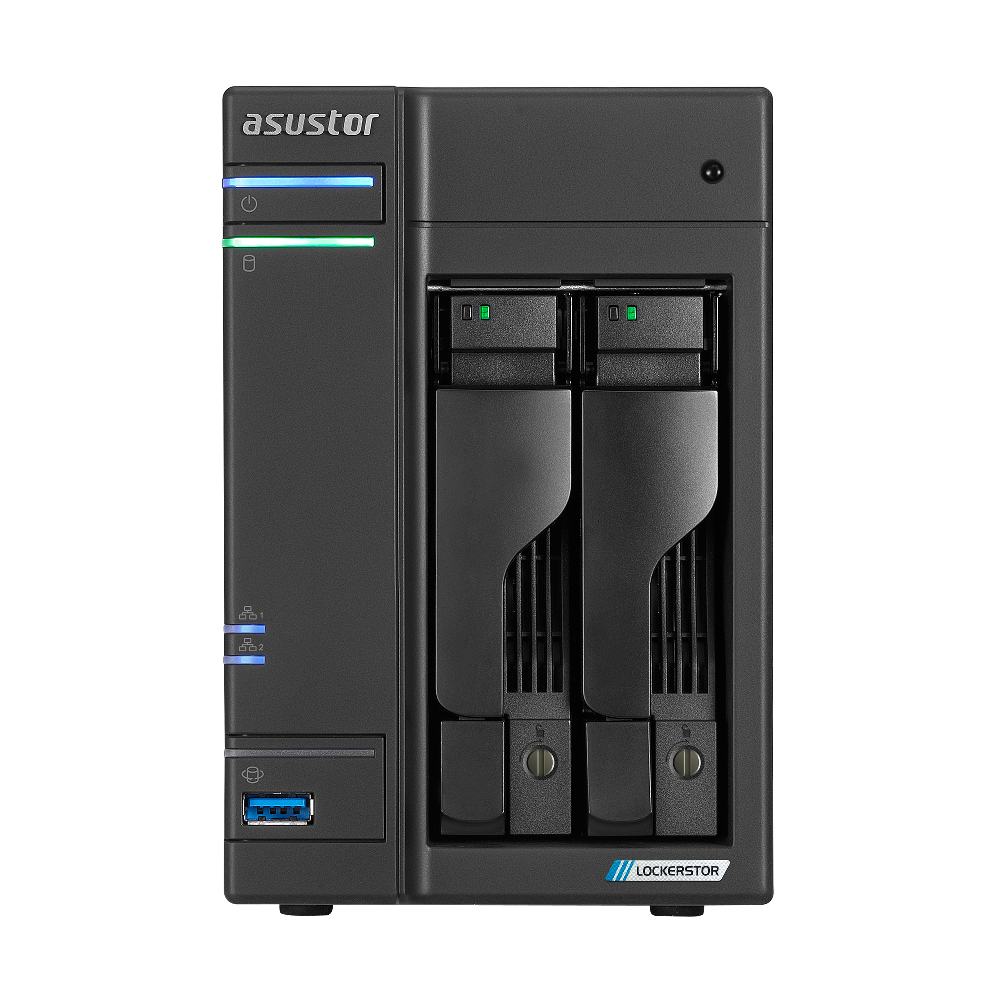
ASUSTOR lists two native 2.5-/3.5-inch SATA positions. A two-bay minimum includes this chassis, but a three-bay floor excludes it. Its four M.2 2280 NVMe slots and an optional expansion unit are separate from the native SATA-bay count.
Explore this need in the finder →Does AS6702T v2 meet a 5-Gbps requirement for one built-in Ethernet port?
Yes for the published link rating: the exact model has two individual 5-Gigabit Ethernet ports, each also supporting lower 2.5G/1G/100M rates. This is not a file-transfer guarantee or one 10-Gbps socket; ASUSTOR says 10GbE is not supported on this two-bay model.
Explore this need in the finder →Can AS6702T v2 support a two-drive redundant arrangement?
The exact SATA specification lists RAID 1, so two buyer-selected, currently compatible SATA drives can form a possible owner-created mirror. They occupy both native bays; the package list has no data drives or configured array. Check the precise drive and firmware, back up before initialization because the QIG warns initialization erases disk data, and keep a separate backup because RAID 1 is not a backup.
Explore this need in the finder →The LOCKERSTOR 2 Gen2+ (AS6702T v2) is a distinct two-bay profile, tied to ASUSTOR product ID 94. It is not the original LOCKERSTOR 2 Gen2 (AS6702T, product ID 76), nor a four-bay AS6704T v2 listing. The clearest change from the original two-bay model is the speed rating of each built-in Ethernet port: ASUSTOR lists 5-Gigabit ports on this v2 rather than 2.5-Gigabit ports on the original. The manufacturer support-status row currently says Generally Available, with software and technical support Supported and three warranty years listed. That is a model reference, not proof of a U.S. retailer listing, live stock or seller-specific warranty coverage.
Two native SATA bays are the main capacity boundary
The exact product specification lists two internal SATA positions for 3.5-inch or 2.5-inch hard drives and 2.5-inch SATA SSDs. Four M.2 2280 NVMe positions sit on a separate PCIe 3.0 x1 storage layer. The manufacturer supports M.2 volumes as well as SATA volumes, but those connectors are not trays three through six and do not change the chassis's two-native-bay count. If your minimum is three internal SATA bays, look at a genuinely larger chassis rather than treating M.2 or an external expansion unit as an extra native bay.
ASUSTOR's specification shows 36 TB as the maximum internal raw-capacity calculation, using two 18-TB drives, and warns that RAID changes capacity. That is not usable RAID space, a drive-compatibility guarantee, or evidence of a drive bundle. The same page lists up to ten bays with an expansion unit; that is an optional external arrangement, not a ten-bay AS6702T v2 enclosure. Consider expansion only after checking the exact expansion product, required connections and total installed cost.
Each built-in port is rated at 5 Gbps
For a single-port requirement, AS6702T v2 has two built-in Ethernet jacks individually rated at 5 Gigabit Ethernet, with support for 2.5G, 1G and 100M rates. That makes it a match to a 5-Gbps minimum for one built-in port. It does not make file copies run at 5 Gbps: the peer network port, switch or router, cable, client, storage, settings and workload all matter. ASUSTOR also describes SMB Multichannel across the pair of ports, but that depends on compatible endpoints and network equipment; it is neither one 10-Gbps socket nor a guaranteed 10-Gbps transfer rate.
Do not assume 10GbE expansion on the two-bay v2
ASUSTOR's exact product page explicitly says that 10GbE is not supported on the two-bay AS6702T and AS6702T v2. This matters because the broader LOCKERSTOR materials discuss 10-Gigabit upgrades for other members of the family. The AS67XXT v2 Quick Installation Guide's 10GbE-card installation diagrams show AS6704T v2 and AS6706T v2, not AS6702T v2. Do not treat the two 5-Gbps built-in ports as a supported 10GbE upgrade path, or buy an add-in card based only on a family-wide description. If one native 10-Gbps connection is essential, compare an exact model that documents that port instead.
A SATA mirror occupies both native trays
The exact hardware page lists SATA RAID 1. A possible owner-created arrangement is two compatible SATA drives in a mirror, connected over one of the model's 5-Gbps ports. This plan fills both native bays, leaving no spare SATA tray. The four M.2 positions remain a separate media group; this assessment does not silently treat them as part of the SATA mirror or assert that every possible SATA/M.2 combination has been checked. A mirrored pair can help keep a volume available after a supported drive failure, but it is not a backup against deletion, ransomware, theft, fire, enclosure failure or a mistaken administration task. Keep an independent copy and test restoration.
No drive pair has been certified by this review. ASUSTOR directs installers to its current SATA and M.2 compatibility lists, where model number and firmware matter. Check those exact identifiers before ordering, especially if the intended plan depends on two matching drives or a particular NVMe SSD. The QIG warns that initializing a system erases data already on the hard disks, so any used drive should be backed up before setup.
Memory and published power figures need context
ASUSTOR lists a quad-core Intel Celeron N5105, 4 GB of DDR4-2933 memory in one pre-installed module, two memory slots and a maximum of 16 GB. The exact specification also lists 8 GB of eMMC flash, an HDMI 2.0b output, two USB 3.2 Gen 2 10-Gbps Type-A ports and one rear USB 2.0 Type-A port. These are component and interface specifications, not independent evidence that a specific virtual machine, container, transcoding task or set of concurrent users will perform at a particular level.
The hardware page and the English datasheet disagree about reference power: the page lists 21 W operating, 13.5 W disk hibernation and 0.79 W sleep figures, while the PDF shows 18.8 W, 12.9 W and 1.18 W. I leave that discrepancy unresolved rather than selecting the more attractive numbers. Neither set is a measurement from this review, and actual draw depends on drives, load and settings. The listed enclosure dimensions are 163.5 × 108 × 230 mm (height × width × depth), and listed weight is 2 kg before drives and cabling; allow room for airflow and access to the trays.
Package contents and setup are not the same as a ready NAS
The exact package page lists one AS6702T v2 unit, a Quick Installation Guide, an AC cord and adapter, two Cat 5e RJ-45 cables, and eight screws each for 3.5-inch and 2.5-inch drives. It does not list data drives or an initialized storage volume. A retailer could offer additional components, but that has to be confirmed from the particular offer; it cannot be inferred from the manufacturer's box list or product photo. Confirm that the exact model suffix, installed memory, included drives, accessories, return rules and warranty terms match the listing you are evaluating.
Who this configuration suits
AS6702T v2 belongs on a shortlist when two native SATA bays are enough, a 5-Gbps built-in link is useful across the whole network path, and the separate four-slot M.2 layer fits the intended storage design. A two-drive RAID 1 plan is documented, but it fills every SATA tray and still calls for a separate backup. It is a poor fit when you need more than two native SATA bays, a single built-in port above 5 Gbps, an assumed 10GbE add-in path, or a confirmed drive-and-firmware combination that has not been checked. Compare it with the original AS6702T carefully: similar family naming does not make the original's 2.5-Gbps ports interchangeable with this model's 5-Gbps profile.
This is a source-based assessment of ASUSTOR's exact product and hardware pages, model datasheet, package contents, applicable v2 installation guide and support-status row. It does not claim hands-on use, ownership, installation, measurement, benchmark testing or customer experience.
Primary references: ASUSTOR's AS6702T v2 product page, its exact hardware and software specification, the AS6702T v2 package list, the English model datasheet, the AS67XXT v2 Quick Installation Guide, and ASUSTOR's product support-status table.
Key specifications
Key details at a glance
| Internal drive bays | 2 bays |
|---|---|
| Documented internal drive media | 3.5-inch SATA HDD / 2.5-inch SATA HDD / 2.5-inch SATA SSD |
| Built-in Ethernet ports | 2 x built-in 5-Gigabit Ethernet (5G/2.5G/1G/100M each) |
| Fastest individual Ethernet port | 5 Gbps |
| Installed system memory | 4 GB |
| Maximum listed memory | 16 GB |
| Listed storage arrangements | Single / JBOD / RAID 0 / RAID 1 |
| Dimensions (H × W × D) | 163.5 x 108 x 230 mm (H x W x D) |
| Weight | 2 kg |
| Hardware warranty | 3 years |
| Data drives included in listed package | No |
| M.2 NVMe slots | 4 |
| M.2 SSD storage-pool support | Yes |
| Processor | Intel Celeron N5105 |
| CPU cores | 4 |
Use the exact model’s instructions for operating limits, supplied equipment and version differences.
Sources for this review
Sources for this assessment
- ASUSTOR LOCKERSTOR 2 Gen2+ (AS6702T v2), product ID 94
- ASUSTOR AS6702T v2 exact hardware, software and SATA/M.2 volume specification, product ID 94
- ASUSTOR AS6702T v2 package contents, product ID 94
- ASUSTOR LOCKERSTOR 2 Gen2+ (AS6702T v2) English datasheet
- ASUSTOR AS67XXT v2 English Quick Installation Guide, applicable model list and SATA/M.2 installation guidance
- ASUSTOR product support-status row for AS6702T v2
- Official ASUSTOR AS6702T v2 front product image from its product page

Check your setup before choosing a NAS
Use the finder to check bay count, the network link you need, and whether a documented two-drive redundant arrangement is essential.