
Your needs, this model
Does it fit your priorities?
Can this make a two-drive mirror?
ASUSTOR's exact-model specification lists two native 3.5-inch SATA HDD bays and RAID 1. With two buyer-supplied drives verified in the current AS1202T compatibility list, an owner can create a two-drive mirror; that pool occupies both bays and remains separate from an independent backup. The installation guide warns that initialization erases drive data.
Explore this need in the finder →What must support 2.5GbE for the port to help?
The AS1202T has one built-in 2.5G/1G/100M Ethernet port. For a 2.5-Gbps link, check the client adapter, switch or router port and cabling across the whole path; the NAS port rating is not a file-transfer measurement or guarantee.
Explore this need in the finder →How much room does the two-bay chassis provide, and what arrives in the box?
The QIG's AS1202T package column lists the NAS-related power items, an RJ45 cable, cord bracket, eight 3.5-inch drive screws and a guide, but no data drives. Capacity evidence conflicts: the current exact-model specification says 36 TB from two 18 TB disks while ASUSTOR's launch announcement says 60 TB. Confirm the supported drive models and current limit before planning; neither raw figure is usable RAID 1 capacity.
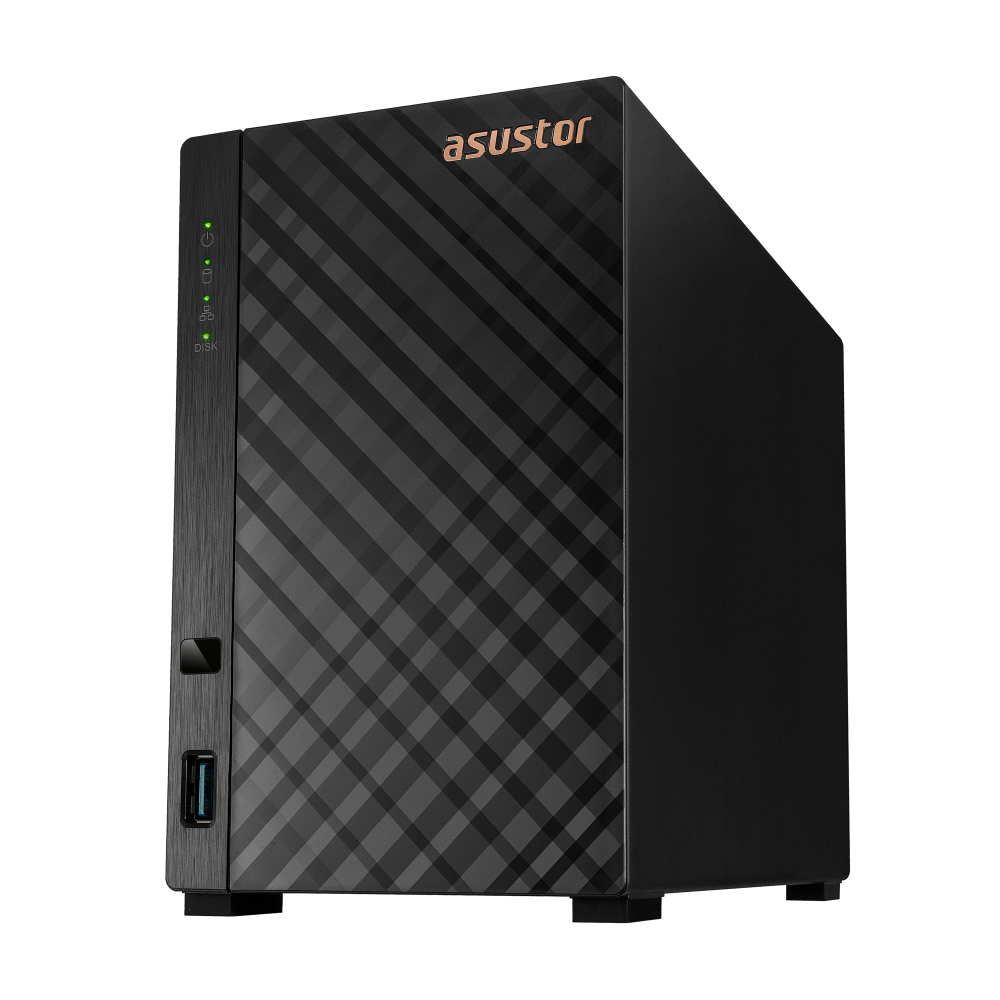
Explore this need in the finder →The ASUSTOR DRIVESTOR 2 Gen2 (AS1202T) is a two-bay desktop NAS whose clearest distinction is one built-in 2.5-Gigabit Ethernet port. Its model-specific specification also lists two 3.5-inch SATA HDD bays and RAID 1, so it can support a buyer-created mirror—but only after the owner supplies compatible drives and initializes the system. This is a documentation-based assessment, not a hands-on test.
A small NAS with a faster single port
The central shopping question is whether the rest of your home or small-office network can use the faster port. ASUSTOR identifies one Ethernet interface rated at 2.5G, 1G or 100M. It is not two ports that can be combined, and the port's label does not promise file copies at 2.5 gigabits per second. The switch or router, client adapter, cabling, drives, storage layout and workload all matter. If the devices at both ends only negotiate gigabit, the NAS does not make those devices faster by itself.
That makes the AS1202T a plausible fit when you need two internal bays and can make use of a single multigigabit link—for example, a computer with a 2.5GbE adapter connected through an equally capable switch. It is less compelling if your network is entirely gigabit today and you have no plan to upgrade, or if your design requires two independent Ethernet links. The manufacturer also lists three 5-Gbps USB ports, including one on the front and two at the rear in its model materials, which may help connect an external backup device. A USB port is not a backup plan by itself: choose a separate destination and test recovery.
Two bays allow RAID 1, not a ready-made mirror
The exact-model table lists two 3.5-inch SATA HDD positions and the Single, JBOD, RAID 0 and RAID 1 volume choices. For the two-drive RAID 1 option assessed here, the buyer must select two drives, check each full model and firmware against ASUSTOR's current compatibility listing, and create the volume during setup. The manufacturer package table does not list data drives. Do not assume a seller's NAS-only listing includes a pair, or that an offer described as a bundle has the drive models you intended.
A mirror uses both native positions, leaving no third internal bay for later additions. RAID 1 can help keep a volume available after a member drive fails, but it does not give you an independent copy against deletion, malware, theft, fire or mistakes. Plan a second backup on another device or service. The quick installation guide says initialization erases the data on installed drives and cannot recover it; back up existing disks before setup rather than treating a migration as a safe experiment.
There is also a capacity discrepancy worth resolving before you buy disks. ASUSTOR's current AS1202T hardware page states 36 TB from two 18-TB disks, while the company's DRIVESTOR Gen2 launch announcement gives a 60-TB maximum for this model. Those are manufacturer statements from different pages, not two capacities I can reconcile from the captured drive-compatibility evidence. Neither is the usable space of a RAID 1 volume. Ask ASUSTOR which current drive models and limit apply to the AS1202T, then size the mirror using the smaller member and the operating system's overhead.
Fixed memory is the main platform constraint
The product-specific datasheet and current specification list a Realtek RTD1619B quad-core processor at 1.7 GHz and 1 GB of DDR4 memory that cannot be upgraded. The memory limit is more important to long-term flexibility than a processor headline: if you expect to add multiple applications or heavier services, compare the exact software requirements with this fixed configuration before treating it as a general-purpose server. No benchmark or workload test was performed for this assessment.
ASUSTOR lists 8 GB of eMMC flash, three 5-Gbps USB ports, no M.2 positions, and EXT4 and Btrfs as internal file systems. The model page describes Btrfs snapshots; snapshots may help recover some earlier file states, but they are still stored on the NAS and do not replace a disconnected or separately administered backup. The product datasheet states ADM 5.0 onwards. Verify the current installation image and supported version for the exact device at setup instead of assuming a software version from an old seller page.
Check the source discrepancies instead of guessing
Several product numbers differ across ASUSTOR's own materials. Besides the 36-TB versus 60-TB capacity statements, the current model page gives a 1.14-kg weight and 11.6-W operating / 5.97-W disk-hibernation figures, while the AS1202T datasheet gives 1.16 kg and 11.2 W / 6.95 W. The conditions and document versions are not fully reconciled here, so I do not use those figures to compare electricity costs, noise or desk loading. The model page lists 18.6 dB with HDDs idle; that is a manufacturer label, not a measurement from this review.
The quick guide names AS1202T and AS1204T as applicable models, and its package table separates their screw counts. However, the PDF's filename includes a 2025 date while its printed revision string says 2015-03-02. I rely on its explicit AS1202T identity, listed package items, compatibility-list pointer and initialization warning, but that odd revision merits a fresh check of the current installation material before following a procedure.
Who should shortlist it?
Consider the AS1202T if you want two native 3.5-inch positions, a documented RAID 1 option, one built-in 2.5GbE port and a compact desktop enclosure—and you are comfortable verifying the disks, making the mirror yourself and keeping a separate backup. The manufacturer support table labels AS1202T Generally Available with software and technical support supported. That is a useful lifecycle signal, not proof that a particular U.S. retailer has stock or honors the manufacturer warranty on the same terms.
Before ordering, distinguish this exact DRIVESTOR 2 Gen2 AS1202T from the two-bay DRIVESTOR 2 Lite AS1102TL and the four-bay AS1204T. The earlier AS1102TL has a Gigabit interface; the AS1202T's individual 2.5GbE port is the meaningful network difference, while the AS1202T still has fixed 1 GB memory and only two native bays. Compare exact model names, the seller's included parts, the current drive compatibility entry and your whole network path. No unique U.S. seller SKU, live price, seller package or tested performance result was established for this review.
Primary references include ASUSTOR's AS1202T product page, its model-specific hardware and software table, the English product datasheet and the AS12XXT quick guide. Source conflicts and setup limits are kept visible rather than resolved by assumption.
Key specifications
Key details at a glance
| Internal drive bays | 2 bays |
|---|---|
| Documented internal drive media | 3.5-inch SATA HDD |
| Built-in Ethernet ports | 1 x built-in 2.5-Gigabit Ethernet (2.5G/1G/100M) |
| Fastest individual Ethernet port | 2.5 Gbps |
| Installed system memory | 1 GB |
| Maximum listed memory | 1 GB |
| Listed storage arrangements | Single / JBOD / RAID 0 / RAID 1 |
| Internal file systems | EXT4 / Btrfs |
| USB 3.2 Gen 1 ports | 3 |
| Dimensions (H × W × D) | 165 x 102 x 218 mm (H x W x D) |
| Hardware warranty | 3 years |
| Data drives included in listed package | No |
| M.2 NVMe slots | 0 |
| M.2 SSD storage-pool support | No |
| Processor | Realtek RTD1619B |
| CPU cores | 4 |
| Installed memory type | 1 GB DDR4; ASUSTOR states the memory is non-upgradeable. |
Use the exact model’s instructions for operating limits, supplied equipment and version differences.
Sources for this review
Sources for this assessment
- ASUSTOR DRIVESTOR 2 Gen2 (AS1202T) product page
- ASUSTOR AS1202T hardware and software specification
- ASUSTOR DRIVESTOR 2 Gen2 AS1202T English datasheet
- ASUSTOR AS12XXT Quick Installation Guide, English
- ASUSTOR product support status
- ASUSTOR DRIVESTOR Gen2 launch announcement
- ASUSTOR AS1202T product-page front image

Check your setup before choosing a NAS
Use the finder to check bay count, the network link you need, and whether a documented two-drive redundant arrangement is essential.