
Your needs, this model
Does it fit your priorities?
Can the AS1102TL use a two-drive mirror on a Gigabit network?
Yes, as a buyer-created arrangement: ASUSTOR lists two 3.5-inch SATA HDD bays and RAID 1 for the AS1102TL, along with one Gigabit Ethernet port. Select two drives from the model's current compatibility list, create the volume during setup, and remember that RAID 1 mirrors the smaller drive's capacity rather than adding both drives together. A mirror is not an independent backup.
Explore this need in the finder →Does its one Gigabit port meet a 2.5-Gbps requirement?
No. The model specification lists one Gigabit Ethernet port, so it can meet a 1.0-Gbps port-rating floor but not a 2.5-Gbps single-port minimum. A faster switch or client does not upgrade the NAS port, and the link rating itself is not expected file-copy speed.
Explore this need in the finder →What should be checked before installing disks?
Use the exact AS1102TL model selection in ASUSTOR's current compatibility lookup and verify each complete drive model and firmware. The saved guide is specific to two 3.5-inch SATA hard disks and warns that initialization erases disk data; back up existing disks before setup. The package contents list does not include the drives.
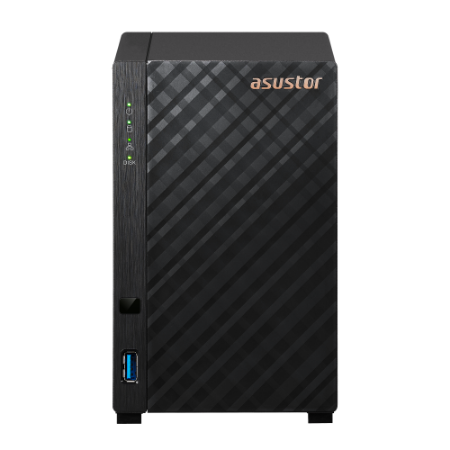
Explore this need in the finder →The ASUSTOR DRIVESTOR 2 Lite (AS1102TL) is a compact, two-bay desktop NAS for buyers who can work within two 3.5-inch SATA hard drives, a single 1-Gigabit Ethernet port, and 1 GB of fixed memory. Its specifications include RAID 1, Btrfs and snapshot features, but those capabilities do not turn the NAS into a backup by themselves. This is a source-based assessment of ASUSTOR's model materials, not a hands-on review; no disks were installed and no noise, power or transfer measurements were made.
Two native bays, and a modest network ceiling
ASUSTOR's model-specific hardware table lists two 3.5-inch SATA HDD positions, one built-in Gigabit Ethernet port rated at 1G/100M, one USB 3.2 Gen 1 port and one USB 2.0 port. It lists no M.2 slots or HDMI output. The single port can meet a 1-Gbps requirement; it cannot meet a 2.5-Gbps single-port minimum. A 1GbE link rate is also not a promise of 1Gb/s file copies. The client, switch or router, cabling, drives and workload all affect actual transfers.
That interface ceiling is a real point of separation within ASUSTOR's own line. Its 2024 U.S.-English comparison lists the neighboring two-bay DRIVESTOR 2 Pro Gen2 (AS3302T v2) with 2 GB of non-upgradeable memory and 2.5-Gigabit Ethernet; the AS1102TL has 1 GB and Gigabit Ethernet. This is a manufacturer-published specification comparison, not a claim about current retailer availability or observed performance. Buyers already using multigigabit network equipment should decide whether the faster port is essential before choosing the Lite.
Fixed 1 GB memory is the main workload constraint
The AS1102TL pairs a quad-core Realtek RTD1619B processor with 1 GB of DDR4 that ASUSTOR marks non-expandable, plus 8 GB of eMMC flash. The exact processor model and fixed memory are more useful to planning than a broad “multitasking” promise. That fixed 1 GB is a reason to plan a modest number of services and concurrent users, not to assume that RAM can later be upgraded. The public specifications do not establish a reliable performance level for any particular app mix.
ASUSTOR's current product page describes Btrfs and snapshot features on the AS1102TL, including scheduled or manual snapshots through Snapshot Center. A snapshot may help with a recoverable earlier file state, but it remains on the same NAS and does not protect the only copy from device loss, theft, damage or every destructive event. Plan a separate copy on another device or location and test that it can be restored.
RAID 1 uses both bays; it does not add capacity
The model page lists Single, JBOD, RAID 0 and RAID 1. That makes an owner-created two-drive RAID 1 plan a documented option, not a supplied array. The manufacturer package list names the NAS, setup material, AC cord and adapter, a Cat 5e network cable and eight drive screws; it does not list data disks. ASUSTOR's quick guide directs owners to its compatibility lookup for the exact hard-drive model and recommends same-capacity drives when creating a RAID layout. Choose and verify both drives before ordering, then initialize the system only after backing up any data on them.
In a mirror, the two disks hold duplicate data, so usable space is constrained by the smaller drive before filesystem overhead; the pair's capacities are not simply added. RAID 1 can help keep data available through one member-drive failure, but it is not an independent backup and does not make an array immune to mistakes or loss of the complete appliance.
Capacity and expansion need careful wording
ASUSTOR's current specification calculates a 36 TB maximum internal raw figure from two 18 TB drives and says capacity may vary by RAID type. That is neither included storage nor a RAID 1 usable-capacity promise. The same table lists up to six total drive positions and 120 TB raw with an expansion unit, based on six 20 TB HDDs. The AS1102TL itself still has two native bays. Treat the expansion figure as a separate-system planning lead: confirm the exact compatible unit, drive models, firmware and delivered package before counting an expansion path.
Installation and evidence checks
The English quick installation guide applies specifically to AS1102TL and describes fitting 3.5-inch SATA hard disks, connecting the NAS to a router or switch, and completing software initialization. It warns that initialization erases installed disk data. The guide links to ASUSTOR's drive compatibility list, but the captured selector page did not establish a positive match for a named drive and firmware combination; I therefore do not recommend a specific disk. The current product page and 2024 U.S. comparison also differ on the earliest ADM version listed, so verify the current AS1102TL download and support status rather than relying on an old installation image.
ASUSTOR's product-support table currently marks AS1102TL Generally Available and lists software support, technical support and a three-year warranty field. That is a manufacturer status record, not proof that a seller has stock or that a particular marketplace offer carries identical warranty terms. The exact U.S. reseller suffix, current offer, package variation and price were not established in the reviewed sources.
Who should shortlist it?
The AS1102TL is worth considering when two internal HDD positions and Gigabit networking fit the existing setup, the buyer is comfortable with fixed 1 GB memory, and a compatible pair of 3.5-inch drives will be supplied separately. Its strongest documented arrangement is a straightforward file-sharing NAS with a buyer-created two-drive RAID 1 volume and a separate backup plan. Look elsewhere if a 2.5GbE port, memory growth, more native bays, M.2 storage, or a known exact-drive compatibility match is essential. Check the exact model label AS1102TL rather than assuming similarly named ASUSTOR models share the same port, memory or drive profile.
ASUSTOR AS1102TL hardware specifications · AS1102TL English quick installation guide · ASUSTOR drive compatibility lookup.
Key specifications
Key details at a glance
| Internal drive bays | 2 bays |
|---|---|
| Documented internal drive media | 3.5-inch SATA HDD |
| Built-in Ethernet ports | 1 x built-in Gigabit Ethernet (1G/100M) |
| Fastest individual Ethernet port | 1 Gbps |
| Installed system memory | 1 GB |
| Maximum listed memory | 1 GB |
| Listed storage arrangements | Single / JBOD / RAID 0 / RAID 1 |
| Internal file systems | Btrfs |
| USB 3.2 Gen 1 ports | 1 |
| Dimensions (H × W × D) | 165 x 102 x 218 mm (H x W x D) |
| Weight | 1.14 kg |
| Manufacturer's idle noise figure | 18.6 dB(A) |
| Hardware warranty | 3 years |
| Data drives included in listed package | No |
| M.2 NVMe slots | 0 |
| M.2 SSD storage-pool support | No |
| Maximum total drive bays with listed expansion | 6 bays |
| Expansion-unit note | The current model specification lists up to six total positions with an expansion unit and a 120 TB raw maximum based on six 20 TB HDDs. This does not mean six bays are built into the AS1102TL; the exact compatible expansion unit and package are a separate check. |
| Processor | Realtek RTD1619B |
| CPU cores | 4 |
| Installed memory type | 1 GB DDR4; ASUSTOR states the memory is not expandable. |
Use the exact model’s instructions for operating limits, supplied equipment and version differences.
Sources for this review
Sources for this assessment
- ASUSTOR DRIVESTOR 2 Lite (AS1102TL) product page
- ASUSTOR AS1102TL hardware and packaging specifications
- ASUSTOR AS1102TL package contents
- ASUSTOR 2024 U.S. English product comparison
- ASUSTOR AS1102TL Quick Installation Guide, English
- ASUSTOR product support status
- ASUSTOR hard-drive compatibility lookup
- ASUSTOR Online Help: Storage volumes and RAID
- ASUSTOR AS1102TL model-page front image

Check your setup before choosing a NAS
Use the finder to check bay count, the network link you need, and whether a documented two-drive redundant arrangement is essential.